This document provides a comprehensive guide for the Chocolate World CW12 Automatic Tempering Machine, covering its function, technical specifications, usage, and maintenance.
Function Description
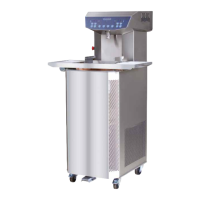
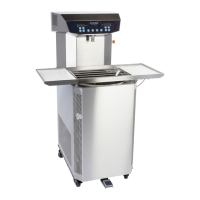
The CW12 is a continuous cycle tempering machine designed for processing chocolate. It features a tank with a capacity of 12 kg where chocolate is melted using electrical heating systems. A spiral plate pumps the chocolate along a heating regulation/adjustment system to the top of the machine, from where it returns to the tank through a spout. The machine is suitable for processing chocolate, including those with color powder, but not chocolate mixed with additional products like nuts or beans, as these can stick together and be crushed by the spiral plate.
Important Technical Specifications
- Tank capacity: 12 kg of chocolate
- Hourly production: Up to 45 kg
- Power required: 230V Mono 50-60Hz 3.1 Kw
- Technology: Microprocessor technology featuring digital temperature display
- Dosing: Dosing pedal
- Vibrating table: Heated vibrating table
- Weight: 121 kg
The machine is equipped with a control panel (1) that includes a main switch (2), chocolate dosing spout (3), spiral plate (4), stainless steel tank (5), housing (6), wheels (7), and a dosing pedal (8). Internally, it features a keyhole (9), vibrating motor (10), cooling unit (11), vibrating table (12), vibrating mat (13), vibrating spring (14), electrical connection for the vibrating table (15), and a plexiglass lid (16). Further internal components include a sensor for tempering temperature (17), print plate (18), condenser (19), heating area (20), valve (21), motor spiral plate (22), ventilator (23), and compressor (24).
The print plate connections include an exit for 220 Volts (vibrating table) (25), heating chocolate pump (26), drive cooling gas (27), heating melting tank (28), refrigerator system (29), spiral plate (30), primary connection transformer 220V (31), 230V Mono 50-60 Hz (32), transformer 220V - 24V (33), secondary connection transformer 24V (34), auxiliary exit 24V (35), heating spout (36), interrupter pedal (37), communication wire (38), and safety contact (39).
The front panel includes:
- A: Tank temperature indication display
- B: Chocolate temperature indication display (tempered chocolate)
- C: ON/OFF button
- D: Heating button
- E: Presence of main voltage
- F: Pump button
- G: Tempering function button
- H: Increase and decrease of temperature in melting tank
- I: Reset button
- J: Button for auxiliary 220V (vibrating table)
- K: Increase and decrease tempering temperature
Usage Features
Installation:
- Remove all packaging and the vibrating table (12) from the back of the machine.
- Take off the plexiglass lid (16) and ensure the spiral plate can rotate freely.
- Clean the machine as described in the maintenance section.
- Plug in the machine. The LED will light up, indicating correct power connection.
- Switch on the main switch (2) by turning it to the right.
- Switch on the ON/OFF button (C).
- Turn on the heating by pressing button (D).
- Wait for the chocolate to melt.
- Turn on the chocolate flow by pressing button (F).
- Cool down the chocolate.
- The machine is then ready for tempering.
Operation:
- Melting: Add ± 5 kg of small chocolate pieces or melted chocolate to the melting tank (5). Cover the tank with the plexiglass lid (16). Set the desired melting temperature using arrow buttons (H). It is advised not to exceed 50°C to preserve chocolate quality. The set temperature is displayed on (A).
- Tempering: Once the chocolate is melted, remove the lid (16) and press button (F) to activate the pump. Chocolate will flow through the dosing spout (3). The actual temperature of the flowing chocolate is shown on display (B). Set the appropriate tempering temperature using arrow buttons (K). Optimal temperatures are 30-31°C for dark chocolate, 29-30°C for milk chocolate, and 28-29°C for white chocolate. A beep signal indicates when the desired temperature is reached.
- Dosing: Pressing the dosing pedal (8) stops the chocolate flow, allowing control over the amount dispensed into moulds. Releasing the pedal resumes flow. Avoid pressing the pedal for too long (only a few seconds) to prevent over-crystallization in the cooling cylinder, which will trigger a beep signal.
- Adding Chocolate: Melted chocolate can be added to the tank (5) during tempering, but allow a few minutes for the desired tempering temperature to be reached again.
Switching Off:
- Daily Production: Press button (G) to switch off the tempering function. Wait a few minutes for the temperature on display (B) to equalize with display (A), then switch off the pump (F). Remove the vibrating table (12) and place the plexiglass lid (16) on the tank (5). The cooling system will switch off automatically.
- Longer Period (+7 days): Remove the vibrating table (12). Remove as much tempered chocolate as possible through the spout (3) and store it in a dry, cool place. Press button (G) to switch off tempering, then button (F) for the pump. Remove the spiral plate by unscrewing the screw at the bottom of the melting tank to clear residual chocolate from the pumping system. Place the plexiglass lid (19) on the tank (5). If chocolate is left in the machine, it will harden and take several hours to melt again.
Vibrating Table:
- Assemble the vibrating table (12) by aligning its 4 springs with the 4 holders on the machine.
- Place rubber mats on both sides of the vibrating table (12) to reduce noise.
- Insert the 2 vibrating table plugs into the sockets on the back of the machine.
- The vibrating function can be switched on/off using button (J).
Maintenance Features
General Maintenance:
- The staff operating and maintaining the machine must be trained and follow all instructions in this manual.
- Always be cautious of moving accessories and keep others away during operation.
- When not in use, always cover the melting tank with the lid.
- For structural maintenance, always disconnect the machine from the main power supply. Reassemble completely before reconnecting.
Cleaning:
- Exterior: Clean with a cloth soaked in warm water to remove chocolate residue. Polish with a soft cotton cloth drained in an alcohol solution. Do not use aggressive soaps or abrasives (PH7 neutral value).
- Interior Tank: Clean with a wet, clean cotton towel.
- Pump System: If necessary, flush with chocolate not intended for consumption.
- Condenser (19): Clean monthly using a vacuum cleaner.
Emptying for Maintenance:
- Follow steps 1-6 for "switching off the machine for a longer time."
- Open the front panel using the turning knobs.
- Place a suitable container underneath and open the tap (21).
- Allow all chocolate to drain, then close the back panel.
Troubleshooting Small Problems:
- Electrical Breakdown: After a power outage, the machine enters safety mode for 10-15 minutes to re-liquefy hardened chocolate in the pumping system.
- Brief Power Interruption: If power is interrupted for only a few seconds, press the reset button (I) to exit safety mode and resume production immediately.
- Motor Blockage: If the motor is blocked (e.g., by hardened chocolate or metal clips), the machine enters safety mode, indicated by a red LED (E) on the front panel. Switch off the machine using the main switch button (12), remove the obstruction, and then restart the activation procedure.
Warranty:
The machine comes with a 24-month warranty from the date of delivery, covering material and workmanship defects. The warranty covers repair or replacement of defective parts. Any modifications by the buyer or third party, or exposure to electrical tension differing by more than 10% from the suggested tension, will void the warranty.

 Need help?
 General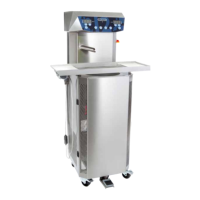

 To Next Page