Chord Electronics
Mojo 2 | User manual
6
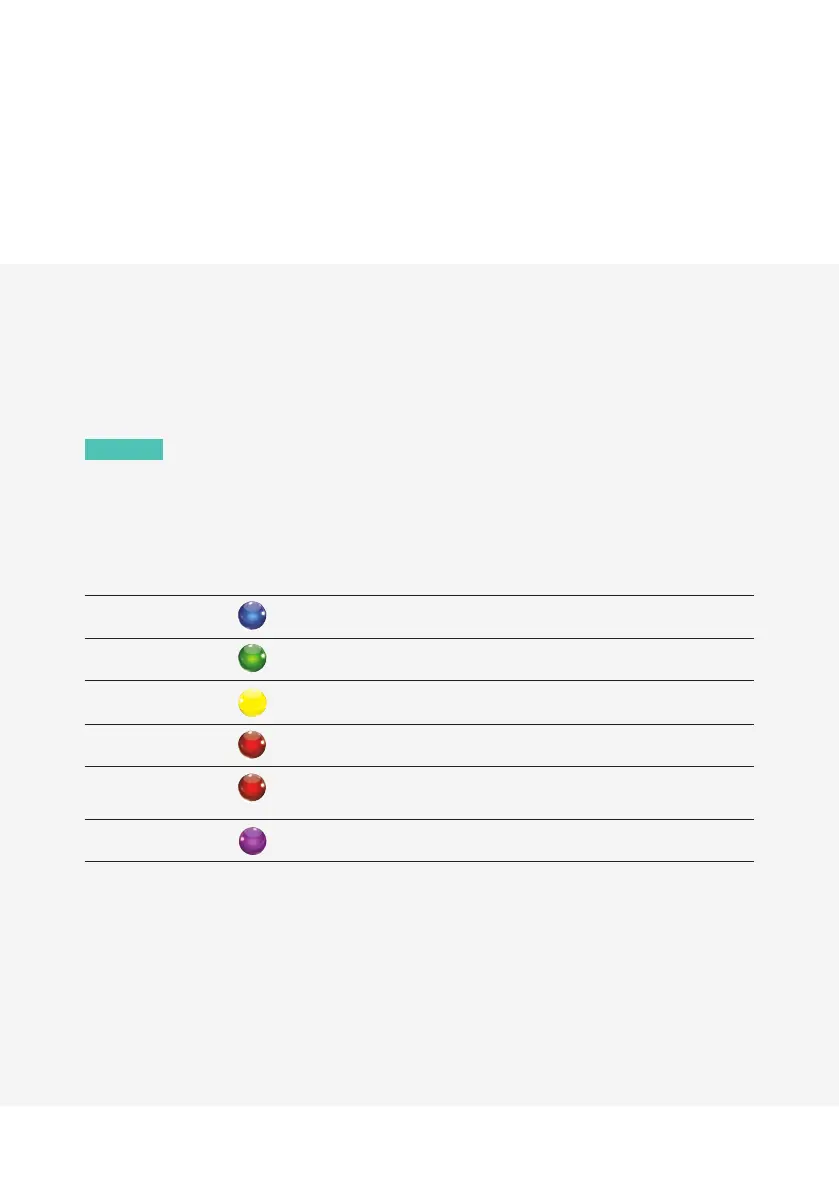
6.2 Battery status indicator
With Mojo 2 connected to power, the charge status LED (see F, above) will pulse and show battery
charge status using colour (see chart below); the charge status is also displayed when operating on
battery power alone.
NOTE
A blue charge status LED indicates the maximum battery capacity range has been reached.
If Mojo 2 is left constantly on charge, it will enter intelligent desktop mode to protect the battery from
overcharging. This will be indicated by a purple battery status light.
Battery status Battery charge
75 % to 100 %
40 % to 75 %
10 % to 40 %
2 % to 10 %
Flashing
0 to 2 %
Intelligent desktop mode
6.3 Depleted battery
Following full depletion of the batteries, the charge status LED will flash red for ten seconds. If coupled with the
device shutting down, a recharge is required.
If following a period of inactivity the device fails to power-on (suggesting a severely depleted battery) then the
device needs to be recharged overnight, with the unit switched o.


 To Next Page