Digital Power Meter 66203/66204 User’s Manual
4-42
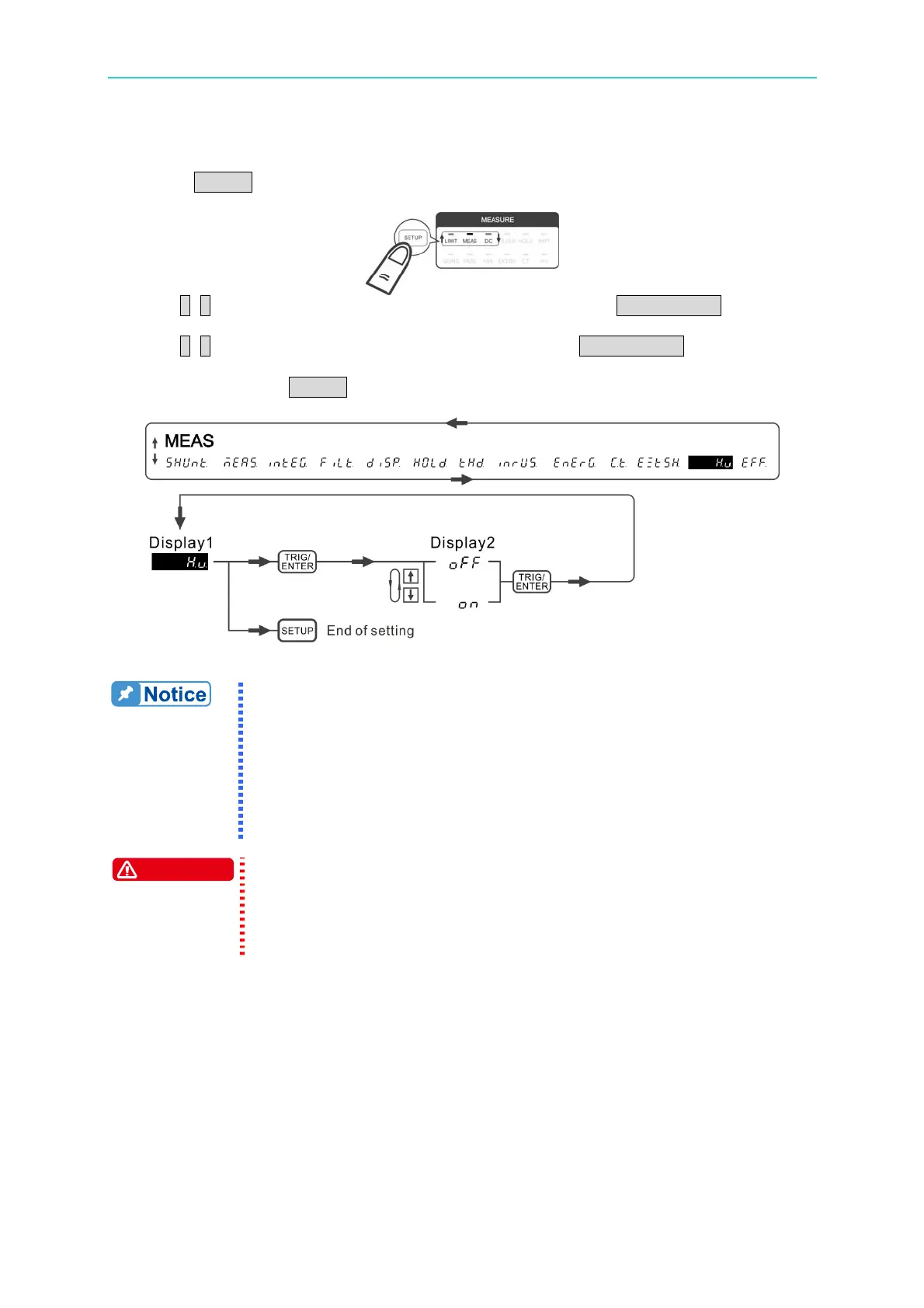
Following is the procedure to set the HV function:
1. Press SETUP to select Meas. The Meas indicator is on.
2. Use ↑, ↓ to select HV function in 1
st
display window and press TRIG/ENTER to confirm
it.
3. Use ↑, ↓ to select on in the 2
nd
display window and press TRIG/ENTER to confirm it.
When the HV indicator is on, it means the HV function is enabled.
4. When done, press SETUP to exit the menu.
Figure 4-65 Process for Setting HV
1. The length of HV measurement kit output cable or twisted wire may
affect the measured specification. Please do not change the
design arbitrarily.
2. When the HV measurement kit is connected, the input impedance
will increase. If the voltage meter is used alone, the input
impedance is able 8MΩ. If the voltage and current meters are
used at the same time for power measurement, the input
impedance is 4MΩ.
WARNING
1. For the input cable of HV Measurement Kit, please use the wire with
the insulation grade of 2.4kV or above.
2. The HV Measurement Kit has high voltage output and input. Do
not open the case or change the input and output cable arbitrarily,
or electric shock hazard may occur.



 To Next Page