REAR SEAT ENTERTAINMENT WITH
AMAZON FIRE TV BUILT-IN
You will be prompted to pair the Voice Remote with Alexa,
connect to a network, and sign into an Amazon account. You
can also enable parental controls.
GET STARTED
Rear Seat Entertainment with Amazon Fire TV built-in can
stream movies, music, and much more!
11
Push the Power button on the Voice Remote with Alexa or
tap on either of the rear touchscreens to turn on the screen
22
Select from one of the available apps or source inputs.
There are AUX and HDMI ports located near both displays
on the seatbacks.
Scan For
Rear Seat Pairing
Video
Scan For Rear Seat
DVD/Blu-ray™
Video
Scan For
Phone Pairing
Video
Scan For Remote
& Touchscreen
Video
You can download games from the Apps
menu to play on your rear touchscreen
DID YOU KNOW?
REAR SEAT ENTERTAINMENT
WITH AMAZON FIRE TV
BUILTIN HEADPHONE
PAIRING
11
Push the Gear/Settings button on
the Voice Remote with Alexa or tap
the screen
33
Select “Settings” on the screen
44
While in Settings, select “Controllers
& Bluetooth
®
Devices”
55
Select “Other Bluetooth
®
Devices” and
follow the on-screen steps for pairing
22
Select the Gear/Settings icon on
the screen
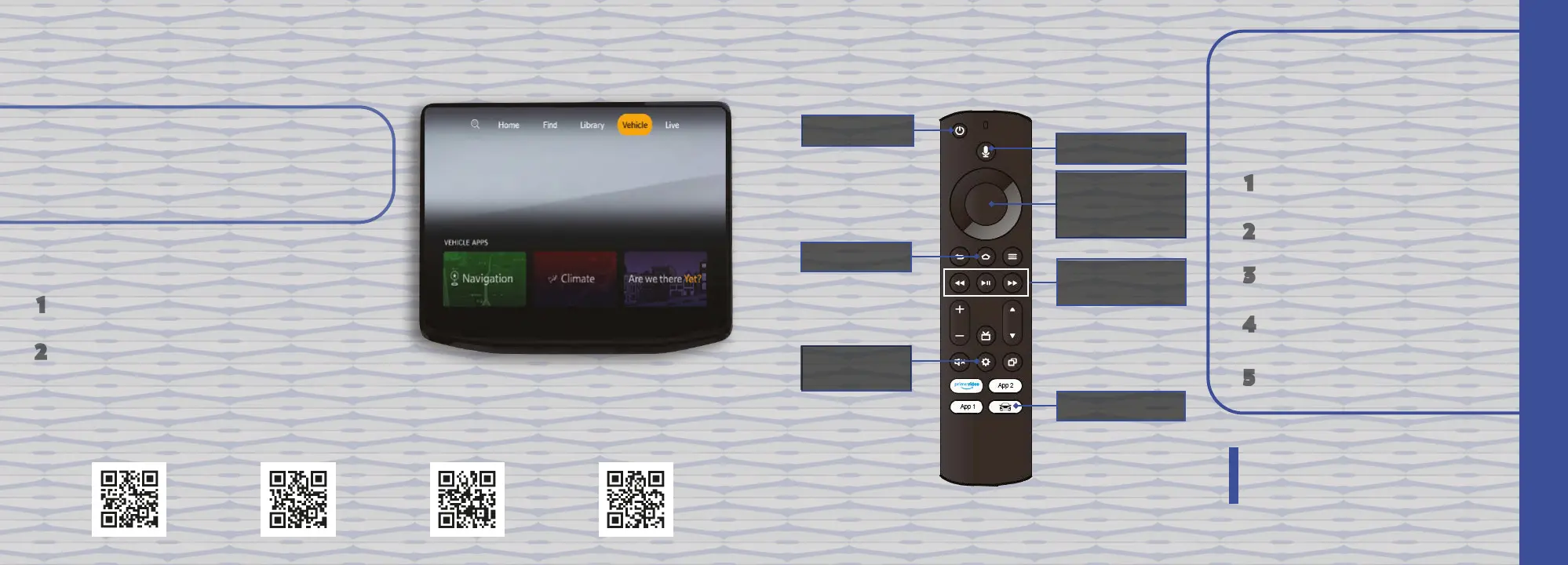
GET TO KNOW YOUR VOICE
REMOTE WITH ALEXA
Power Button
Voice Button
Five-Way
Navigation
Control
Home Button
Playback Control
Buttons
Vehicle Button
Gear/Settings
Button
REAR SEAT ENTERTAINMENT















 To Next Page