EN EN
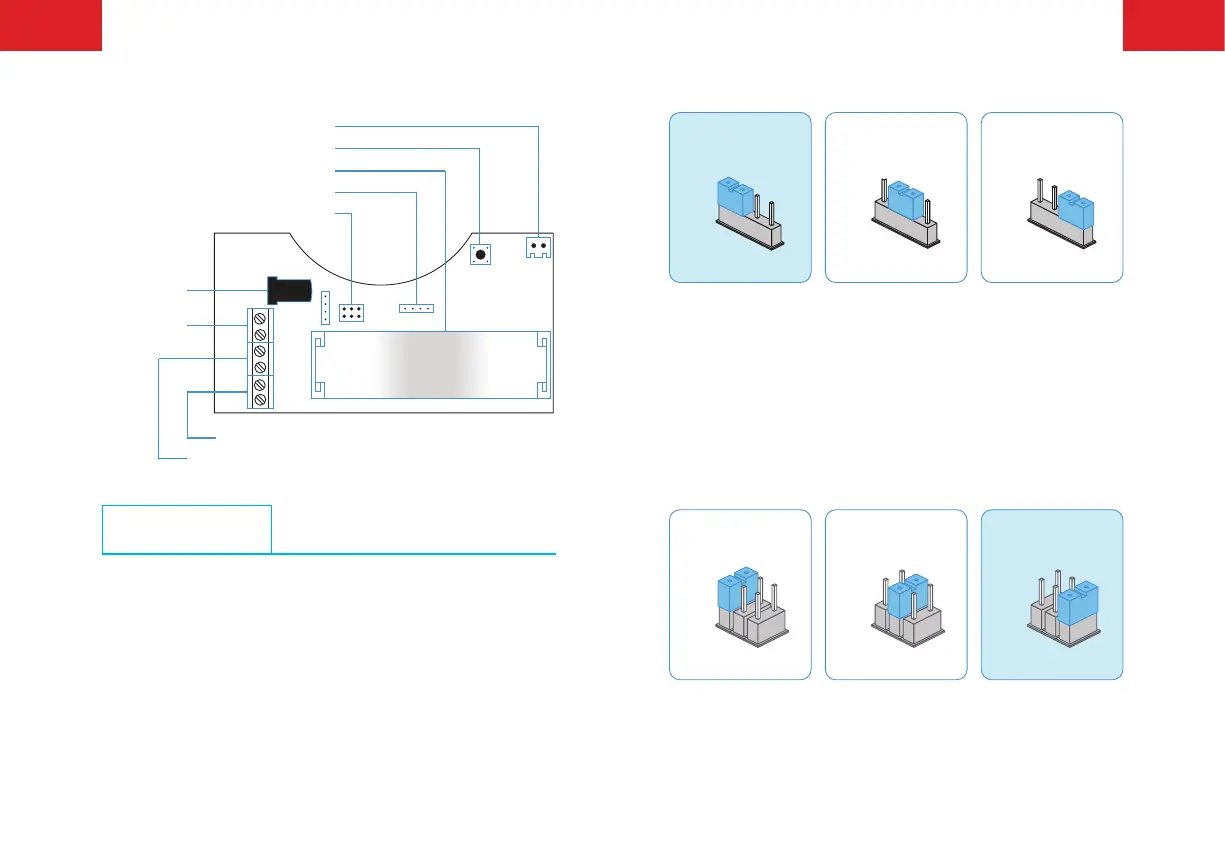
PCB Layout
Siren Interface
Learn Button
Adapter Jack
DC 12V
Terminals
Wired Sensor Terminals (Normal Zone)
Wired Sensor Terminals (24-H Zone)
Battery Slot
Alarming Volume Setup
Alarming Duration Setup
Jumper Setup
Please setup alarming volume and alarming duration time on the
PCB board accordingly.
Alarming Volume Setup
HIGH MUTE LOW
HIGH
HIGH
HIGH
MUTE
MUTE
MUTE
LOW
LOW
LOW
Default Setting
Note: When the siren is connected to control panel, it will hoot at the pre-
set volume even if the control panel is set to mute alarm. This is to alert the
neighbors and avoid the intrusion. When the control panel is set to mute
disarm/arm, the siren will be disarmed/ armed mutely. When the siren is set
to mute mode, there are still tones for arming and disarming.
Alarming Duration Setup
5 MIN
5MIN
5 MIN
2 MIN
2 MIN
2 MIN
30S
30S
30S
5 MIN 2 MIN 30S
Default Setting



 To Next Page