EasyManua.ls Logo

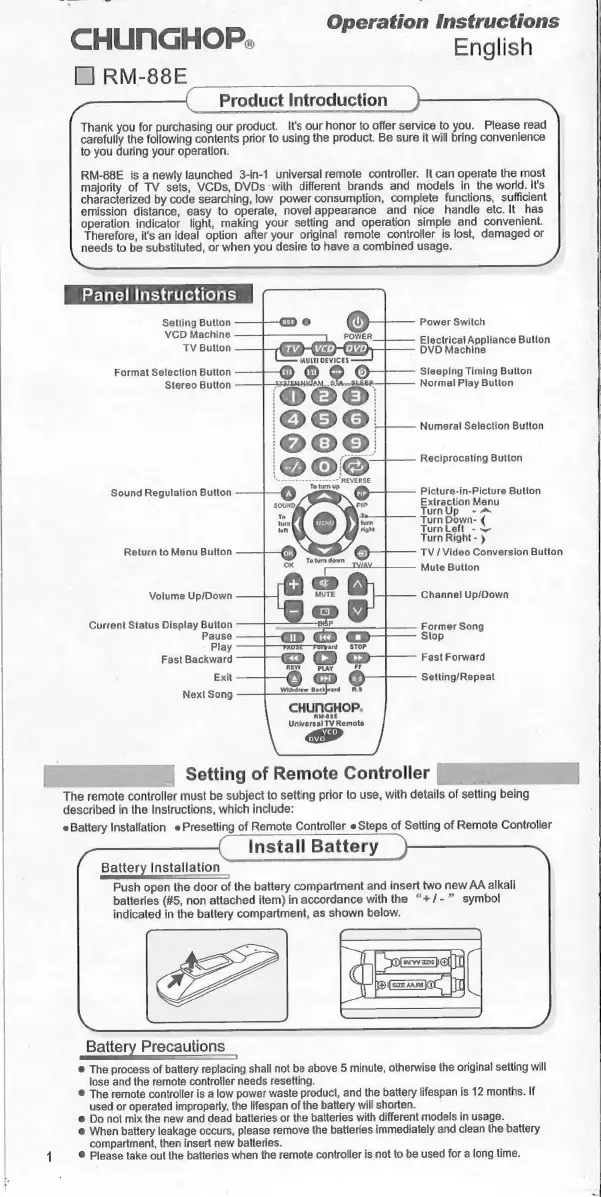
Chunghop RM-88E - Product Introduction; Panel Instructions; Primary Controls; Secondary Functions

Default Icon
31 pages
Print Icon
To Next Page IconTo Next Page
To Previous Page IconTo Previous Page
Loading...
Operation
Instructions
CHUNGHOP.
English
El]
RM-88E
Product
Introduction
Thank
you
for
purchasing
our
product.
It's
our
honor
to
offer
service
to
you.
Please
read
carefully
the
following
contents
prior
to
using
the
product.
Be
sure
it
will
bring
convenience
to
you
during
your
operation.
ВМ-88Е
is
a
newly
launched
3-in-4
universal
remote
controller.
It
can
operate
the
most
majority
of
TV
sets,
VCDs,
DVDs
with
different
brands
and
models
іп
the
world.
Its
characterized
by
code
searching,
low
power
consumption,
complete
functions,
sufficient
emission
distance,
easy
to
operate,
novel
appearance
and
nice
handle
etc.
It
has
operation
indicator
light,
making
your
setting
and
operation
simple
and
convenient.
Therefore,
it's
an
ideal
option
after
your
original
remote
controller
is
lost,
damaged
or
needs
to
be
substituted,
or
when
you
desire
to
have
a
combined
usage.
Panel
Instructions
Setting
Button
VCD
Machine
TV
Button
Power
Switch
Electrical
Appliance
Button
DVD
Machine
Format
Selection
Button
Stereo
Button
Sleeping
Timing
Button
Normal
Play
Button
Numeral
Selection
Button
Reciprocating
Button
Picture-in-Picture
Button
Extraction
Menu
Тит
Ур
-^
Turn
Down-
(
Turn
Left
-w
Turn
Right-
у
TV/Video
Conversion
Button
Mute
Button
Sound
Regulation
Button
Return
to
Menu
Button
Volume
Up/Down
Channel
Up/Down
Current
Status
Display
Button
Pause
Play
Fast
Backward
Exit
Next
Song
Former
Song
Stop
Fast
Forward
Setting/Repeat
CHUNGHOP.
RM-88E
Universal
TV
Remote
=
|
Setting
of
Remote
Controller
[I
|
_
The
remote
controller
must
be
subject
to
setting
prior
to
use,
with
details
of
setting
being
described
in
the
Instructions,
which
include:
Battery
Installation
e
Presetting
of
Remote
Controller
e
Steps
of
Setting
of
Remote
Controller
Install
Battery
Battery
Installation
q
Push
open
the
door
of
the
battery
compartment
and
insert
two
new
AA
alkali
batteries
(#5,
non
attached
item)
in
accordance
with
the
“+/-
>”
symbol
indicated
in
the
battery
compartment,
as
shown
below.
Battery
Precautions
©
The
process
of
battery
replacing
shall
not
be
above
5
minute,
otherwise
the
original
setting
will
lose
and
the
remote
controller
needs
resetting.
©
The
remote
controller
is
a
low
power
waste
product,
and
the
battery
lifespan
is
12
months.
If
used
or
operated
improperly,
the
lifespan
of
the
battery
will
shorten.
e
Do
not
mix
the
new
and
dead
batteries
or
the
batteries
with
different
models
in
usage.
e
When
battery
leakage
occurs,
please
remove
the
batteries
immediately
and
clean
the
battery
compartment,
then
insert
new
batteries.
1
©
Please
take
out
the
batteries
when
the
remote
controller
is
not
to
be
used
for
a
long
time.

Related product manuals