EasyManua.ls Logo

Chunghop RM-88E - DVD Setup Guide; Manual DVD Code Entry; Automatic DVD Code Search

Default Icon
31 pages
Print Icon
To Next Page IconTo Next Page
To Previous Page IconTo Previous Page
Loading...
Search
For
the
Correct
Code
In
case
that
your
VCD
machine
cannot
be
remotely
controlled
after
all
the
codes
available
are
tried,
or
in
case
that
your
VCD
machine
is
the
brand
that
has
no
matching
code
in
the
“code
list”
,
you
may
try
the
following
steps:
1.Manually
switch
on
the
VCD
machine
that
you
desire
to
control
and
insert
one
compact
disk,
making
the
machine
in
the
idle
status.
Notice:
When
turn
on
your
VCD,
if
it
is
automatically
playing,
please
press
the
"pause"
key
of
your
VCD
to
stop
it.
2.Aim
the
remote
controller
at
the
VCD
machine.
Press
and
hold
the
“Setting”
button
at
first,
then
press
the
“VCD”
button.
At
this
time,
the
indicator
light
illuminates.
Then
release
both
buttons.
3.Press
the
“Play”
button
on
the
remote
controller
and
release
it
to
observe
whether
the
VCD
machine
plays.
Repeat
the
operation
till
the
VCD
machine
plays,
and
then
press
the
“Setting”
button.
А
Note:
Each
press
of
the
“Play”
button
will
lead
to
one
code
emission.
If
the
code
is
identifiable
by
the
VCD
machine,
the
VCD
machine
will
play.
4.At
this
time,
the
indicator
light
extinguishes,
and
the
setting
ends.
You
can
check
other
functional
buttons,
for
example,
“Exit”
to
ensure
that
they
work
well.
5.In
case
other
buttons
fail
to
work
properly,
a
resetting
started
from
Step
2
shall
commence
till
the
correct
code
is
found.
Note:
After
each
press
of
“Play”
button,
the
code
number
of
the
remote
controller
will
add
1
and
the
“Play”
code
under
the
code
will
be
emitted
once.
In
case
a
normal
control
still
cannot
be
obtained,
please
refer
to
the
“Problem
Solving”
Setting
Steps
for
DVD
Machine
Manual
Setting
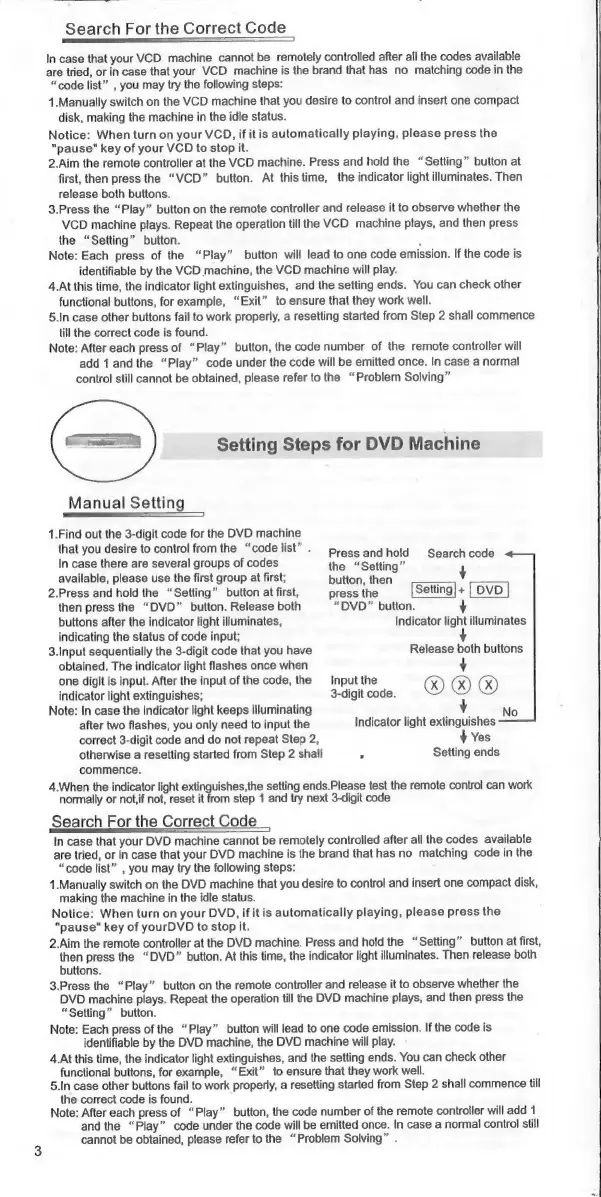
1.Find
out
the
3-digit
code
for
the
DVD
machine
that
you
desire
to
control
from
the
“code
list”
.
Pressiand
hold
«Search
code
In
case
there
are
several
groups
of
codes
the
“Setting”
y
available,
please
use
the
first
group
at
first;
button,
then
2.Press
and
hold
the
“Setting”
button
at
first,
press
the
Setting)
+
|
DVD
then
press
the
“DVD”
button.
Release
both
“DVD”
button.
buttons
after
the
indicator
light
illuminates,
Indicator
light
illuminates
indicating
the
status
of
code
input;
3.Input
sequentially
the
3-digit
code
that
you
have
Release
both
buttons
obtained.
The
indicator
light
flashes
once
when
y
one
digit
is
input.
After
the
input
of
the
code,
the
Input
the
indicator
light
extinguishes;
3-digit
code.
09
09
09
Note:
In
case
the
indicator
light
keeps
illuminating
y
No
after
two
flashes,
you
only
need
to
input
the
Indicator
light
extinguishes
correct
3-digit
code
and
do
not
repeat
Step
2,
+
Yes
otherwise
a
resetting
started
from
Step
2
shall
5
Setting
ends
commence.
4.When
the
indicator
light
extinguishes,the
setting
ends.Please
test
the
remote
control
can
work
normally
or
not,if
not,
reset
it
from
step
1
and
try
next
3-digit
code
Search
For
the
Correct
Code
In
case
that
your
DVD
machine
cannot
be
remotely
controlled
after
all
the
codes
available
are
tried,
or
in
case
that
your
DVD
machine
is
the
brand
that
has
no
matching
code
in
the
“code
list”
,
you
may
try
the
following
steps:
1.Manually
switch
on
the
DVD
machine
that
you
desire
to
control
and
insert
one
compact
disk,
making
the
machine
in
the
idle
status.
Notice:
When
turn
on
your
DVD,
ifitis
automatically
playing,
please
press
the
"pause"
key
of
yourDVD
to
stop
it.
2.Aim
the
remote
controller
at
the
DVD
machine.
Press
and
hold
the
“Setting”
button
at
first,
then
press
the
“DVD”
button.
At
this
time,
the
indicator
light
illuminates.
Then
release
both
buttons.
3.Press
the
“Play”
button
on
the
remote
controller
and
release
it
to
observe
whether
the
DVD
machine
plays.
Repeat
the
operation
till
the
DVD
machine
plays,
and
then
press
the
“Setting”
button.
Note:
Each
press
of
the
“Play”
button
will
lead
to
one
code
emission.
If
the
code
is
identifiable
by
the
DVD
machine,
the
DVD
machine
will
play.
4.At
this
time,
the
indicator
light
extinguishes,
and
the
setting
ends.
You
can
check
other
functional
buttons,
for
example,
“Exit”
to
ensure
that
they
work
well.
5.In
case
other
buttons
fail
to
work
properly,
а
resetting
started
from
Step
2
shall
commence
ШІ
the
correct
code
is
found.
Note:
After
each
press
of
“Play”
button,
the
code
number
of
the
remote
controller
will
add
1
and
the
“Play”
code
under
the
code
will
be
emitted
once.
In
case
a
normal
control
still
cannot
be
obtained,
please
refer
to
the
“Problem
Solving”
.

Related product manuals