Overview
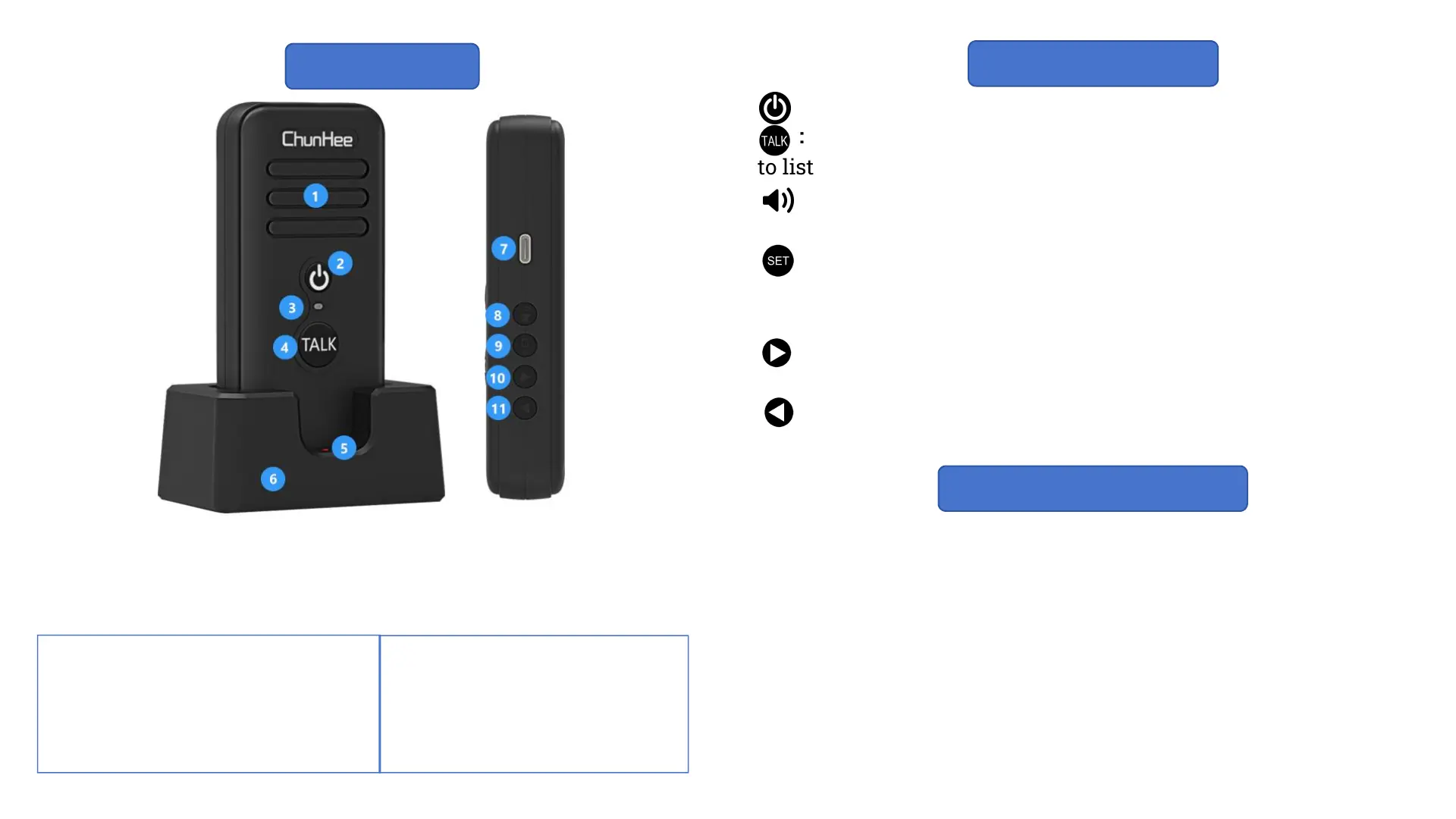
① Speaker
② Power Button
③ Indicator
④ Talk Button
⑤ Charge Indicator
⑥ Charge Station
⑦ Type-C Charge Port
⑧ Volume
: Power Button: Hold it for 3 seconds to turn on/off the device.
: Talk Button: Hold it to speak with other devices and release
to listen to the response (Ensure all device is at the same channel).
: Volume Adjust Button: Press it to adjust the volume (4 levels
available).
: Channel Lock/Unlock: Hold it for 5 seconds till hear a “DI”
sound to lock the channel, preventing further changes. Hold it for
5 seconds till hear a “DI-DI” sound to unlock the Channel.
: Channel Increase: Press to increase the channels (16
channels availiable).
: Channel Decrease: Press to decrease the channels (16
channels availiable).
Keys Introduction
* ③Indicator of Intercom
Red Color: Charging
Flashing Red Color: Low Battery
Blue Color: Fully Charged
Flashing Blue Color: Stand-by
* ⑤Indicator of Charge Base
Station
Red Color: Charging
Yellow Color: Fully Charged
The two-way radio will activate a voice prompt saying "Please
charge the battery." while the battery level reaches 3%. This
reminder will be broadcast every 5 minutes until the battery is
completely depleted.
Note: * It is essential to recharge the battery promptly once the
low battery reminder is activated to ensure uninterrupted
communication.
* Charge the battery at least 4 hours for the first time, and 3
hours for subsequent charge.
Low Battery Reminder
⑨ Channel Lock
⑩ Channel Increase
⑪ Channel Decrease


 To Next Page