REMOTE CONTROL
6
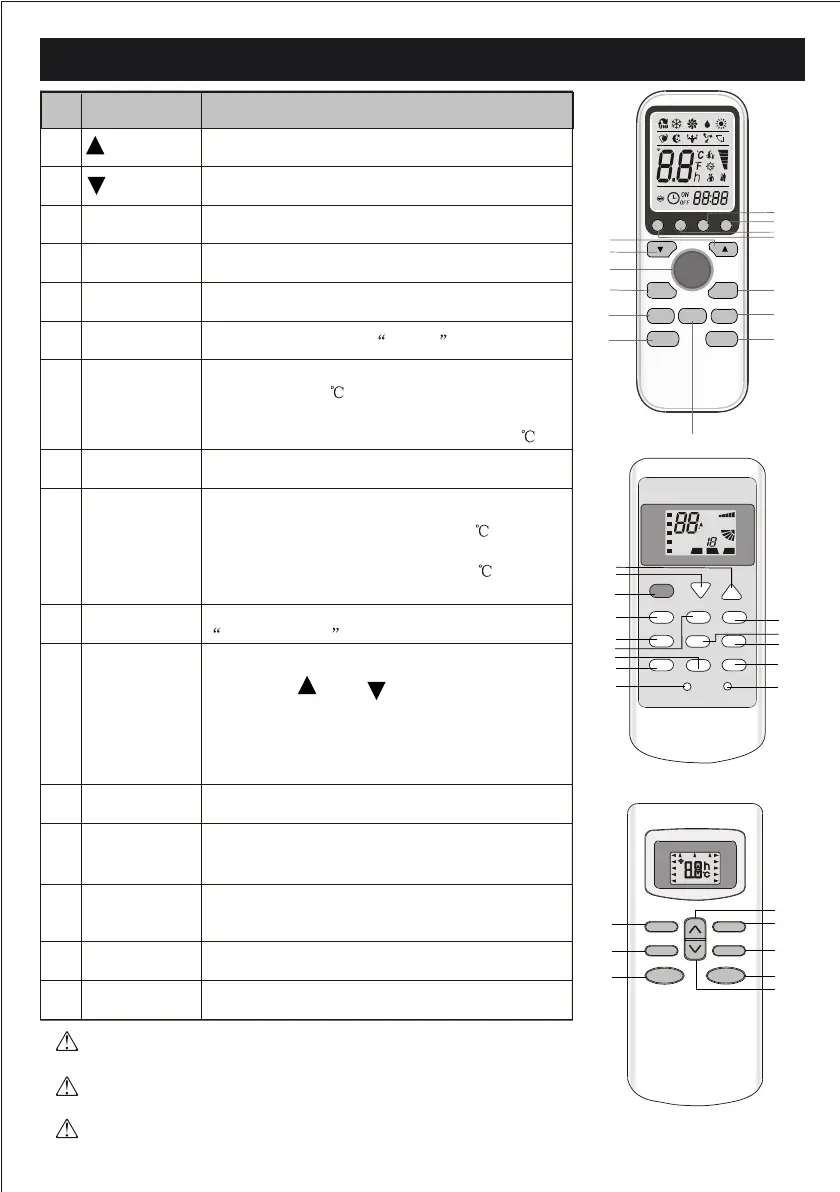
The shape and position of buttons and indicators may vary according to
the model, but their function is the same.
The appearance and some function of remote control may vary according
to the model.
The unit conrms the correct reception of each press button with a beep.
Selects the mode of operation
To LED display (if present) switch on/o the
To activate or deactivate of the movement of the air
DEFLECTORS .
To activate the function SLEEP
To switch - on /o HEALTHY funtion.It is a button
which controls the ionizer or plasma generator only
for inverter type.
Pressing this button will increase the set point
temperature by 2
Pressing this button In heating mode
will decrease the set-point temperature by 2
Pressing this button in cooling mode will set to
the minimum cooling temperature 16
Pressing this button in heating mode will set to
the maximum heating temperature 31
Decrease the temperature or time by 1 unit
Increase the temperature or time by 1 unit
To switch the conditioner on and o.
To set automatic switching-on/o
To select the fan speed of auto/low/mid/high
No.
8
10
12
6
14
7
9
13
MODE
SWING
DISPLAY
SLEEP
HEALTHY
ECO
SUPER
11
3D
CLOCK
1
(TEMP DN)
(TEMP UP)
2
3
4
ON/OFF
FAN
5
TIMER
This button is useless for w all-mounted type.
When you press "3D", the horizontal and vertical
vanes will swing together at the same time.
RESET
ANTI-MILDEW
Button
Function
To activate the function ANTI-MILDEW
To restart REMOTE CONTROL
2
1
6
5
8
3
10
4
ON/OFF
S WIN G
FA N
TIME R
S UP E R
S LE EP MO DE
E CO
1
11
3
2
9
13
8
12
4
14
10
5
6
DIS P LA Y HE A LTH Y3D
C LO CK
7
1
3
4
5
12
13
10
9
8
7
6
ON
OFF
ON
C
AUTOQUIE T
POWE RFUL
hr
DEL AY
DRY
FAN
HEAT
TIME R
HEALTHY
AIR
SWING
FAN
SPE ED
2
COOL
FE EL
ON/OF F
MODE TIME R
FAN SPE E D S UPER ECO
ANTI-MILDEW
SWING S LEEP HE ALTHY
DIS PL AY R E SET
15
16
16
15
Press this button andthe time display will blink
then using " " and " " you can adjust
the time and if you continue to press, the time
changes rapidly, after adjusting to your requi-
red time, please press this button again to
x the time.
SLEEP
FAN
TIM ER
SWI NG
O N /O F FMO DE
M ID
SWI NG
AUTO
DR Y
FAN
HEAT
C O O L
FE EL
SLEE P
TIME R O N
HIG H
LO W
TMIE R O FF



 To Next Page