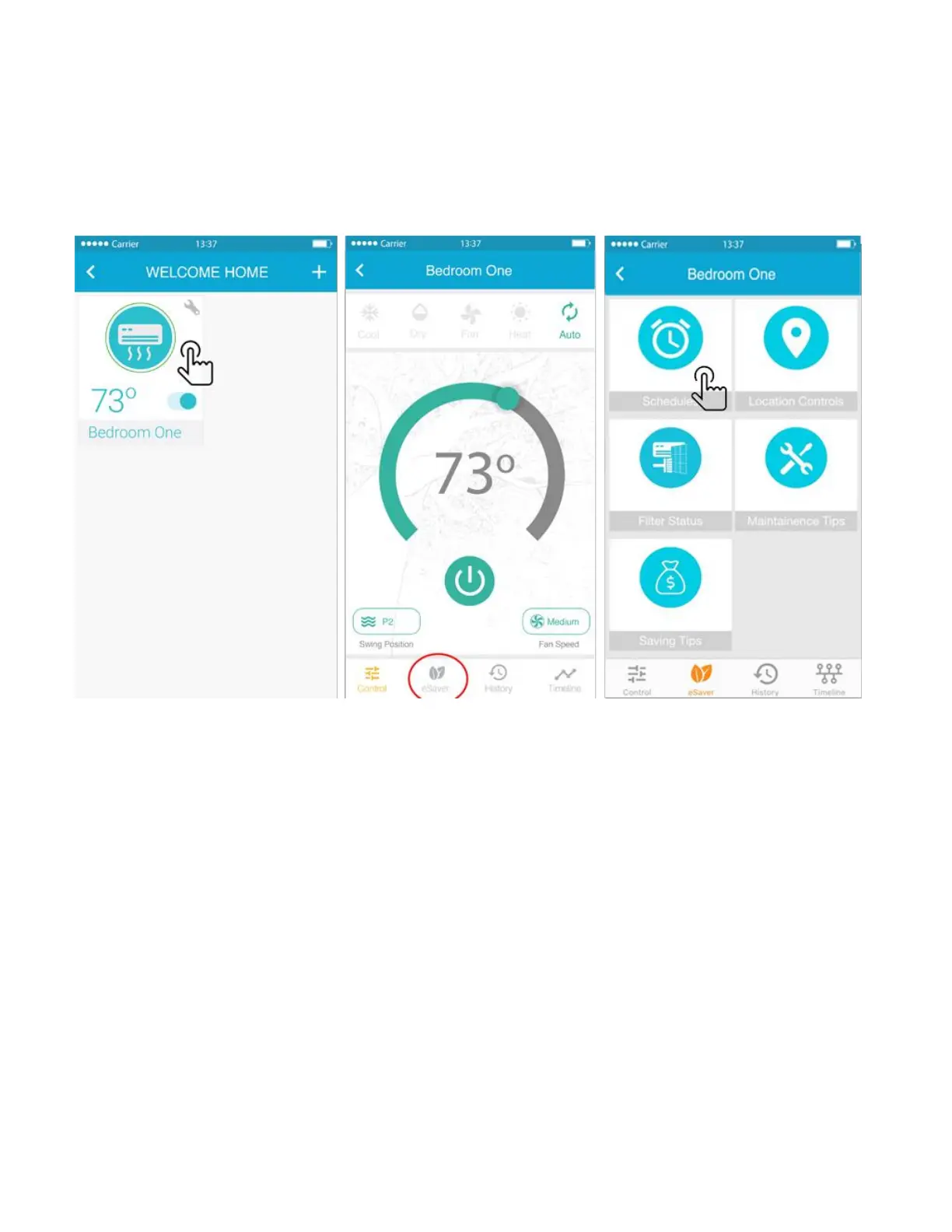
Step 6a: Setting up the schedules - for iOS Users
You can schedule your Air-Conditioner / Heat Pump through Cielo Breez by following the below given
steps:
• On the Home Screen, tap on the Air-Conditioner / Heat Pump you want to schedule.
• Tap on “eSaver” in the navigation bar and press the “Schedules option”
• Press the + icon to add a schedule and this will take you to Schedule Configuration screen.
• If you want to turn the Air-Conditioner / Heat Pump ON via schedule, select the time, mode,
temperature and fan speed at which you want to turn On the AC / Heat Pump. Select the power On
and select the day/days for which you want to set the schedule. You may choose to name the
schedule/schedules as per your preference.
• If you want to turn the Air-Conditioner / Heat Pump OFF via schedule, select the power OFF, Select the
day/days for which you want to set the schedule. You may choose to name the schedule/schedules as
per your preference.
• Press “Save” to set-up the schedule. After Breez performs the scheduled activity on your Air-
Conditioner / Heat Pump you will get a notification in the timeline.



 To Next Page