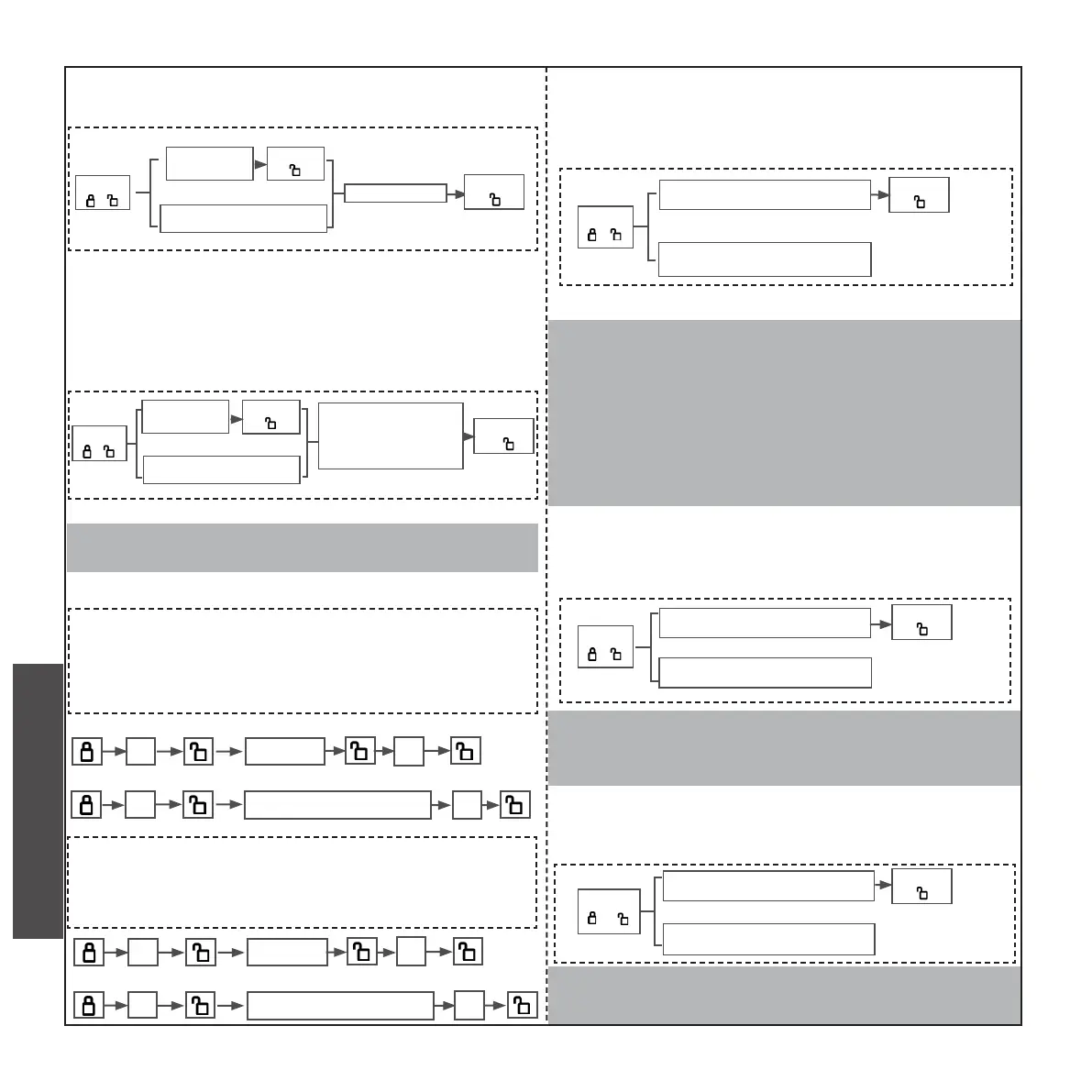
H. NORMALLY OPEN MODE
(THERE WILL BE POTENTIAL SAFETY HAZARD AFTER USING
THIS FUNCTION ,IT IS NECESSARY TO FULLY UNDERSTAND
BEFORE USING IT.)
Press
” 4 “
Enter admin password
Press
“ ”
• Release the normally open,it is the same way
that you set normally open mode. Or removing
the battery and touch the screen for several times
and then install the battery.Or reset the system,-
this two ways also can release the normally open
.under the normally open, the door can be opened
without password, just pressing hand directly.
I. QUIET MODE
(THE BUZZER WILL NOT MAKE ANY SOUND DURING OPERA-
TION AFTER MUTE)
Press
” 5 “
• Release the quiet mode :it is the same way
that you set the quiet mode.
J. VACATION MODE
(ONLY ADMIN CODE CAN UNLOCK,OTHER CODE WILL
PROMPT ERROR)
Press
” 10 “
• Disable:After removing one of the battery and
touching the keypad or Resetting the system.
Enter admin ngerprint
Press
“ ”
Press
“ ”
F. DELETION OF ALL USERS
(EXCEPT ADMINISTRATOR)
Press
” 3 “
Enter 00000
Press
“ ”
Enter
admin code
Press
“ ”
Enter admin ngerprint
G. AUTOMATIC LOCK FUNCTION
(TIME VALUE RANGE:5 SECONDS TO 30 SECONDS)
Press
” 3 “
Enter
admin code
Press
“ ”
Enter admin ngerprint
Unlock to Lock Time
value range
Press
“ ”
eg, if you want automatic locking 10s after un-
locking,the admin code is “666666 “or nger-
print,the enter steps are as follows:
6 666666
10
6
admin ngerprint 10
eg, if you want disable automatic locking ”,the
admin code is “666666 or ngerprint,the en-
ter steps are as follows:
6 666666
0
6
admin ngerprint
0
Disable Automatic Lock :Setting timevalue range to “0”.
Enter admin password
Enter admin ngerprint
Enter admin password
Enter admin ngerprint
CHECK AND PREPARATION
INSTALLTION STEPS
INSTRUCTION OPERATION



 To Next Page
 Loading...