EasyManua.ls Logo

CIGAR OASIS MAGNA - User Manual

CIGAR OASIS MAGNA
2 pages
Print Icon
To Next Page IconTo Next Page
Loading...
ASSEMBLY & STARTING YOUR CIGAR OASIS MAGNA
1. Remove all contents from the box.
2. Remove the white plastic cap from the front of the unit.
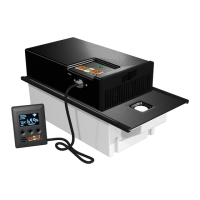
3. Locate the water beads and pour through the hole into the
white water tank. Fill half of the water tank up with distilled
water (approximately 70 ounces).
4. Place the white plastic cap over the hole in front of the unit.
5. Plug the micro USB connector into the side of the unit and
plug the adapter into the wall to power up the unit.
6. Locate the remote (digital readout) and plug into the unit.
7. Plug the circulation fans into remote and locate at the
furthest point possible in the humidor from the water tank.
Face them towards the middle of the humidor at a 45 degree
angle / \.
Water Tank Refill Instructions
1. Remove the white plastic cap from the front of the unit.
2. Pour distilled water through the hole into the water tank.
3. Place the white plastic cap over the hole in the front of the
unit.
4. It will take up to 24 hours for the beads to fully absorb the
water, however the unit may be used immediately. The
beads are refillable, but should be replaced at least one time
per year.
USING YOUR CIGAR OASIS MAGNA
Once the MAGNA is put together and plugged in, it turns on and
will read the current humidity. The unit is factory preset at 70%
humidity. As soon as the humidity drops below 70% the internal
fans will come on to add moisture to the humidor. The external
circulation fans will run constantly.
To raise or lower the humidity settings use the UP or DOWN
arrows. A few seconds after the adjustment the unit will go back
to showing the current humidity level.
When the unit needs to be refilled, it will flash Lo H2O.
By pressing the SUN button you can view the following information:
Press 1 time to view TEMPERATURE. Use Up and Down
arrows to select Celsius or Fahrenheit. To save your selection
press the SUN button again.
Press 2 times to view Average Humidity.
Press 3 times to view LOW Humidity over 3 days (the unit will
start at 0 until it has enough information to give an accurate
reading).
Press 4 times to view HIGH Humidity over 3 days (the unit will
start at 0).
CALIBRATION INSTRUCTIONS
To set the unit to match another hygrometer, you may adjust the
reading by up to 9% (+ or -) on your Cigar Oasis MAGNA.
1) Determine if you need to increase or decrease the reading on
the Cigar Oasis Humidifier to match the reading on your
separate digital hygrometer.
2) Press the UP and SUN button simultaneously and hold for 3
seconds to enter the Calibration Mode (Displays U 0).
3) Press UP button if you need to increase the reading on the
humidifier to match the reading on your separate hygrometer OR
Press the DOWN button if you need to decrease the reading on
the humidifier to match the reading on your separate
hygrometer.
4) Press SUN button to leave the Calibration Mode.
5) Allow the humidifier to run for at least an hour before you check
if humidity level matches the other hygrometer.
If further re-calibration is necessary, follow the above procedures
again. Re-calibration should not be done more than three times in a
row.
Micro USB Connector
Power Adapter
Water Tank
Circulation Fans
Rails
USB & Remote Connections
Remote
Question and Answer IconNeed help?

Do you have a question about the CIGAR OASIS MAGNA and is the answer not in the manual?

Summary

Assembly and Starting Your Cigar Oasis Magna

Water Tank Refill Instructions

Instructions for refilling the water tank with distilled water, noting absorption time and bead replacement.

Using Your Cigar Oasis Magna

Viewing Information via SUN Button

Details on how to view temperature, average, low, and high humidity readings using the SUN button.

Calibration Instructions

Optional Accessory

Wi-Fi Module

Reference to the Wi-Fi manual for instructions on the operation of the Wi-Fi module.

Overview

The Cigar Oasis MAGNA is an electronic cigar humidifier designed to maintain optimal humidity levels in a humidor. It features an internal fan system to add moisture and external circulation fans that run constantly to distribute humidity evenly.

Function Description:

The primary function of the Cigar Oasis MAGNA is to automatically regulate the humidity inside a humidor. Once assembled and plugged in, it powers on and displays the current humidity. The unit is factory preset to 70% humidity. When the humidity drops below this set point, the internal fans activate to release moisture into the humidor. The external circulation fans operate continuously to ensure consistent humidity distribution throughout the humidor.

Important Technical Specifications:

  • Water Tank Capacity: Approximately 70 ounces of distilled water.
  • Humidity Range: Factory preset at 70%, adjustable.
  • Power Source: Plugs into a wall outlet via a power adapter.
  • Connectivity: Micro USB connector for power and remote connection.
  • Refill Indicator: Flashes "Lo H2O" when the unit needs to be refilled.
  • Bead Lifespan: Refillable beads, recommended to be replaced at least once per year.
  • Calibration Range: Adjustable by up to 9% (+ or -) to match other hygrometers.
  • Optional Accessory: Wi-Fi module (requires separate Wi-Fi manual for operation).

Usage Features:

  • Assembly and Setup:

    1. Remove all contents from the box.
    2. Remove the white plastic cap from the front of the unit.
    3. Pour water beads into the hole in the water tank.
    4. Fill the water tank halfway with approximately 70 ounces of distilled water.
    5. Replace the white plastic cap over the hole.
    6. Plug the micro USB connector into the side of the unit and connect the power adapter to a wall outlet.
    7. Plug the remote (digital readout) into the unit.
    8. Plug the circulation fans into the remote and position them at the furthest point possible from the water tank in the humidor, facing towards the middle at a 45-degree angle.
    9. Allow up to 24 hours for the beads to fully absorb water, though the unit can be used immediately.
  • Humidity Adjustment:

    • Use the UP or DOWN arrows on the remote to raise or lower the desired humidity setting. The unit will revert to displaying the current humidity level a few seconds after adjustment.
  • Information Display (via SUN button):

    • Press 1 time: View TEMPERATURE. Use Up and Down arrows to select Celsius or Fahrenheit, then press SUN again to save.
    • Press 2 times: View Average Humidity.
    • Press 3 times: View LOW Humidity over 3 days (starts at 0 until sufficient data is collected).
    • Press 4 times: View HIGH Humidity over 3 days (starts at 0 until sufficient data is collected).
  • Calibration:

    1. Determine if the reading needs to be increased or decreased to match a separate digital hygrometer.
    2. Press the UP and SUN buttons simultaneously and hold for 3 seconds to enter Calibration Mode (displays "U 0").
    3. Press the UP button to increase the reading or the DOWN button to decrease it.
    4. Press the SUN button to exit Calibration Mode.
    5. Allow the humidifier to run for at least an hour before re-checking the humidity level.
    6. Re-calibration should not be performed more than three times in a row.

Maintenance Features:

  • Water Tank Refill:

    1. Remove the white plastic cap from the front of the unit.
    2. Pour distilled water through the hole into the water tank.
    3. Replace the white plastic cap.
    4. The unit will flash "Lo H2O" when a refill is needed.
  • Bead Replacement: The water beads are refillable but should be replaced at least once per year to ensure optimal performance.

Warranty and Registration:

For warranty information and product registration, users should visit www.cigaroasis.com.

Contact Information:

Cigar Oasis 79 Heisser Court Farmingdale, NY 11735 Phone: 516.520.5258 Website: www.cigaroasis.com

CIGAR OASIS MAGNA Specifications

General IconGeneral
BrandCIGAR OASIS
ModelMAGNA
CategoryHumidifier
LanguageEnglish

Related product manuals