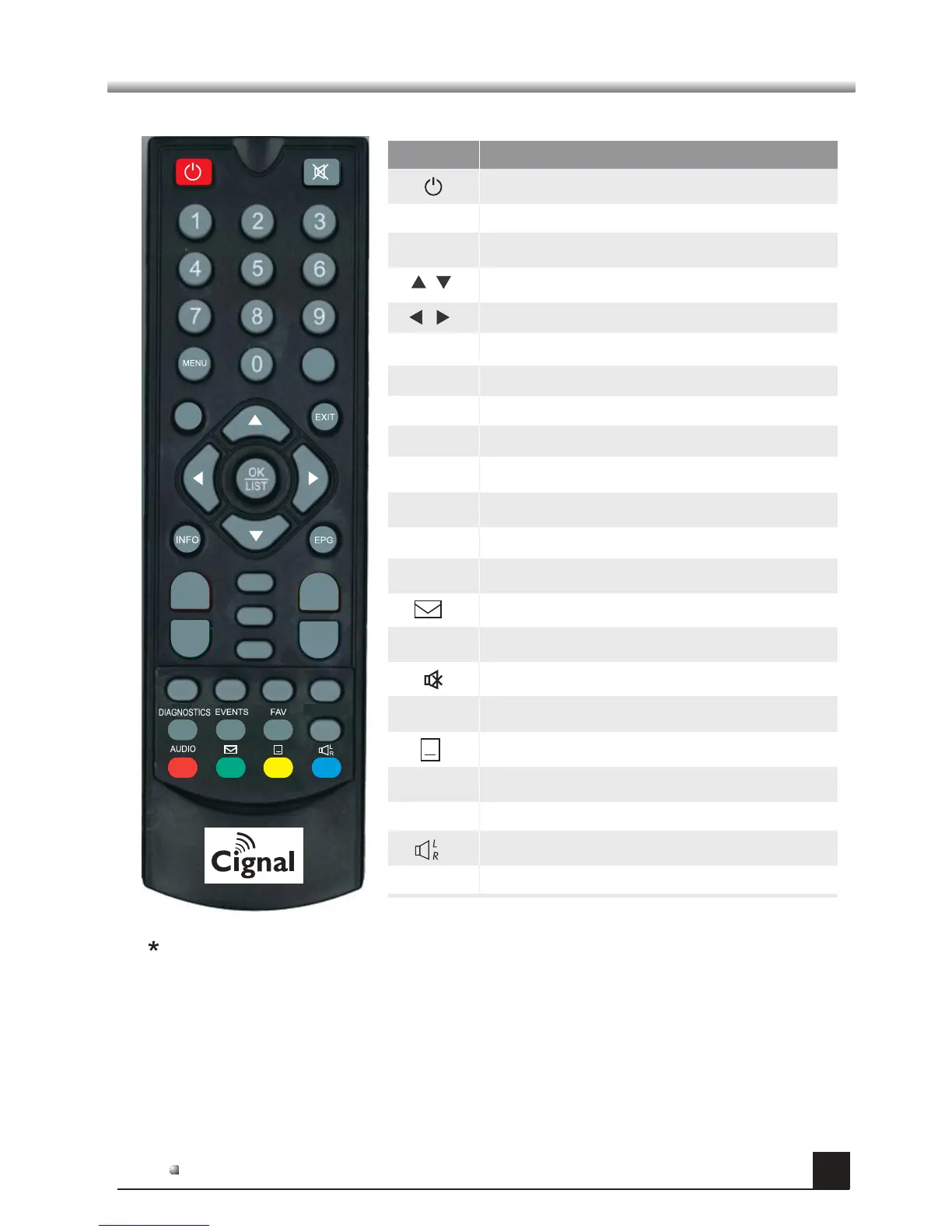
Remote Control Unit (RCU)
6
Please note, picture for reference only. Exact product details may vary.
Key
Fu ncti o n
Switch ON/OFF the STB
Mute the sound
Switch between TV mode and Radio mode
0~9
EXIT
OK
Channel number or number entry
Cancel or return from the menu
TV/RADIO
Access the Favorites Channel list
Show the information of current channel
Access the Bmail screen
FAV
INFO
Enter or select item, or open channel list
Display EPG information
EPG
AUDIO
CH+,CH-
Volume up/down
Volume up/down or move cursor left/right
Channel up/down or move cursor up/down
Channel up/down
VOL+,VOL-
Back to previous channel or menu
MENU
Access the Home menu
Switch on/off teletext or subtitle mode
BACK
VOL+
VOL-
CH+
CH-
TV/RADIO
SETUP
BACK
EVENTS
DIAGNOSTICS
Display booked events list
Display diagnostics list
Switch between audio modes
Switch audio tracks
SETUP
Access user setup menu
- Multiple languages, teletext and subtitles are dependent on availability
*
*


 To Next Page