Home
Cirris
Test Equipment
CH2
Performance Test Manual
Page 5 (Add-on Scanner Parts List)
Cirris CH2 - Add-on Scanner Parts List; Optional Accessories for CH2
21 pages
Manual
Save Page as PDF
To Next Page
To Next Page
To Previous Page
To Previous Page
Loading...
3
Performance
Verification
3.
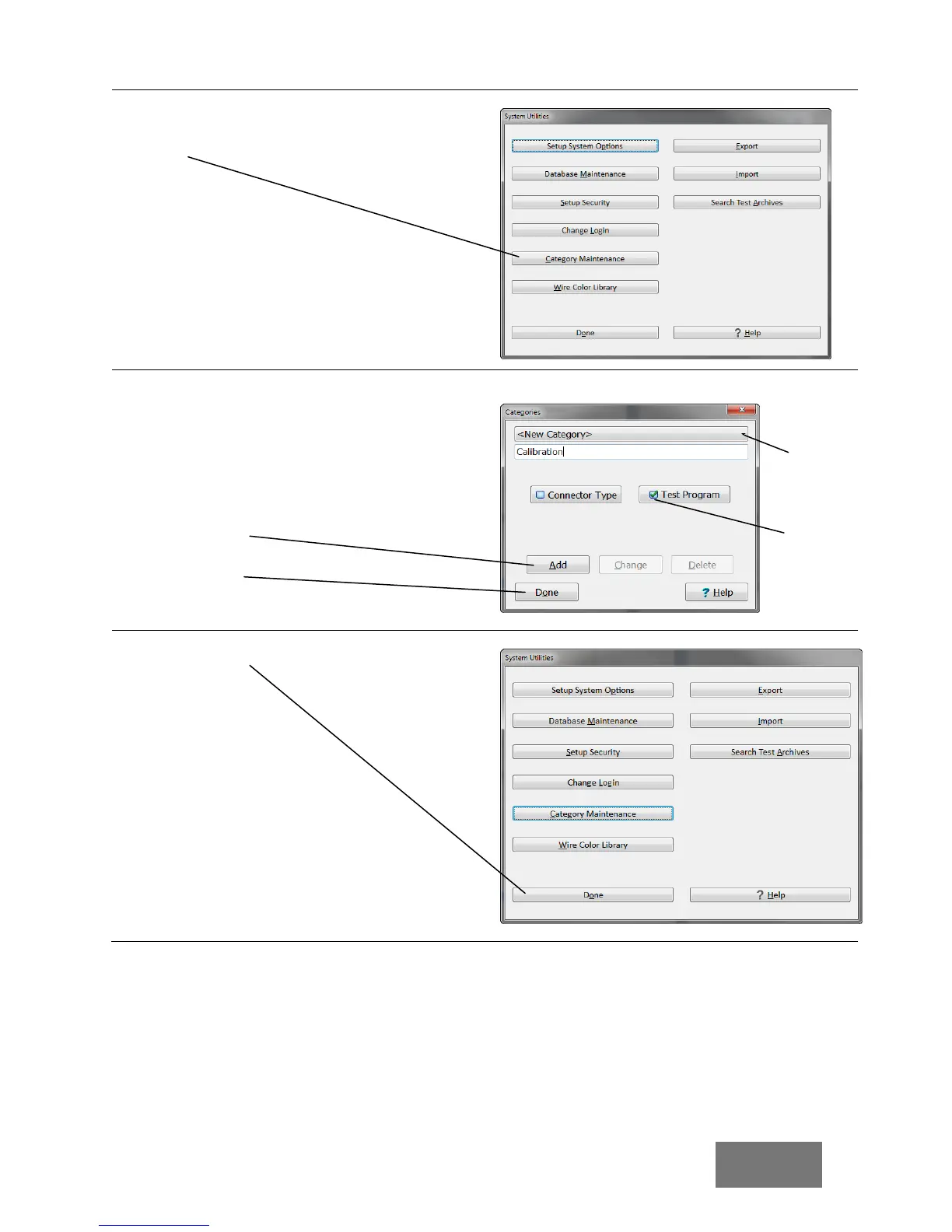
Click
T
est
Category M
aintenance
(or Test
Category Maintena
nce in version 8.6).
4.
Make sure
T
est Program
is chec
ked. Click
the down arrow
and see if there is
a
category called
Cal
ibration.
If there is no Cate
gory c
alled
Calibration,
create one by en
tering the w
ord
“Calibration”
in
the text box
and clicking
A
dd
.
5.
Click
Do
ne
.
6.
Click
Do
ne
.
Make sure
Test
Program
is
checked.
Click the
down arrow
to see the
available
categories.
4
6
Other manuals for Cirris CH2
User Manual
64 pages
Instruction Manual
41 pages
Manual
2 pages
Getting Started Guide
12 pages
Related product manuals
Cirris Easy-Touch Pro
46 pages
Cirris 4200
60 pages
Cirris 4200 Series
60 pages



 To Next Page