Chapter 1 Cisco 1721 Router Overview
Back Panel Ports and LEDs
1-4
Cisco 1721 Router Hardware Installation Guide
78-13834-02
Back Panel Ports and LEDs
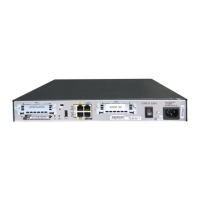
This section describes the router back panel ports and LEDs, which are shown in
Figure 1-2 and described in Table 1-2 and Table 1-3.
Figure 1-2 Back Panel Ports and LEDs
Table 1-2 Back Panel Connectors
Connector/Slot Label/Color Description
Ethernet port 10/100
ETHERNET
(yellow)
Connects the router to the local Ethernet network
through this port. This port autosenses the speed
(10 Mbps or 100 Mbps) and duplex mode (full- or half-)
of the device to which it is connected and then operates
at the same speed and in the same duplex mode.
Auxiliary port AUX
(black)
Connects to a modem for remote configuration with
Cisco IOS software.
Console port CONSOLE
(blue)
Connects to a terminal or PC for local configuration
using Cisco IOS software.
Power
socket
+5, +12, -12 VDC
CONSOLE
10/100 ETHERNET
AUX
FDX LINK100WIC 0 OK WIC 1 OKMOD OK
Power switch
Model
Cisco 1721
65524
FDX/100/
LINK LEDs
Auxiliary port
Kensington-compatible
locking socket
WIC 0
OK LED
10/100-Mbps
Ethernet port
MOD OK
LED
WIC 1 OK
LED
WIC 0 slot WIC 1 slot
Console port
SEE MANUAL BEFORE INSTALLATION
DSU
56K
CD
AL
LP
RD
TD



 To Next Page