EasyManua.ls Logo

Cisco 1700 series - User Manual

Cisco 1700 series
5 pages
Print Icon
To Next Page IconTo Next Page
Loading...
Configuring a Cisco 1700/2600/3600 ADSL WIC to
Support PPPoE Clients, Terminating on a Cisco
6400 UAC
Document ID: 12963
Contents
Introduction
Prerequisits
Requirements
Components Used
Conventions
Configure
Network Diagram
Configurations
Verify
Troubleshoot
Related Information
Introduction
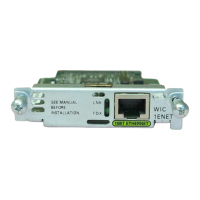
The Cisco 1700, 2600, and 3600 series routers support the Asymmetric Digital Subscriber Line (ADSL)
WAN Interface Card (WIC). All three platforms are configured essentially the same, but there are differences
in hardware and in the Cisco IOS® Software release required for each one. Throughout this document, the
Cisco 1700/2600/3600 is referred to as the Cisco ADSL WIC.
This sample configuration shows you how to support a Point−to−Point Protocol over Ethernet (PPPoE) client
when it is connected to the Ethernet interface of a Cisco ADSL WIC.
The Cisco ADSL WIC is configured with RFC 1483 bridging and terminates on a Cisco 6400 Universal
Access Concentrator (UAC) that has been configured to support PPPoE using a multipoint ATM subinterface.
The PPPoE feature allows you to initiate a PPP session on a simple bridging Ethernet connected client. The
session is transported over the ATM link via encapsulated Ethernet−bridged frames. The session can be
terminated at either a local exchange carrier central office or an Internet service provider (ISP) point of
presence.
PPPoE is a client−initiated connection. On the Customer Premises Equipment (CPE) side, a PC with an
Ethernet Network Interface Card (NIC) and the PPPoE client code are established. This PC and other PCs are
connected to the ADSL WIC Ethernet segment.
The ADSL WIC ATM interface is connected to a Cisco 6130 DSL Access Multiplexer (DSLAM) and
terminates on a Cisco 6400 UAC.
Prerequisits
Requirements
Before you attempt this configuration, please ensure that you use one of these prerequisite software releases:

Other manuals for Cisco 1700 series

Question and Answer IconNeed help?

Do you have a question about the Cisco 1700 series and is the answer not in the manual?

Summary

Introduction to ADSL WIC Configuration

Prerequisites for ADSL WIC Setup

Software and Hardware Requirements

Details the minimum Cisco IOS Software Releases and hardware components required for ADSL WIC.

Document Conventions

References the Cisco Technical Tips Conventions for document terminology and symbols.

Configuration Steps

Network Diagram Overview

Illustrates the network setup for PPPoE client configuration with the ADSL WIC.

Device Configurations

Provides the specific Cisco IOS configurations for the ADSL WIC and Cisco 6400 NRP.

Verification Procedures

Troubleshooting ADSL WIC

Related Information Resources

Overview

This document outlines the configuration of a Cisco 1700/2600/3600 ADSL WAN Interface Card (WIC) to support Point-to-Point Protocol over Ethernet (PPPoE) clients, with termination on a Cisco 6400 Universal Access Concentrator (UAC). The primary function of this setup is to enable Internet access for clients connected to the ADSL WIC's Ethernet interface, leveraging an Asymmetric Digital Subscriber Line (ADSL) connection.

Function Description

The core function of this configuration is to bridge the gap between a local Ethernet network, where PPPoE clients reside, and an Asymmetric Digital Subscriber Line (ADSL) Wide Area Network (WAN) connection. The Cisco ADSL WIC acts as the customer premises equipment (CPE), facilitating the initiation of PPP sessions from client PCs. These sessions are then encapsulated within Ethernet-bridged frames and transported over an Asynchronous Transfer Mode (ATM) link. The ultimate destination for these sessions is a Cisco 6400 UAC, which serves as the access concentrator, typically located at a local exchange carrier central office or an Internet service provider (ISP) point of presence.

The PPPoE protocol is crucial here, as it allows for authentication, authorization, and accounting (AAA) services for individual client connections, even though the underlying network is Ethernet-based. This provides a more secure and manageable way to deliver broadband services compared to simple bridging without PPP. The ADSL WIC, therefore, performs several key functions:

  • Ethernet Bridging: It connects the local Ethernet segment (where client PCs are attached) to the ADSL WAN.
  • PPPoE Client Support: It allows client PCs running PPPoE client software to initiate PPP sessions.
  • ATM Encapsulation: It encapsulates the Ethernet-bridged frames, including the PPPoE sessions, into ATM Adaptation Layer 5 (AAL5) frames for transmission over the ADSL line.
  • RFC 1483 Bridging: This standard is used for bridging IP over ATM, ensuring compatibility with the DSLAM and UAC.

The Cisco 6400 UAC, on the other hand, is responsible for:

  • PPPoE Termination: It receives the encapsulated PPPoE sessions from the ADSL WIC and terminates them, effectively establishing the PPP connection.
  • Multipoint ATM Subinterface: It uses a multipoint ATM subinterface to handle multiple PPPoE sessions from various ADSL WICs.
  • IP Address Assignment: It assigns IP addresses to the PPPoE clients, typically from a local IP pool.
  • Authentication: It authenticates the PPPoE clients using protocols like CHAP (Challenge Handshake Authentication Protocol), ensuring only authorized users gain access.

The overall system provides a robust and scalable solution for delivering broadband Internet access to multiple users over ADSL infrastructure.

Usage Features

The usage features of this system are primarily focused on enabling reliable and secure broadband connectivity for end-users.

  • Client-Initiated Connections: PPPoE is a client-initiated protocol, meaning the end-user's PC actively establishes the connection. This gives users control over when their Internet session begins and ends.
  • Scalability: The use of a Cisco 6400 UAC with multipoint ATM subinterfaces allows for the termination of numerous PPPoE sessions from multiple ADSL WICs, making it suitable for larger deployments or ISPs serving many subscribers.
  • Security through Authentication: PPP authentication (e.g., CHAP) ensures that only legitimate users with valid credentials can establish an Internet connection, enhancing network security. The username and password configured on the UAC must match those used by the client.
  • Flexible IP Address Management: The UAC can assign IP addresses dynamically from a defined local pool, simplifying network administration and allowing for efficient use of IP address space.
  • Standard-Based Operation: The reliance on RFC 1483 bridging and standard PPPoE protocols ensures interoperability with various DSLAMs and client software.
  • Hardware Compatibility: The ADSL WIC is supported across multiple Cisco router platforms (1700, 2600, 3600 series), offering flexibility in deployment based on specific performance and port density requirements.
  • Software Release Dependency: The system's functionality is tied to specific Cisco IOS Software releases for each component (ADSL WIC, UAC NRP, UAC NSP, DSLAM), emphasizing the importance of maintaining compatible software versions for optimal operation.
  • Virtual Templates for Configuration: The UAC utilizes virtual templates for configuring PPPoE sessions, which streamlines the management of common settings for multiple clients. This allows for consistent application of policies and parameters.
  • MTU Management: The configuration highlights the importance of setting the Maximum Transmission Unit (MTU) size, which is critical for efficient data transmission over PPPoE connections and preventing fragmentation issues.

Maintenance Features

Maintaining this ADSL WIC and UAC setup involves several considerations to ensure continuous and optimal performance.

  • Software Version Management: Regular checks and updates of Cisco IOS Software releases for all components (ADSL WIC, UAC, DSLAM) are crucial. The document explicitly lists minimum required versions, indicating that compatibility is key. Staying updated helps in leveraging new features, security patches, and bug fixes.
  • Configuration Backup and Restoration: It is essential to regularly back up the configurations of both the ADSL WIC and the UAC. This allows for quick recovery in case of accidental configuration changes or hardware failures.
  • Monitoring and Troubleshooting: Although the document states no specific troubleshooting information is available, the nature of network devices implies the need for monitoring tools. Commands like show interface and show pppoe (if available) would be used to check the status of the ADSL line, PPPoE sessions, and interface statistics. The debug commands (e.g., debug pppoe) would be invaluable for diagnosing connection issues.
  • Hardware Compatibility Checks: When deploying or upgrading, it's important to verify hardware compatibility, especially for the Cisco 3600 series, where ADSL WICs are not supported on certain Network Modules (NMs). This prevents deployment errors and ensures proper functionality.
  • Password Management: The document explicitly states that the username and password on the UAC must match the client's credentials. This highlights the importance of secure password management practices for both the network administrator and the end-users.
  • IP Address Pool Management: For the UAC, managing the IP address pool is a maintenance task. Ensuring the pool has sufficient addresses for all potential clients and that there are no conflicts is vital for service availability.
  • Documentation: Maintaining detailed documentation of the network diagram, configurations, and any changes made is critical for effective troubleshooting and future maintenance.
  • Understanding Command Impact: The document advises understanding the potential impact of any command before use in a live network. This emphasizes the need for careful planning and testing of configuration changes, ideally in a lab environment, before implementing them in production.
  • MTU Troubleshooting: The reference to troubleshooting MTU size in PPPoE Dialin Connectivity suggests that MTU-related issues can arise and require specific diagnostic and resolution steps. This implies that network administrators should be familiar with MTU concepts and their impact on PPPoE.

Cisco 1700 series Specifications

General IconGeneral
Model1700 Series
Connectivity TechnologyWired
Remote Management ProtocolSNMP, Telnet, HTTP
Encryption AlgorithmDES, 3DES, AES
ProcessorMotorola MPC860
QoS SupportYes
Operating SystemCisco IOS
Routing ProtocolsOSPF, EIGRP, BGP
Security FeaturesFirewall, VPN
Memory16 MB
Expansion Slots1 x WIC
Data Link ProtocolEthernet, Fast Ethernet
Network / Transport ProtocolTCP/IP
FeaturesDHCP, NAT, VLAN
LAN Ports4 x 10/100Base-TX

Related product manuals