Cisco 3640 Series Router-PBX Interoperability: VIC 2BRI-NT/TE card to Alcatel 4400 PBX with BRI ISDN QSIG Signaling
Page 2
Set Up
This section includes the following information:
• Connectivity Diagrams
• Set Up Notes
Connectivity Diagrams
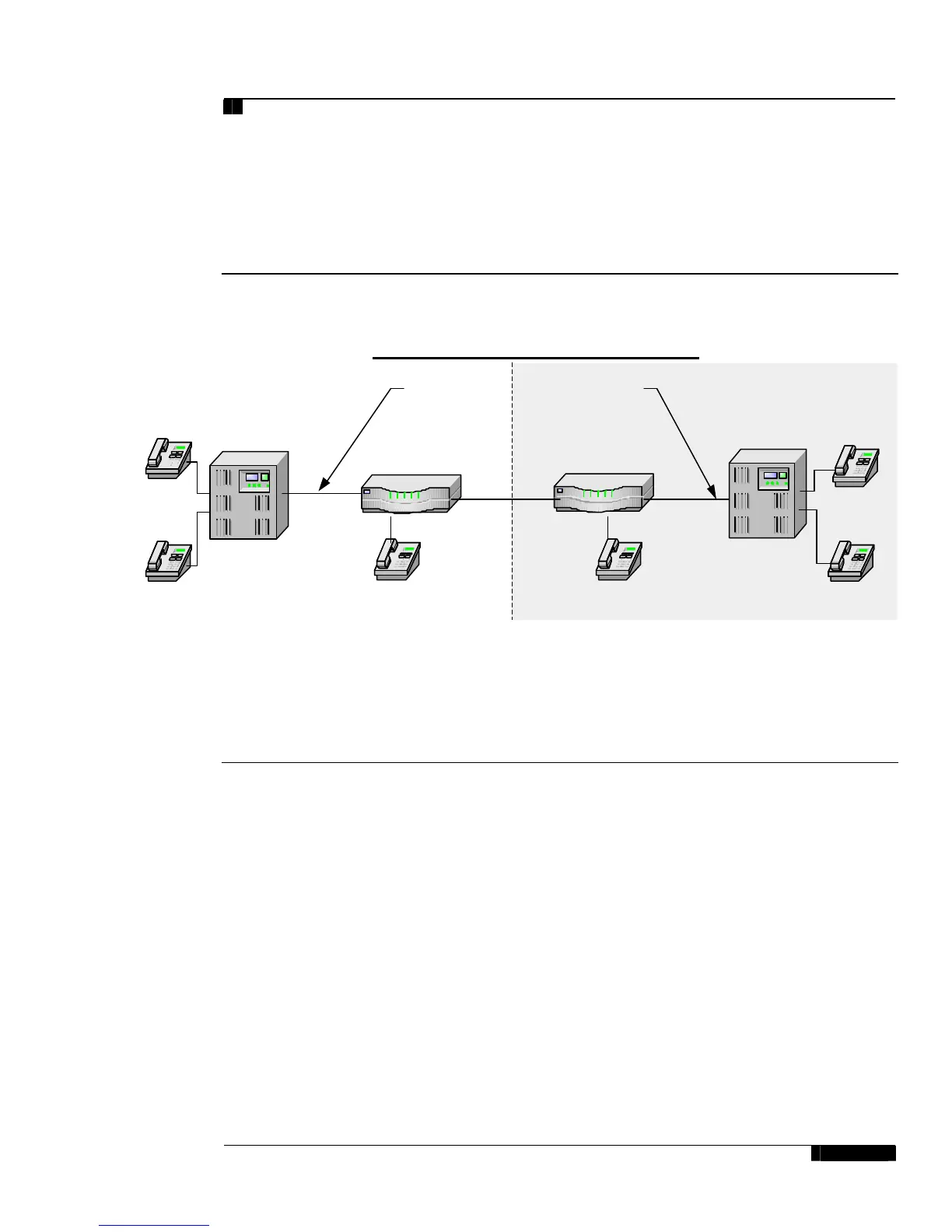
Figure 1: Test Configuration
Figure 1 represents the configuration used for testing: an Alcatel 4400PBX connected to a Cisco 3640
series router through an E1-QSIG connection.
Set Up Notes
The Cisco 3640 router with ISDN switch type setting of basic-qsig supports both protocol sides by using
the isdn protocol-emulate network/user command.
• The Alcatel 4400 supports both “USER” (slave) and “NETWORK” (master) protocol sides.
• The following options are of particular interest:
• Trunk interface type must be set to BRA2.
• Network/User options are set in the Board/Digital Access Options menu. Network mode must be
set to Yes for Master/Network or No for Slave/User.
• Access Type must be set to T0.
• Q931 signal variant is used to determine Protocol type. This option was set to ISDN ABC-F.
The Alcatel 4400 PBX configuration screen for the BRI trunk interface is reached using both Alcatel Board
and Board\Digital Access menus, setting the BRI physical layer parameters.
Phone C
x3000
Basic Call Setup End-to-End Configuration
VoIP
PBX2: Alcatel 4400,
slot 4
Phone B
x3002
Phone D
x3003
Phone A
x3001
PBX #1 PBX #2
Phone E
x N/A
Phone F
x N/A
PBX1: Alcatel 4400,
slot3
ISDN Type:
E1-QSIG
ISDN Type:
E1-QSIG
7206VXR_A 7206VXR_B






 To Next Page