Cisco IP Phone Key Expansion Module
• Cisco IP Phone Key Expansion Module Setup Overview, on page 1
• Key Expansion Module Power Information, on page 3
• Connect a Key Expansion Module to a Cisco IP Phone, on page 4
• Connect Two or Three Key Expansion Modules to a Cisco IP Phone, on page 8
• Auto Detection of Key Expansion Modules, on page 11
• Configure the Key Expansion Module from the Phone Web Page, on page 12
• Access Key Expansion Module Setup, on page 12
• Allocate a Key Expansion Module Type, on page 13
• Allocate a Key Expansion Module Type with the Phone Menu, on page 13
• Reset the Single LCD Screen Key Expansion Module, on page 13
• Troubleshoot the Key Expansion Module, on page 14
• Key Expansion Module Does Not Go Through the Normal Start Up Process, on page 14
Cisco IP Phone Key Expansion Module Setup Overview
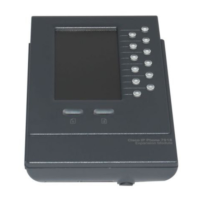
Figure 1: Key Expansion Module with Single LCD Screen
Cisco IP Phone Key Expansion Module
1

 Need help?
 General

 To Next Page