7
–
Router: 192.168.42.1
Step 7 Click OK.
Connect to the Appliance
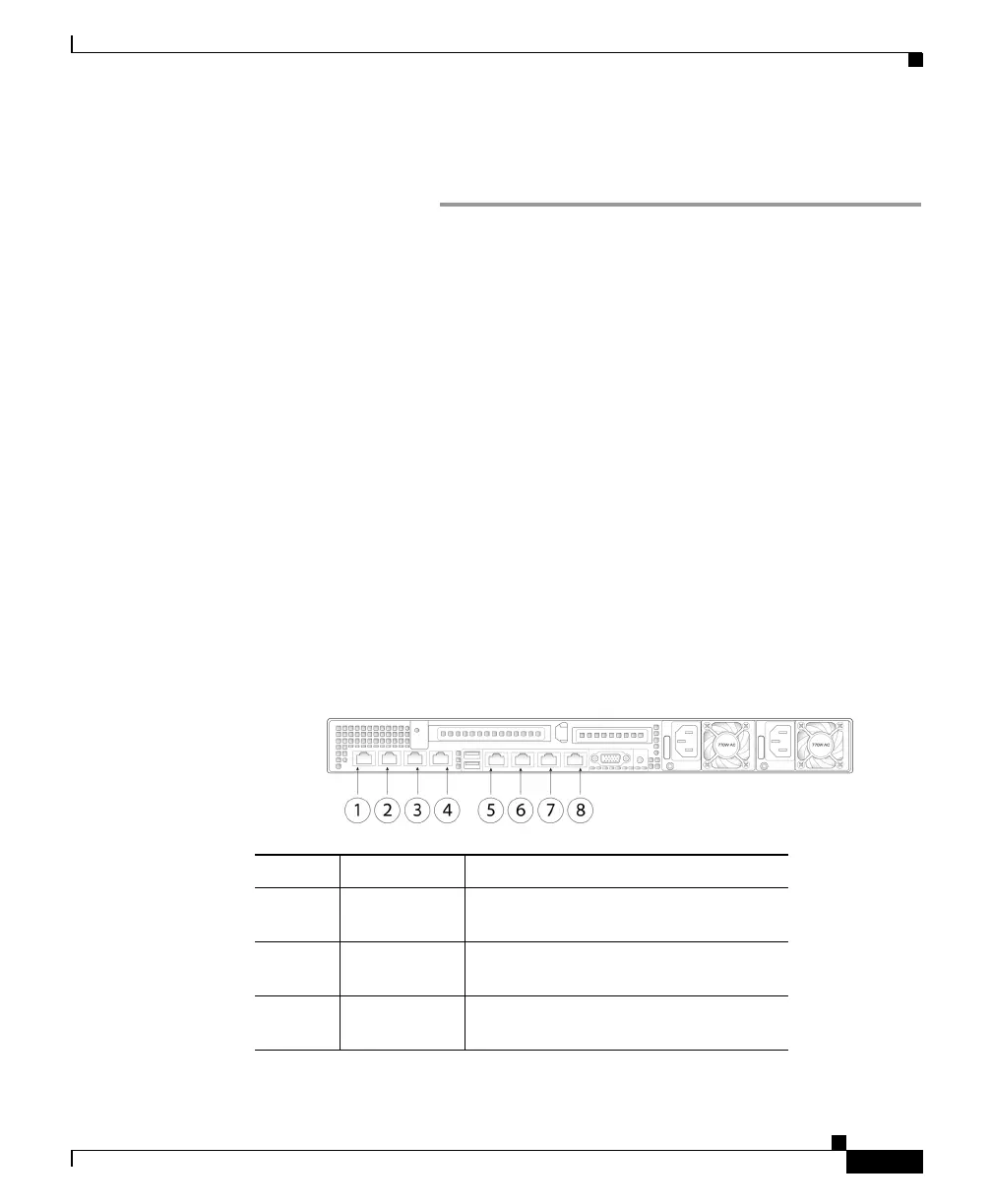
The Cisco C390 appliances have five gigabit network ports and a Management
port, as shown in the figure on the following page . At least one static IP address
is required to send and receive email.
You can receive and deliver email from a s
ingle connection to either network
port if your network topology dictates it. Two IP addresses can be configured on
one network interface.
Or, you can connect the Data 1 network port to your public network and
conn
ect the Data 2 network port to your private network.
To access and manage the appliance by Ethernet, use the Management network
port. Th
e IPv4 address that has been assigned to the Management port by the
factory is 192.168.42.42.
For serial access to the appliance's console port,
use the RJ-45 to DB-9 Rollover
cable provided in the accessory kit to connect the computer to the console port
on the appliance.
Item Port Description
1 Data 1 A Gigabit Ethernet customer data
interface.
2 Data 2 A Gigabit Ethernet customer data
in
terface.
3 Data 3 A Gigabit Ethernet customer data
in
terface.


 To Next Page