2-13
Catalyst 3750-X and 3560-X Switch Hardware Installation Guide
OL-19593-01
Chapter 2 Switch Installation
StackPower Cabling Configurations
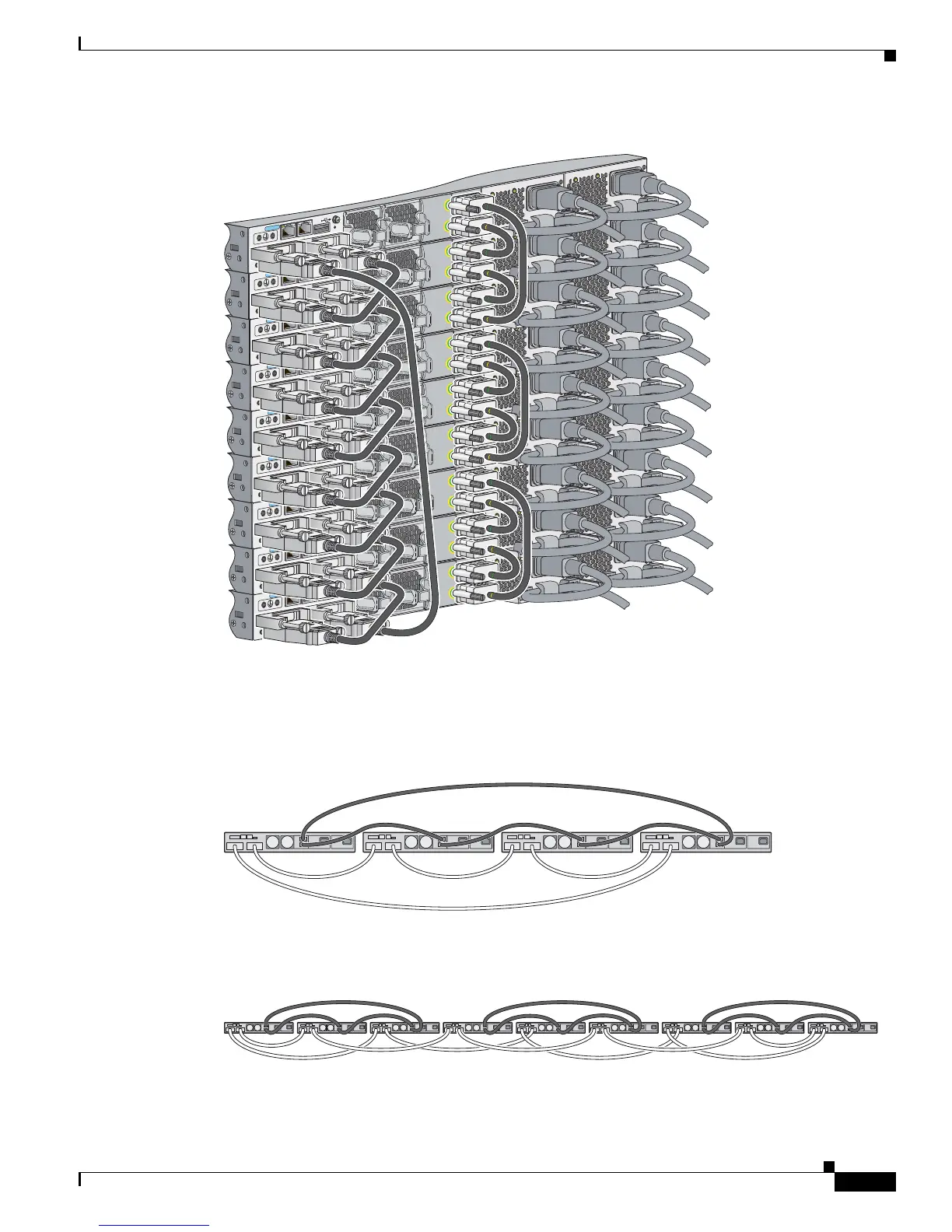
Figure 2-12 Power Stacking Catalyst 3750-X Switches within a Switch Data Stack
Figure 2-13 and Figure 2-14 are examples of recommended configurations when the switches are
mounted side-by-side. Use the 1.5-meter StackPower cables to connect the switches. These
configurations provide redundant connections.
Figure 2-13 PowerStack: Four Switches in a Side-by-Side Mounting Configuration
Figure 2-14 Power Stacking within a Nine-Switch Data Stack in a Side-by-Side Mounting
Configuration
CONSOLE
RESET
AUX
STACK 1
STACK 2
S-PWR
XPS
S-PWR
AC OK
PS OK
AC OK
PS OK
CONSOLE
RESET
AUX
STACK 1
STACK 2
S-PWR
XPS
S-PWR
AC OK
PS OK
AC OK
PS OK
CONSOLE
RESET
AUX
STACK 1
STACK 2
S-PWR
XPS
S-PWR
AC OK
PS OK
AC OK
PS OK
CONSOLE
RESET
AUX
STACK 1
STACK 2
S-PWR
XPS
S-PWR
AC OK
PS OK
AC OK
PS OK
CONSOLE
RESET
AUX
STACK 1
STACK 2
S-PWR
XPS
S-PWR
AC OK
PS OK
AC OK
PS OK
CONSOLE
RESET
AUX
STACK 1
STACK 2
S-PWR
XPS
S-PWR
AC OK
PS OK
AC OK
PS OK
CONSOLE
RESET
AUX
STACK 1
STACK 2
S-PWR
XPS
S-PWR
AC OK
PS OK
AC OK
PS OK
CONSOLE
RESET
AUX
STACK 1
STACK 2
S-PWR
XPS
S-PWR
AC OK
PS OK
AC OK
PS OK
CONSOLE
RESET
AUX
STACK 1
STACK 2
S-PWR
XPS
S-PWR
AC OK
C3KX-PWR-715WAC
PS OK
AC OK
C3KX-PWR-715WAC
PS OK
253398








 To Next Page