Step 4 Pull down the retention handles until the lower lip of the DIN rail mounting bracket seats in the lower mounting bracket
clip.
Step 5 Release the retention handles.
Using the Pole Mounting Bracket
You can choose one of the following pole mounting brackets in the following table, according to the size of
the pole that you are going to mount your access point on.
Table 2: Pole Mounting Brackets
Applicable Pole DiameterCisco Part NumberMounting Bracket
2–3.2 inchesAIR-ACCPMK3700=Pole Mounting Bracket
2–16 inchesAIR-ACCPMK3700-2=Pole Mounting Bracket 2
Using the Mounting Bracket AIR-ACCPMK3700=
To mount the access point on a pole using the mounting bracket AIR-ACCPMK3700=:
Procedure
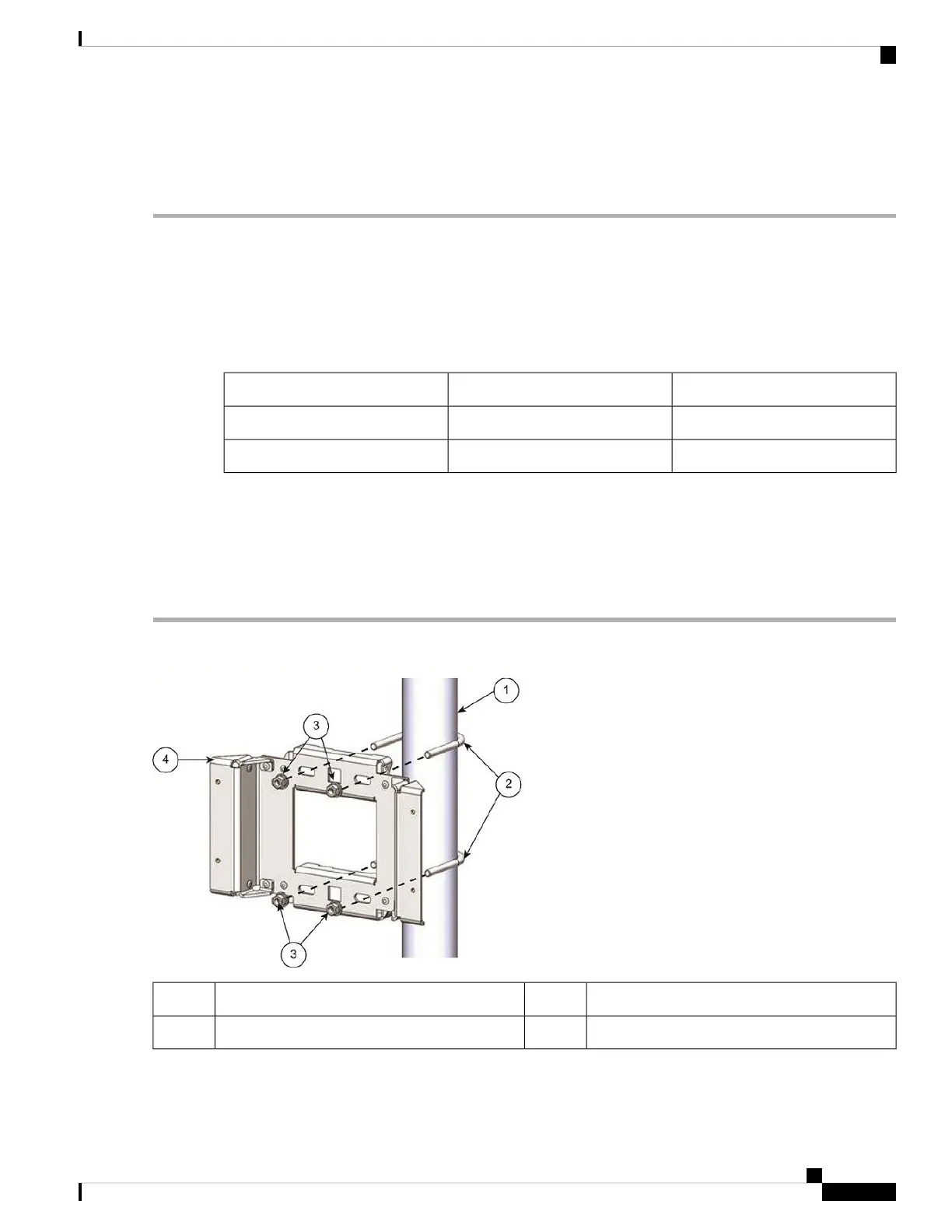
Step 1 Use the supplied U bolts, washers, and nuts to attach the mounting bracket to the pole.
M8 x 1.25 nuts and washers32"– 3.2" (5–8 cm) diameter pole1
Pole mounting bracket4M8 x 1.25 U-bolt2
Step 2 Use the included bolts, washers, and nuts to attach the access point to the mounting plate.
Installation Overview
9
Installation Overview
Using the Pole Mounting Bracket





 To Next Page