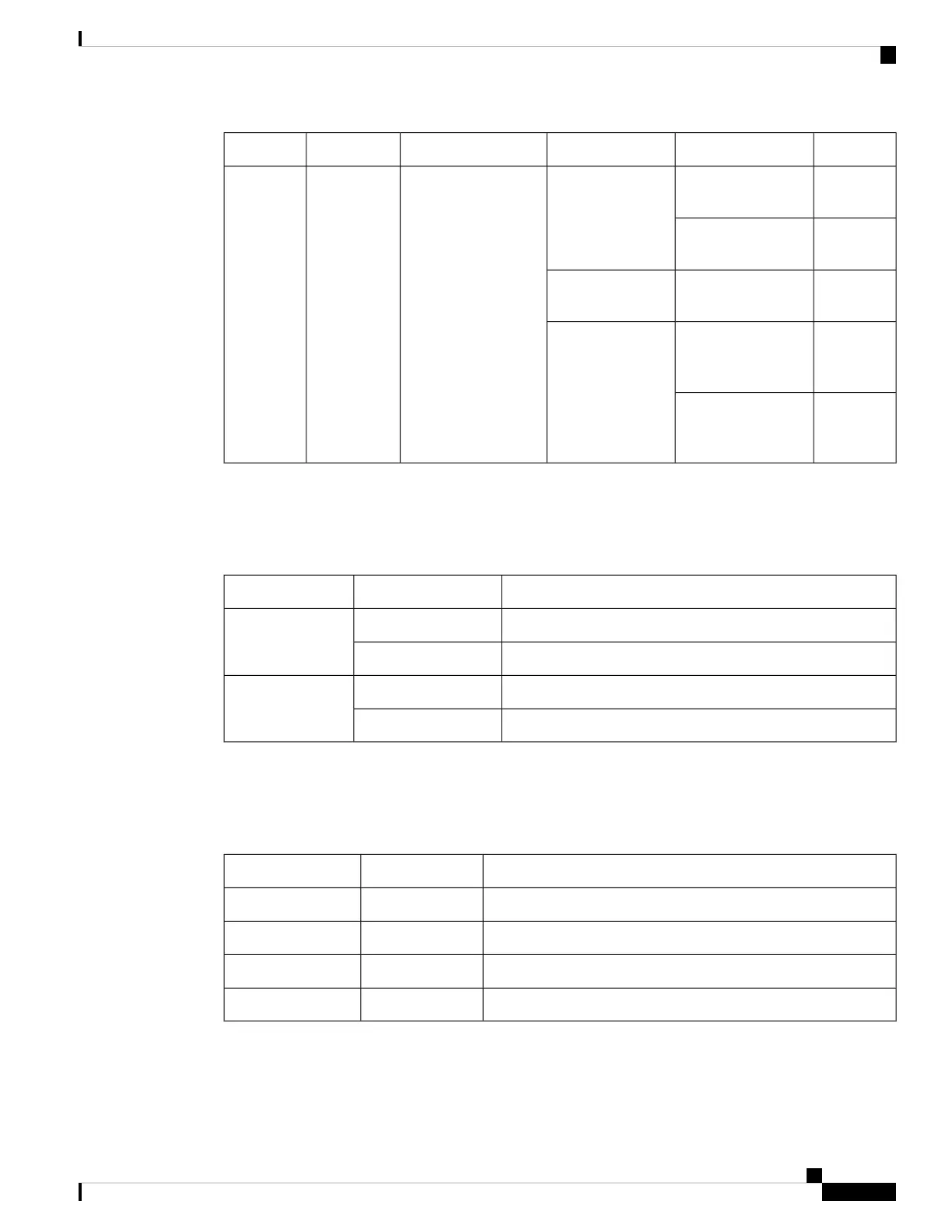
DescriptionStateColorFunctionLocationLED
Normal
operation
Solid onGreenIndicate system
power/health at bootup
and run time
Front and rearSystem
Status LED
System
powered off
Off
System
fault
OnAmber
Power shut
down by
software
Solid onRed
Secure boot
validation
has failed
Blinking
Network Management Port LEDs
The states of the LEDs of the management port on the front panel are listed below.
DescriptionLED StateLED Position
No linkOffLeft
Physical linkSolid green
No activity
OffRight
ActivityBlinking green
L1 and L2 Port LEDs
The states of the LEDs on the L1 and L2 front-panel ports are listed below.
DescriptionLED StateLED Position
No linkOffLeft
Physical linkSolid greenLeft
No activityOffRight
ActivityBlinking greenRight
Cisco UCS 6400 Series Fabric Interconnect Hardware Installation Guide
11
Product Overview
Network Management Port LEDs


 To Next Page
 Loading...