35
Calibrating compass indication Calibrating compass indication
2
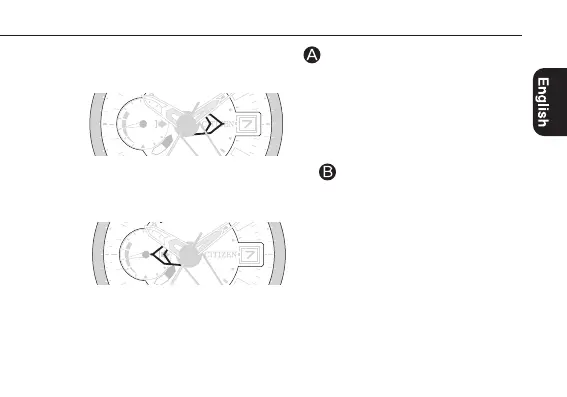
Press and hold the upper left button for 3 seconds or more.
The compass hand points the 3 o’clock position.
3
Press and release the lower left button .
The first surrounding environment data is stored and the compass hand turns 180º to
point the 9 o’clock position.
Continued on the next page
-
400
600
2
3
4
5
x 1000 m
W
E
(-30)
(-80)
30
70
20
60
10
1
0
(
-
9
0
)
(
+
5
0
)
S
(
-
5
0
)
m
W
E
(
-
3
0
)
8
(
-
8
0
)
3
-
400
600
2
3
4
5
9
x 1000 m
W
E
(-30)
(-80)
80
30
70
20
60
10
1
0
(
-
9
0
)
(
+
5
0
)
S
(
-
5
0
)
m
W
E
(
-
3
0
)
8
0
(
-
8
0
)
3



 To Next Page