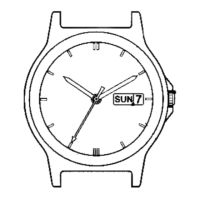
Component identification
• Actual appearance may differ from the illustration.
• The crown has two positions when pulling it out.
Setting the time
1.
Pull the crown out to position
2
when the second hand points
0 second.
The second hand stops.
2.
Rotate the crown to set the time.
• Check whether the time set is AM or PM with the 24-hour hand.
• When you set the hands to around midnight, the date will change to the
following day. To return to the previous day, set the hands to any position
before 23:30.
Go to step 3 after the date has completely stopped.
3.
Push the crown in to position
0
in accordance with a reliable
time source.
E310
Abbreviated instruction
• This watch is solar-powered. Expose the dial to light and use it sufficiently charged.
• To see details of charging time, specifications and operations, refer to the instruction manual:
E310 instruction manual
English
Setting the date
• The calendar of this watch does not have to be adjusted manually until February
28, 2100 including leap years.
• Be sure to perform all steps from the beginning to step 5-2 when setting the date
even though what you need to adjust is only the year, month, or date. Pushing
the crown in to position 0 in the middle of the procedure makes all operations
previously performed ineffective.
• Do not adjust the date indication while the watch shows 11:00 PM ‒ 0:30 AM.
Otherwise, the date indication may change incorrectly thereafter.
• You cannot go back to previous steps. Try again from the first step.
• You cannot go to the next step while the figures in the date window are moving.
1.
Check the calendar setting.
1-1. Push the crown in to position
0
.
The date is indicated in the date window.
1-2. Pull the crown out to position
1
.
The month (M) is indicated in the date window.
Ex.: when it is February
15
カレンダー窓の表示例
日を 見 て いるとき
月を 見 て い るとき
・
年を 見 て い るとき
・
この時計のカレンダーは、月末の日付修正を自動で行う「パーペチュアルカレン
ダー」です。一度合わせると、2100年2月28日まで修正の必要はありません。
パーペチュアルカレンダー
日付の切り替えには、若干時間がかかります
• Pressing button
A
indicates the number of years since the last
leap year (L.Y.) in the date window.
Ex.: When 1 year passed since the leap year
15
カレンダー窓の表示例
日を 見 て い るとき
月を 見 て い るとき
・
年を 見 て い るとき
・
この時計のカレンダーは、月末の日付修正を自動で行う「パーペチュアルカレン
ダー」です。一度合わせると、2100年2月28日まで修正の必要はありません。
パーペチュアルカレンダー
日付の切り替えには、若干時間がかかります
• When the calendar setting is correct, push the crown in to position
0
to
finish the procedure.
Proceed to step 2 to adjust the calendar setting.
2.
Enter the calendar setting mode.
2-1. Press and hold button
B
until the figures in the date
window start moving.
The calendar setting mode starts.
• The figures in the date window move slightly up and down or
right and left, or change to tell you that you can do the next
operation.
• It takes time to change the indication in the date windows.
3.
Set the year.
3-1. Press and release the lower right button
A
repeatedly to
set the year.
Ex.: When setting the year to 1 year since the previous leap year
15
カレンダー窓の表示例
日を 見 て い るとき
月を 見 て い るとき
・
年を 見 て い るとき
・
この時計のカレンダーは、月末の日付修正を自動で行う「パーペチュアルカレン
ダー」です。一度合わせると、2100年2月28日まで修正の必要はありません。
パーペチュアルカレンダー
日付の切り替えには、若干時間がかかります
3-2. Press and release the upper right button
B
.
The month becomes adjustable.
Crown's position
0 1 2
Hour
hand
Second
hand
Minute
hand
Crown
24-hour
hand
Button
A
Button
B
Date window


 To Next Page
 Need help?

 General