36
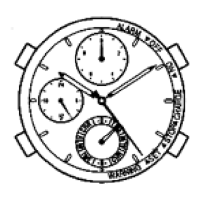
Correcting the reference position
6
Rotate the crown counterclockwise to set the date
indication to “1”.
• If you rotate the crown quickly a few times, the hand will
move continuously. To stop the rapid movement, rotate the
crown counterclockwise.
• Rotate the crown while pressing and holding the button to
adjust the position finely.








 To Next Page