
 Need help?
Do you have a question about the claber Aquauno PRATICO and is the answer not in the manual?
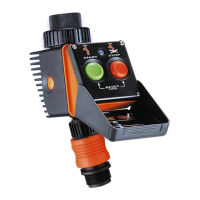
Green button to start, red button to stop. Both can be pressed to reset or cancel settings.
Do not use with pressure < 7.3 PSI or > 145 PSI, and water temp > 104°F (40°C).
Keep out of reach of children/animals; avoid temperatures below 37.4°F (3°C).
Use Alkaline only, replace seasonally, check LED for status, setting not retained when removed.
Do not install in valve box/under soil; use tap water only; observe pressure/temperature limits.
Details on the green Start button, red Stop button, and combined reset/cancel function.
Steps to set start and stop times for the watering cycle using buttons.
Instructions for setting watering cycle duration using LED flashes and button presses.
 General
| Power supply | 1 x 9V alkaline battery |
|---|---|
| Type | Water timer |
| Watering programs | 1 |
| Watering frequency | 1 to 7 days |
| Connection | 3/4" tap connector |
| Number of watering cycles | 1 cycle per day |
| Compatibility | Compatible with most |



 To Next Page
