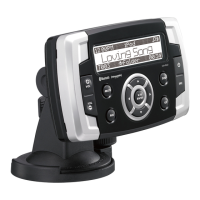
The Clarion M608 is a watertight marine Bluetooth® USB/MP3/WMA receiver designed for use in marine environments. It offers a range of features for audio playback and connectivity, along with robust construction to withstand the elements.
Function Description:
The M608 serves as a central audio hub for boats, providing multiple source options including AM/FM radio, SiriusXM Satellite Radio (tuner sold separately), USB playback of MP3/WMA files, iPod/iPhone/iPad connectivity, Bluetooth audio streaming, and auxiliary input. It supports multi-zone audio control, allowing for different audio configurations across various areas of the boat. The unit is designed to be watertight, making it suitable for marine applications where exposure to water is common.
Important Technical Specifications:
FM Tuner:
- Frequency Range:
- North America: 87.9 - 107.9 MHz
- Europe: 87.5 - 108 MHz
- Asia & Australia: 87.5 - 108 MHz
- Usable Sensitivity: 8 dBμV
- Alternate Channel Selectivity: 60 dB
- Stereo Separation (1 kHz): 30 dB
- Frequency Response (±3 dB): 30 Hz - 15 kHz
AM Tuner:
- Frequency Range:
- North America: 530 kHz - 1710 kHz
- Europe: 531 kHz - 1602 kHz
- Asia & Australia: 531 kHz - 1629 kHz
- Usable Sensitivity: 28 dBμV
WB Tuner:
- Frequency Range: 162.400 - 162.550 MHz
- Step Length: 25 kHz
MP3/WMA Mode:
- MP3 Sampling Rate: 8 kHz - 48 kHz
- MP3 Bit Rate: 8 kbps - 320 kbps / VBR
- WMA Bit Rate: 8 kbps - 320 kbps
- Logical Format: ISO9660 level 1,2, Joliet file system
USB:
- Specification: USB 1.1
- USB Power Supply: DC 5V, 2.1 Amp
- Playable Audio Format: MP3 (MPEG 1/2/Audio Layer-3), WMA (Ver 7/8/9.1/9.2)
- File/Folder Recognition: Up to 999 files per folder, up to 99 folders, up to 3000 files total.
Bluetooth:
- Specification: Bluetooth Ver. 2.1+EDR
- Profile: A2DP (Advanced Audio Distribution Profile), AVRCP (AV Remote Control Profile)
- Send/Receive Sensitivity: Class 2
- Operating Frequency: 2402 MHz to 2480 MHz
- RF Output Power: <20dBm
Audio Amplifier:
- Maximum Power Output: 180 W (45 W x 4 channels)
- Bass Control Action (100 Hz): +6 dB, -6 dB
- Treble Control Action (10 kHz): +6 dB, -6 dB
- Line Output Level (USB 1 kHz): 4 V
- Output Power: 18W RMS x 4 channels at 4Ω and 1% THD+N (CTA-2006 Compliant)
- Signal to Noise Ratio: 94 dBA (reference: 1W into 4Ω)
- Audio Input Sensitivity: High: 320mV (at 1V output), Mid: 650mV (at 1V output), Low: 1.3V (at 1V output)
- (Input Impedance: 10 kΩ or greater)
- Aux-in Level: ≤2 V
General:
- Power Supply Voltage: 14.4 VDC (10.8 - 15.6 V allowable), negative ground
- Pre-Amp Output Voltage: 4.0 V (USB play mode: 1 kHz, 0 dB, 10 kΩ load)
- Fuse: 15 A
- Main Unit Dimensions: 196 mm (W) x 88.8 mm (H) x 235.6 mm (D)
- Remote Control Dimensions: 43 mm (W) x 11 mm (H) x 113 mm (D)
Usage Features:
- Power On/Off: The unit can be turned on/off by pressing the SRC button. It's recommended to start the engine before operating the unit to avoid draining the boat's battery.
- Volume Adjustment: Volume can be adjusted using the [VOLUME] knob on the front panel or the [▲]/[▼] buttons on the remote control. The unit supports multi-zone and tower volume control, allowing for independent adjustment in different areas of the boat.
- Source Selection: Pressing the SRC button cycles through available audio sources (Tuner, SiriusXM, USB, iPod, Bluetooth, AUX).
- Display Change: The [ENT] button on the front panel or [DISP] button on the remote control can switch the display information between clock, station information, and track information.
- System Setup: Access system settings by pressing and holding the [MENU] button. This allows configuration of clock, audio mode (Standard, Multi Zone, Tower), DX/LO for radio, AUX input sensitivity, parental control for SiriusXM, and Bluetooth device management.
- Tuner Operations: Includes manual tuning, seek tuning, auto memory store, and preset scanning for AM/FM/WB radio.
- SiriusXM Satellite Radio Operations: Requires a separate SiriusXM Connect Tuner. Features include category browsing, preset scanning, instant replay, and parental control with password protection.
- USB Operations: Supports playback of MP3/WMA files from USB devices. Features include pausing, track selection, fast-forward/reverse, folder selection, search function, repeat play (track, folder, all), and random play.
- iPod, iPhone & iPad Operations: Connects via USB for audio playback. Features include menu alphabetical search, play/pause, repeat play, and random play.
- Bluetooth Operations: Enables wireless audio streaming (A2DP) from Bluetooth-enabled devices. Supports pairing with up to three devices. Includes play/pause, track selection, and ID3 tag display for music information.
- AUX Operations: Provides rear RCA AUX terminals for connecting external audio devices. AUX input sensitivity (LOW, MID, HIGH) can be adjusted.
- Remote Control (RCX001 - Sold Separately): Offers comprehensive control over all unit functions, including source selection, volume, tuning, track control, and display options.
- Optional Wired Remote Control Unit: Provides additional control options for specific functions.
- Zone Control: Allows for configuration of audio output to different zones, enabling independent volume control or linked operation depending on the chosen audio mode (Standard, Multi Zone, or Tower).
Maintenance Features:
- Cleaning the Cabinet: Use a soft, dry cloth for light dust. For stubborn dirt, use a soft cloth dampened with diluted neutral detergent, followed by a dry cloth. Avoid using harsh chemicals like benzene, thinner, or boat cleaners, as they can damage the finish. Also, prevent rubber or plastic products from prolonged contact with the cabinet to avoid staining.
- Battery Replacement (for RCX001 Remote Control): The remote control uses a CR2025 (3V) button-shaped lithium battery. Instructions are provided for safe battery insertion and replacement.
- Software Updates: Users are encouraged to periodically check the Clarion website (www.clarion.com) for software updates and improvements under the "Get Support" tab.
- Troubleshooting Guide: The manual includes a comprehensive troubleshooting section for common issues related to power, audio output, USB functionality, Bluetooth connectivity, and SiriusXM error messages, along with suggested solutions.
- Reset Function: In case of errors not covered by the troubleshooting guide, pressing the [RESET] button can resolve issues, though it will clear stored radio presets and other memory data.

 Need help?
 General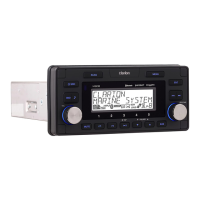

 To Next Page