Need help?
Do you have a question about the Clarion DRB3475 and is the answer not in the manual?
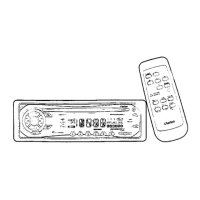
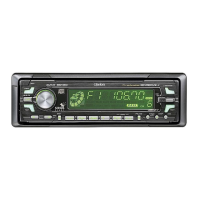
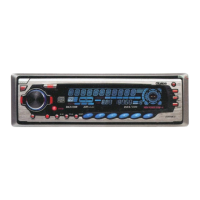
This document describes the Clarion DRB3475/DRB2475 AM/FM CD Player, an in-car audio system designed for optimal sound quality and user convenience.
The Clarion DRB3475/DRB2475 is an AM/FM CD player that provides a comprehensive in-car audio experience. It features a MAGI-TUNE FM Reception System, which enhances FM performance through signal-actuated stereo control and multipath noise reduction circuits, ensuring clear and stable radio reception. The unit supports multiple AM/FM bands (1 AM, 3 FM) and offers 18 FM/6 AM touchbutton memory presets for quick access to favorite stations. An Automatic Station Store (AS) function allows for automatic tuning and storage of up to six strong stations.
For CD playback, the unit incorporates an 8-Times Oversampling Digital Filter and Dual 1-bit D/A Converters, contributing to high-fidelity audio reproduction. It supports standard 5-inch (12 cm) CDs and 3-inch (8 cm) single CDs without requiring an adapter. CD playback features include track-up/down, fast-forward/fast-backward, top play (resets to the first track), scan play (plays the first 10 seconds of each track), repeat play (continuously plays the current track), and random playback (selects and plays tracks in no particular order).
The unit also includes an Intro Music Scan function, which plays the first 10 seconds of each track on a disc, useful for quickly finding desired songs. A Digital Quartz Clock is integrated for time display. Electronic Audio Controls allow for precise adjustment of bass, treble, balance, and fader settings. The DRB3475 model specifically offers 2-Channel RCA Line Level Output, providing flexibility for connecting external amplifiers. The system delivers a maximum power output of 140 W (35 W x 4), ensuring robust sound.
The DRB3475/DRB2475 is designed for intuitive operation, primarily through its Alpha-Touch Controller (a-selector) and a set of dedicated buttons.
Detachable Control Panel (DCP): A key security feature is the detachable control panel. To remove it, the power must be off, then the DCP release button is pressed, and the left side of the panel is pulled. For storage, the DCP should be placed in its dedicated case. Attaching the DCP involves inserting the right side first into the source unit opening, then pressing the left side to snap it into place. Users are cautioned against forcing the panel or inserting the left side first, as this can damage the locking mechanism. The DCP is sensitive to shocks, so care should be taken when handling it.
Power On/Off: The unit is powered on by pressing the POWER button. It remembers the last operation mode and automatically switches to that display. To turn off the power, the POWER button is pressed and held for 1 second or longer.
Volume Adjustment: Volume is adjusted using the a-selector, by selecting up or down. Holding the a-selector in either direction for 1 second or longer allows for continuous volume increase or decrease.
Audio Mode Adjustment: The A-M (Audio Mode) button cycles through adjustment modes for Bass/Treble, Balance/Fader, and Mode display. Adjustments are made using the a-selector. The display automatically reverts to the main mode display after 7 seconds if no adjustments are made.
Tone Adjustment: In the "BA:Tr" (bass/treb) adjustment mode, bass is adjusted by selecting right or left on the a-selector, and treble by selecting up or down.
Balance and Fader Adjustment: In the "BL:Fd" (balance/fader) adjustment mode, balance (left/right sound level) is adjusted by selecting right or left on the a-selector, and fader (front/rear sound level) by selecting up or down.
Loudness: The loudness effect emphasizes bass and treble for a natural sound at low volumes. It is activated or deactivated by pressing and holding the LOUD button for 2 seconds or longer. "LD" illuminates in the display when active.
Display Switching: The display can be toggled between the main display and the clock display by pressing and holding the BAND button, then pressing the DISP button. The preferred display style (Clock or Main) becomes the default.
Clock Setting: To set the clock, press and hold the BAND button, then press the DISP button to enter clock mode. Press and hold both buttons again for at least 2 seconds to enter clock setting mode. Minutes are adjusted by selecting right on the a-selector, and hours by selecting left. The clock displays time in a 12-hour format. Pressing the BAND button sets the clock into memory and resets the seconds counter to zero.
CD Loading and Playback: CDs are inserted label side up into the insertion slot and begin playing automatically. The unit is designed for discs bearing the "COMPACT DISC DIGITAL AUDIO" mark. The DISP button toggles between track time and track number display during playback. Playback can be paused and resumed using the Play/Pause button. Tracks are selected using the a-selector (right for next track, left for current/previous track). Fast-forward and fast-backward functions are also controlled by holding the a-selector right or left.
Radio Tuning: The FUNC button selects the radio mode. The BAND button cycles through FM1, FM2, FM3, and AM bands. Seek tuning is performed by selecting right or left on the a-selector. Manual tuning is enabled by pressing and holding the BAND button for 2 seconds or longer until "MANU" appears. Quick tuning steps through the band quickly by holding the a-selector, while step tuning moves one step at a time by momentarily selecting the a-selector. Preset tuning recalls stored stations by pressing the corresponding Direct Buttons. Stations are stored by tuning to a desired station and then pressing and holding a Direct Button for 2 seconds or longer.
Auto Store: The AS button, when pressed and held for 2 seconds or longer, automatically tunes and stores up to 6 strong stations to the preset buttons.
Reception Area Change: The unit's frequency reception range can be switched between U.S. standard and outside U.S. settings. This is done by pressing the BAND button and then selecting left on the a-selector to change to outside U.S. settings, or right to revert to U.S. settings.
Moisture Condensation: If the car's interior is cold and the heater is used, moisture may form on the disc or optical parts, potentially affecting playback. If dew forms on the disc, it should be wiped with a soft cloth. If moisture forms on the optical parts, the player should not be used for about an hour, allowing the condensation to dissipate naturally.
Disc Handling: Compact discs should always be handled by their edges to avoid fingerprints and scratches. Fingermarks and dust should be wiped off with a soft, dry cloth in a straight motion from the center to the outside. Labels should not be stuck on discs, nor should the surface be marked with a pencil or pen. Solvents, commercially available cleaners, anti-static sprays, or thinners should not be used for cleaning discs. Damaged, misshaped, or cracked discs should not be used. New discs with rough edges may cause skipping; a ball-point pen can be used to remove this roughness. Discs should not be exposed to direct sunlight or heat sources.
Troubleshooting: The manual includes a troubleshooting section with common symptoms, causes, and measures. For example, if the unit does not power on, the fuse may be blown or wiring incomplete. If a CD does not enter or comes out, another CD might already be inside, or it may be inserted upside down. Sound skipping or poor quality can be due to a dirty, scratched, or warped disc, or moisture condensation on internal lenses.
Self-Diagnostic Functions: The unit is equipped with self-diagnostic functions that display error codes (e.g., Er 2, Er 3) if a fault occurs. "Er 2" indicates a mechanism fault, suggesting checking the source unit. "Er 3" indicates a pickup focus issue, possibly due to a scratched disc or other factors, suggesting checking the compact disc.
General Cautions: Users are advised to reduce the volume level before turning off the ignition or power to prevent hearing damage or speaker damage, as the unit remembers its last volume setting. Operating the unit for long periods without the car's engine running can drain the battery. The unit uses a precision mechanism and should never be opened, disassembled, or lubricated by unauthorized personnel. Any changes or modifications to the product not approved by the manufacturer will void the warranty and violate FCC approval.
 General
| Number of Channels | 4 |
|---|---|
| CD-R Playback | Yes |
| CD-RW Playback | Yes |
| CD Player | Yes |
| Aux Input | Yes |
| Bluetooth | No |
| DIN Size | 1 DIN |
| AM/FM Presets | 18 FM, 6 AM |

 To Next Page