EasyManua.ls Logo

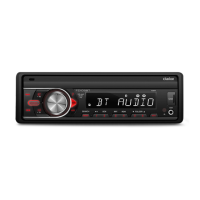
Clarion FZ105BT - User Manual

Clarion FZ105BT
17 pages
Print Icon
To Next Page IconTo Next Page
Loading...
USB/MP3/WMA DIGITAL MEDIA
RECEVIER
Owner’s manual & Installation manual

Other manuals for Clarion FZ105BT

Questions and Answers

  • A
    Allison BernardAug 19, 2025
    What to do if Clarion Car Receiver Bluetooth sound is bad?
    • K
      Kristy MckinneyAug 20, 2025
      If the audio quality is poor after connecting a Bluetooth-enabled device to your Clarion Car Receiver, the Bluetooth reception might be weak. Try moving the device closer to the audio system or remove any obstacles between the device and the system.
  • J
    John ThomasAug 21, 2025
    Why won't my device pair with my Clarion Car Receiver via Bluetooth?
    • B
      Brian BarrettAug 21, 2025
      If you cannot pair your Bluetooth enabled device with the Clarion Car Receiver, it could be due to a couple of reasons. The device might not support the profiles required for the system, so try connecting with another device. Also, the Bluetooth function of your device might not be enabled, so try connecting with another device. Refer to the user manual of the device for how to enable the function.
  • W
    William KeyAug 23, 2025
    How to fix Clarion FZ105BT Car Stereo System that will not power on?
    • S
      Scott CarneyAug 25, 2025
      If your Clarion Car Stereo System unit won't power on, it could be due to a blown fuse. Check both the unit fuse and the car battery fuse, replacing either with a new fuse of the correct rating.
  • M
    Mary WatkinsAug 26, 2025
    Why is there no audio output from my Clarion FZ105BT Car Stereo System?
    • M
      Molly NunezAug 26, 2025
      If you're experiencing no or low audio output from your Clarion Car Stereo System, several factors could be at play. First, check the audio output connections to ensure they are properly wired. Next, verify that the volume isn't set too low and increase it as needed. Also, inspect the speakers for any damage and replace them if necessary. Make sure the volume balance isn't heavily biased to one side by adjusting the channel balance to the center position. Finally, check if the speaker wiring is touching any metal parts of the car and, if so, insulate the connections.
  • S
    Stephen TerryAug 27, 2025
    What to do if my Clarion FZ105BT Car Stereo System has poor sound quality?
    • C
      crystal06Aug 27, 2025
      Poor sound quality or distortion in your Clarion Car Stereo System can stem from a few potential issues. The speakers' power rating might not match the unit, in which case you should replace the speakers. Incorrect wiring or a shorted speaker can also cause this problem, so it's recommended to check the wiring and correct any issues.
  • L
    Lisa MorrisAug 29, 2025
    Why can't I pair my device with my Clarion Car Stereo System via Bluetooth?
    • E
      Edward FarmerAug 29, 2025
      If you cannot pair your Bluetooth enabled device with the Clarion Car Stereo System, it could be due to a couple of reasons. The device may not support the profiles required for the system, so try using another device to connect. Alternatively, the Bluetooth function of the device may not be enabled; refer to the user manual of the device for instructions on how to enable it.
  • E
    elliottisaacAug 31, 2025
    What to do if there is no audio output from my Clarion Car Receiver?
    • R
      Rachel RayAug 31, 2025
      If you're experiencing no or low audio output from your Clarion Car Receiver, first, check the wiring to ensure proper audio output connection and correct if necessary. Then, make sure the volume isn't set too low and increase it if needed. Damaged speakers can also cause this issue, so consider replacing them. Additionally, check the channel balance and adjust it to the center position if it's heavily biased. Finally, ensure that the speaker wiring is not in contact with any metal parts of the car; if it is, insulate all speaker wiring connections.
  • M
    Marie BanksSep 2, 2025
    Why my Clarion Car Receiver won't turn on?
    • C
      Chelsea SantanaSep 3, 2025
      If your Clarion Car Receiver unit won't power on, the unit fuse might be blown. Replace it with a new fuse of the correct rating. Alternatively, the car battery fuse may be blown, so replace that with a new fuse of the correct rating as well.
  • J
    Jason YorkSep 4, 2025
    How to fix poor sound quality on Clarion Car Receiver?
    • J
      Jessica WheelerSep 5, 2025
      Poor sound quality or distortion in your Clarion Car Receiver can stem from a few issues. First, the speaker power rating might not match the unit, in which case, replace the speakers. Second, there could be wrong connections; check the wiring and correct it. Lastly, the speaker might be shorted, so check the wiring and correct it if needed.
  • J
    joseph07Sep 6, 2025
    Why does my Clarion Car Stereo System reset when the engine is off?
    • A
      Alicia GarzaSep 6, 2025
      If your Clarion Car Stereo System resets itself when the engine is off, it's likely due to an incorrect connection between the ACC and the battery. Check the wiring and correct it to resolve this issue.

Summary

Controls

Operational Panel

Overview of the unit's operational panel and its buttons.

Name of Buttons and Their Functions

Detailed explanation of each button's function on the operational panel.

Operations

Basic Operation

Fundamental operations including power, volume, and source selection.

Radio Operation

USB Mode Operation

iPod;iPhone Mode Operation

Bluetooth Operation

Bluetooth Device Pairing and Call Management

Pairing devices and handling calls (making, answering, redialing, transferring).

Troubleshooting

General Troubleshooting

Solutions for common issues like no power, no audio, or unit resets.

USB Troubleshooting

Resolving problems with USB device insertion, recognition, and playback.

Bluetooth Troubleshooting

Addressing issues with Bluetooth pairing, connection, and audio quality.

Installation and Wire Connection

Installation Pre-checks and Cautions

Safety precautions, general handling, and specific installation warnings.

Source Unit Installation

Steps for mounting the main unit into the vehicle dashboard.

Wiring and Connections

Clarion FZ105BT Specifications

General IconGeneral
Power Output50W x 4
Display TypeLCD
BluetoothYes
USB PortYes
Aux InputYes
Radio TunerFM/AM
Hands-Free CallingYes
TypeSingle DIN
Remote ControlYes
Supported Audio FormatsMP3, WMA

Related product manuals