14
English
1
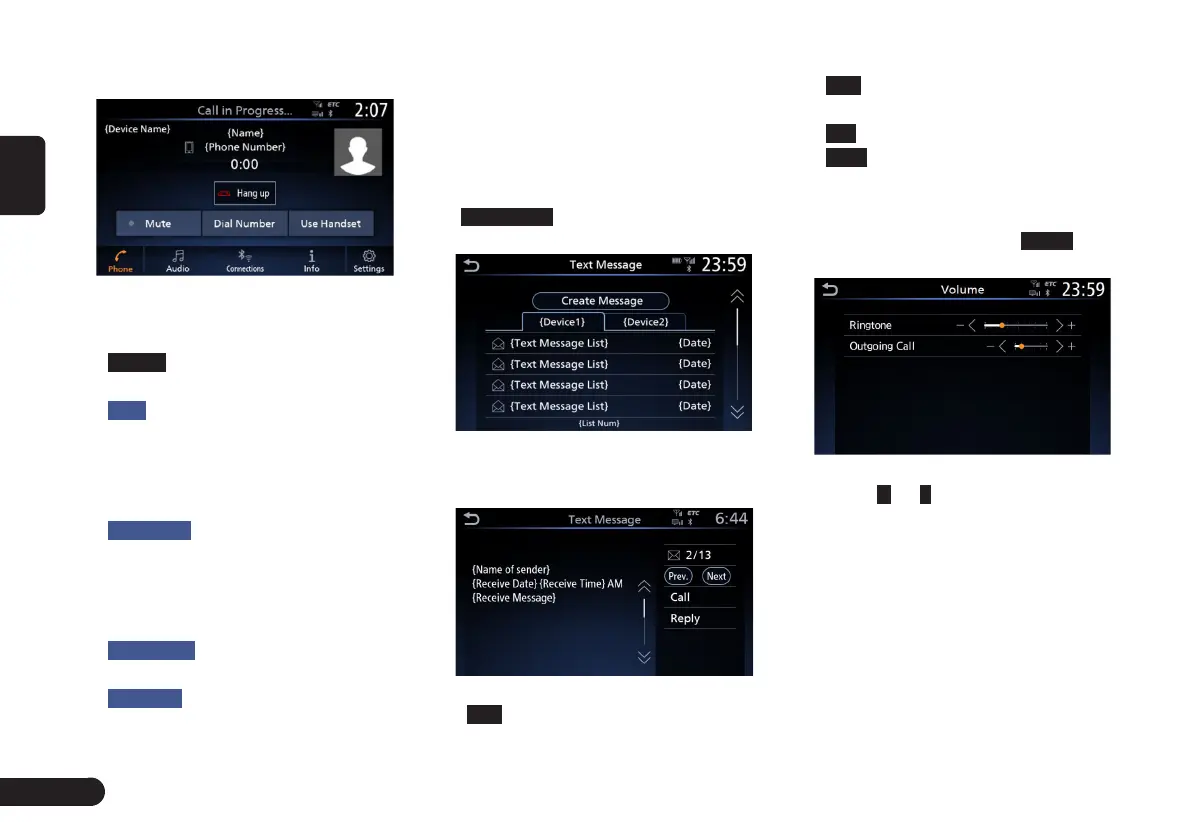
The following screen is displayed
during a telephone call.
(Fig 3-3-11)
For 2 phones connected, the
Device Name is displayed.
G
Hang up
: Touch to hang up the
phone to hang up the call.
G
Mute
: You may touch if you do not
want other party to hear the call
under special circumstances.
Touch again to make the call
output from the vehicle speakers.
G
Dial Number
: Open the number pad
if you need to enter PIN or code
for some special calls, or if you
want to make another outgoing
call.
G
Use Handset
: Touch to use your
phone to answer the call.
G
Switch Call
: When you make
another outgoing call or there is
another incoming during calling,
touch to switch between the two
calls.
■
Reading and Text Message
1
In the phone menu screen
((Fig 3-3-1) page 11), touch
Text Message
to enter the Text
Message screen.
(Fig 3-3-12)
2
Touch to select a text message to
display the detailed text message.
(Fig 3-3-13)
G
Prev.
: switch to the previous text
message.
G
Next
: switch to the next text
message.
G
Call
: make outgoing call.
G
Reply
: reply the text message.
■
Volume setting
1
In the phone menu screen ((Fig
3-3-1) page 11), touch
Volume
to
enter the volume setting screen.
(Fig 3-3-14)
2
Touch
+
or
-
to adjust the ringtone
or outgoing call volume.



 To Next Page