Need help?
Do you have a question about the Clarke Air Series and is the answer not in the manual?
Provides a welcome message and advice on reading the manual for safe operation.
Details the product guarantee period, conditions for validity, and return policy.
Details the color coding for power cable wires and plug safety guidelines.
Instructions for assembling the fan, including attaching axles and tubes.
Guidance on using the speed regulator to select fan speed settings.
Covers general maintenance, motor bearing information, and the start of cleaning advice.
Step-by-step guide for cleaning fan blades and motor assembly.
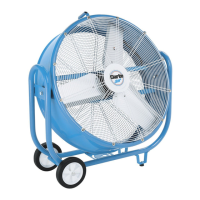
Lists and illustrates all parts of the drum fan for identification.
This document describes the operation and maintenance of Clarke 24 & 30 Inch Drum Fans, specifically models CAM24 and CAM30. These fans are designed for indoor use, providing powerful airflow for various applications.
The Clarke Drum Fans are high-performance air circulation devices. Their primary function is to move a large volume of air efficiently, making them suitable for cooling, ventilation, or drying purposes in indoor environments. The fans are equipped with a motor that drives a blade assembly, enclosed within a protective drum and guards. They feature a speed regulator, allowing users to adjust the airflow according to their needs. The robust design, including a wheel and axle assembly and supporting feet, ensures stability and portability.
Assembly: Before initial use, the fan requires a simple assembly process. This involves inserting each axle section into the mounting brackets. It's important to twist each axle section so that the screws align and rest securely in the cut-outs of the mounting brackets. Following this, the smaller diameter tube needs to be inserted into the larger one and fastened in place using the provided split pin. For full security and stability, the split pin should be bent back.
Electrical Connections: The fans operate on a 230V AC 50Hz mains supply. Before connecting the fan, users must ensure that their electricity supply voltage matches the rating plate. The product may come with a non-rewireable plug. If the fuse needs replacement, the fuse cover must be refitted. If the fuse cover is lost or damaged, the plug should not be used until a suitable replacement is obtained. If the plug itself needs to be changed due to incompatibility with the socket or damage, it should be cut off, and a replacement fitted according to the wiring instructions provided in the manual. The old plug must be disposed of safely to prevent electrical hazards. The wiring code specifies Blue for Neutral, Brown for Live, and Yellow and Green for Earth. These wires must be connected to the corresponding terminals in the plug (N or Black for Blue, L or Red for Brown, and E or ⏚ or Green for Yellow and Green). The plug must be BS1363/A approved and fitted with a 5 Amp fuse. It is crucial to ensure that the outer sheath of the cable is firmly held by the clamp within the plug. For enhanced safety, it is strongly recommended to connect the fan to the mains supply via a Residual Current Device (RCD). If there is any doubt regarding electrical connections, a qualified electrician should be consulted, and no attempts at self-repair should be made.
Adjusting the Speed: The fan offers multiple speed settings to control the airflow. To adjust the fan speed, simply turn the switch located on the speed regulator. This allows users to select the desired level of air movement, optimizing performance for different tasks or environmental conditions.
Safety Precautions: Users must always read the manual before operating the fan. The fans are strictly for indoor use. It is important to avoid using them in dusty environments or areas containing chemical fumes. They are not designed to be used as extractor fans or in high humidity/water vapour areas such as bathrooms. The fan should never be connected to a duct system. To ensure proper airflow and prevent overheating, the fan must not be covered with clothing or any material that could restrict air movement. For safety, never touch the blades with hands or any loose objects while the fan is operating. Always unplug the fan before moving it or performing any maintenance, and avoid touching the fan with wet hands. Disassembly, repair, or rebuilding of the fan should only be performed by qualified electricians. The fan should always be unplugged when not in use. When unplugging, always hold the plug itself, not the cable, to prevent damage. Never use the fan if the cable or plug are damaged. Keep the fan away from fires. This fan should not be used with any solid-state speed control device, as this could increase the risk of fire or electric shock.
General Maintenance: Regular maintenance ensures the longevity and safe operation of the fan. Any repairs should be carried out by a suitably qualified person. A key feature of these fans is that the motor bearings are permanently sealed for life, meaning they do not require any additional lubrication throughout the product's lifespan.
Cleaning: If the fan is used for extended periods in dusty environments, the blades and motor assembly may accumulate dust and debris, necessitating cleaning. To clean the fan, first, disconnect the power cable from the mains supply. Then, carefully unscrew the front guard and lift it away. Once the guard is removed, wipe the fan blades with a dry cloth to remove any dust. The motor assembly can be cleaned using a soft paintbrush, a vacuum cleaner, or a jet of compressed air to dislodge dust. It is crucial never to use polish or any corrosive liquid for cleaning, as these can damage the surface finish of the fan components. After cleaning, securely replace the front guard before using the fan again.
Environmental Recycling Policy: As part of the purchase of this product, customers are obligated to handle Waste Electrical and Electronic Equipment (WEEE) in accordance with WEEE regulations. This means the product should not be disposed of with general household waste. Instead, it must be disposed of at a recognized disposal facility that adheres to the laws governing WEEE, ensuring proper treatment, recycling, recovery, and environmentally sound disposal.
 General
| Model | Air Series |
|---|---|
| Type | Pedestal Fan |
| Frequency | 50Hz |
| Speed Settings | 3 |
| Oscillation | Yes |
| Height Adjustment | Yes |

 To Next Page