6
Parts & Service: 020 8988 7400 / E-mail: Parts@clarkeinternational.com or Service@clarkeinternational.com
OPERATION
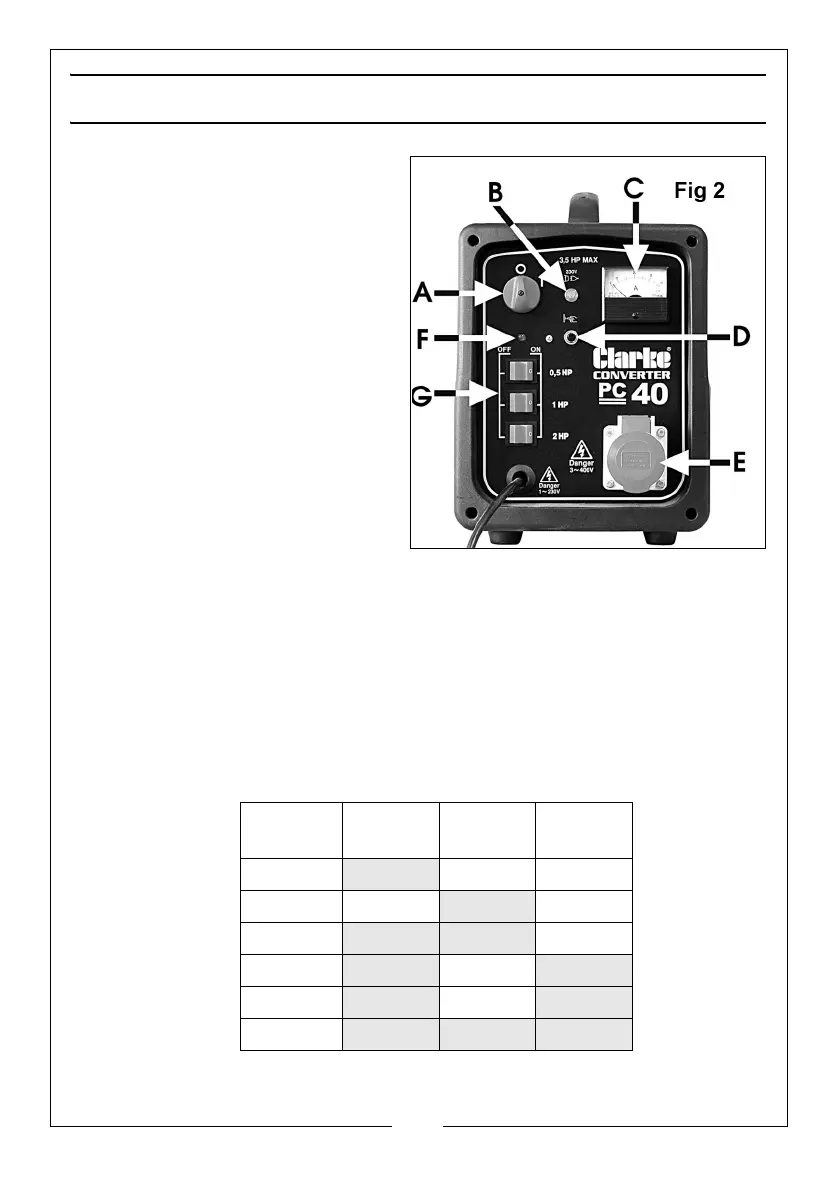
1. Before inserting the output plug,
switch all three switches (G) to
OFF. Then switch the converter
ON, using the ON/OFF switch (A)
on the front panel.
In this condition the lamp (B) and
the rocker switch A will illuminate.
Check to ensure the ammeter (C) is
set to zero. If necessary, adjust
using the small adjustment screw
located at the bottom centre of
the ammeter so that it reads zero.
2. Switch OFF the converter and
connect the plug from the
motor to the output socket (E).
3. Using the three switches (G), set
the output so that it is equivalent
to the HP of the motor to be driven. This value should be found on the
motor data plate.
The chart below shows the switch settings for the required outputs.
4. With the switches set, and the output plugged in, switch ON the converter
and proceed to start the motor/machine. Note that indicator lamp (F) will
illuminate when the switches (G) are set.
DO NOT ADJUST THE SWITCHES (G) WHEN THE PHASE CONVERTER IS SWITCHED
ON.
Model PC60 Motor HP SW 1
0.5HP
SW 2
0.5HP
SW3
1|HP
1
ON OFF OFF
1.5 OFF
ON OFF
2.5
ON ON OFF
4
ON OFF ON
4.5
OFF ON ON
5.5
ON ON ON


 To Next Page