6
English
Care and maintenance
Theproduct can be wiped clean using asoft, dampcloth. Neveruse abrasive cleaning
agents or solvents.
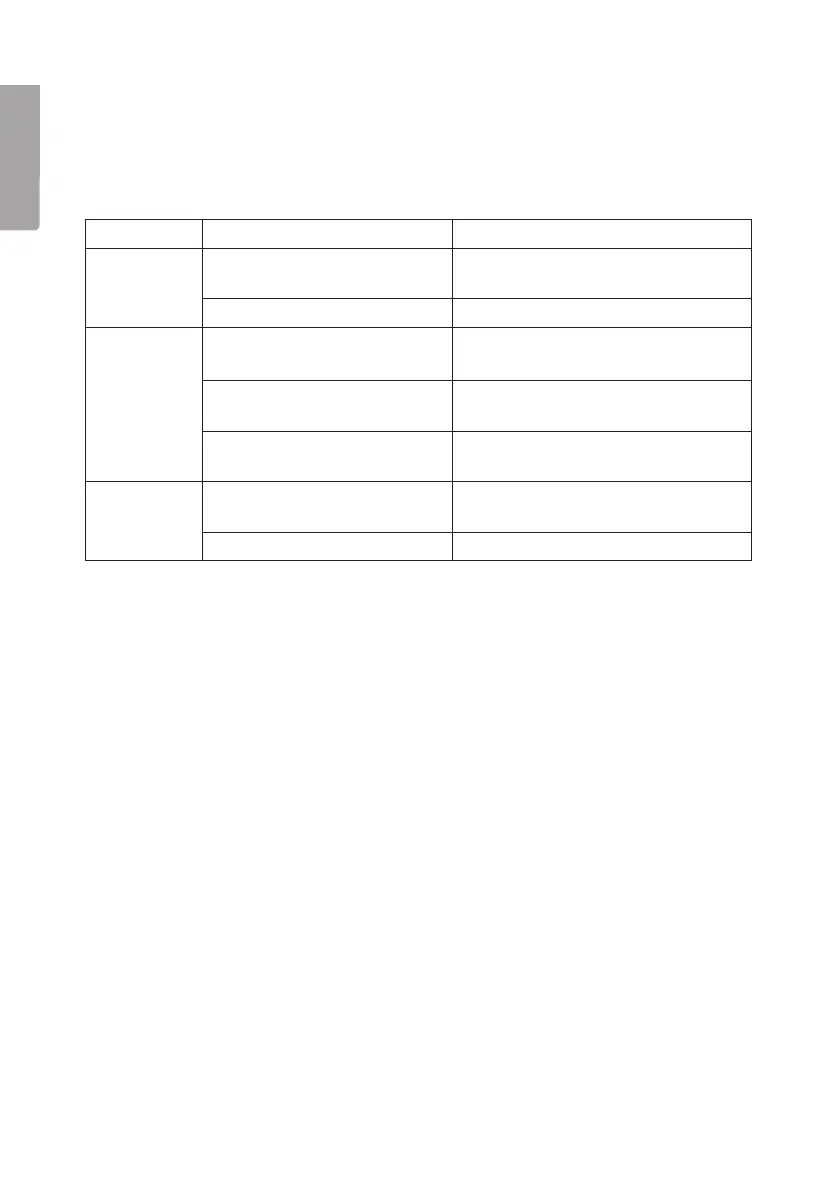
Troubleshootingguide
Problem Cause Solution
Nothing is
shown on
thedisplay.
Thebatteries are inserted
incorrectly.
Remove thebatteries and insert
them correctly.
Thebatteries areflat. Change thebatteries.
Nosound. Thevolume switch is in
theOFF position.
Turn thevolume switch clockwise.
Theaudio source is not
switchedon.
Start playback on theexternal audio
source.
Theaudio cable is not con-
nected properly.
Check that theaudio cable is fully
pluggedin.
Background
noise.
Theradio station is not tuned
in correctly.
Adjust thefrequency.
Poor signal reception. Change thebatteries.
Disposal
This product should be disposed of in accordance with local regulations.
Ifyou are unsure how to proceed, contact your local council.


 To Next Page