EasyManua.ls Logo

Classic IRC85553-OD - User Manual

Classic IRC85553-OD
2 pages
Print Icon
To Next Page IconTo Next Page
Loading...
IRC OD MM1
Functions (English) Funktionen (deutsch)
IRC85553-OD
Mute Ton aus
Bedienungsanleitung
Power Ein/aus
User Instructions
MODE 1 Portable Portable
MODE 2 CD CD
MODE 3 iPOD iPOD
No Function keine Funktion
Pause Pause
No Function keine Funktion
Skip Backward Skip rückwärts
Stop Stopp
Skip Forward Skip vorwärts
Scroll Down abwärts Scrollen
Play Wiedergabe
Scroll Up aufwärts Scrollen
+
Volume + Lautstärke +
INPUT
No Function keine Funktion
P Folder Up Ordner aufwärts
-
Volume - Lautstärke -
Setup Setup
P Folder Down Ordner abwärts
MENU Menu Menü
GUIDE
No Function keine Funktion
Cursor Up Cursor aufwärts
Cursor < Cursor <
OK Enter Enter
Cursor > Cursor >
Cursor Down Cursor abwärts
RETURN
No Function keine Funktion
EXIT
No Function keine Funktion
DISC MENU Shuffle Shuffle
INFO MARKER
No Function keine Funktion
REPEAT Repeat Wiederholung
TITLE MENU
No Function keine Funktion
F1 USB USB
F2 TUNER TUNER
F3
No Function keine Funktion
F4
No Function keine Funktion
SMART LINK
No Function keine Funktion
LIST SEARCH
No Function keine Funktion
SOUND TEXT
No Function keine Funktion
DISPLAY ZOOM
Display Display
1
No Function keine Funktion
2
No Function keine Funktion
3
No Function keine Funktion
4
No Function keine Funktion
5
No Function keine Funktion
6
No Function keine Funktion
7
No Function keine Funktion
8
No Function keine Funktion
9
No Function keine Funktion
0
No Function keine Funktion
TOOLS OPTIONS
No Function keine Funktion
AUDIO SUBT
No Function keine Funktion
PLAY M REC M
No Function keine Funktion
F Shift Key Shift-Taste
F + Sleep Timer Abschalt-Timer
F + Tuning < Suchlauf <
F + Tuning > Suchlauf >
F + Preset < Preset <
F + Preset > Preset >
TIMER DELETE
Timer Timer
PROGRAM CLEAR
Memory Speicher
irc85553od_d_gb.xlsx 16.05.2019
Question and Answer IconNeed help?

Do you have a question about the Classic IRC85553-OD and is the answer not in the manual?

Overview

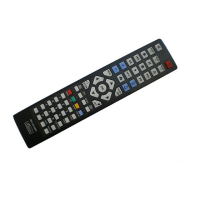
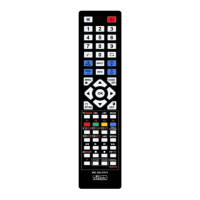
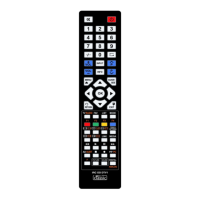
This document describes the IRC85553-OD remote control, a versatile device designed for controlling various electronic equipment. The remote features a comprehensive set of buttons and functions, making it suitable for a wide range of applications, from basic media playback to advanced system control.

Function Description

The IRC85553-OD remote control offers a broad spectrum of functions, categorized for ease of use.

Basic Control Functions:

  • Mute: Toggles audio mute.
  • Power: Turns the device on/off.
  • Portable: Activates portable mode.
  • CD: Selects CD input/mode.
  • IPOD: Selects iPod input/mode.
  • Pause: Pauses playback.
  • Skip Backward/Forward: Navigates through tracks or content.
  • Stop: Stops playback.
  • Scroll Down/Up: Scrolls through menus or lists.
  • Play: Starts playback.
  • Volume +/-: Adjusts audio volume.
  • Folder Up/Down: Navigates through folders.
  • Setup: Accesses device settings.
  • Menu: Opens the main menu.
  • Guide: Displays program guide.
  • Cursor Up/Down/Left/Right: Navigates through menus and options.
  • Enter (OK): Confirms selections.

Playback and Media Management:

  • Shuffle: Toggles shuffle playback mode.
  • Repeat: Toggles repeat playback mode.
  • USB: Selects USB input/mode.
  • Disc Menu: Accesses the disc menu.
  • Info Marker: Sets or displays information markers.
  • Title Menu: Accesses the title menu.

Tuner Functions:

  • F1, F2, F3, F4: Function buttons, often used for specific tuner presets or features. The manual indicates F3 and F4 have no specific function listed, implying they might be programmable or device-specific.

Advanced Features:

  • Smart Link: Likely a feature for intelligent device linking or control.
  • List Search: Enables searching within lists or directories.
  • Sound Text: Potentially for displaying sound-related information or text.
  • Display Zoom: Adjusts display zoom levels.
  • Tools Options: Accesses additional tools or options.
  • Audio Subt: Controls audio and subtitle settings.
  • Play Rec M: Manages playback and recording modes.

Special Keys and Combinations:

  • Shift Key (F +): Activates secondary functions of other buttons.
  • Sleep Timer (F +): Sets a timer for the device to power off.
  • Tuning +/- (F +): Adjusts tuner frequency.
  • Preset +/- (F +): Navigates through tuner presets.
  • Timer Delete: Deletes programmed timers.
  • Program Clear: Clears programmed settings or memory.

Key-Lock Feature:

The remote includes a "Key-Lock" function to prevent accidental button presses or unauthorized use.

  • To Lock Keys: Simultaneously press and hold the "Cursor Left" and "Cursor Right" keys for at least 7 seconds. Release both keys. Then, briefly press the specific key(s) you wish to lock. To save and exit, press the STANDBY key (Power button). If a key is accidentally locked, pressing it again will unlock it.
  • To Unlock All Keys: Simultaneously press and hold the "Cursor Up" and "Cursor Down" keys for approximately 7 seconds. This will unlock all previously locked keys. Note that individual keys cannot be unlocked; only a full unlock is possible.

Important Technical Specifications

While specific technical specifications like frequency, range, or power consumption are not detailed in the provided document, the remote's design suggests it operates on standard infrared (IR) technology, common for consumer electronics. The presence of "MODE 1," "MODE 2," and "MODE 3" buttons implies multi-device control capabilities, allowing the remote to be programmed for different types of equipment.

Usage Features

  • Multi-Mode Operation: The "MODE 1," "MODE 2," and "MODE 3" buttons indicate that the remote can control up to three different devices or operate in three distinct modes for a single complex system. This versatility is a key usage feature.
  • Intuitive Layout: The button layout is logically grouped, with navigation controls centrally located around the "OK" button, and playback controls (Skip, Stop, Play) positioned together. Volume and channel controls are also clearly separated.
  • Numeric Keypad: A standard 0-9 numeric keypad is provided for direct input, such as channel numbers or track selection.
  • Function Buttons (F1-F4): These buttons offer quick access to specific functions, which can vary depending on the device being controlled.
  • Shift Functionality: The "F" button acts as a shift key, expanding the functionality of other buttons, allowing for a compact design while offering a wide range of controls.
  • Key-Lock for Security/Convenience: The key-lock feature is a significant usage feature, preventing unintended actions, especially useful in households with children or for specific operational scenarios where certain functions need to be restricted.

Maintenance Features

The document does not explicitly detail maintenance features such as battery replacement instructions or cleaning guidelines. However, based on typical remote control design:

  • Battery Replacement: It is highly probable that the remote uses standard AAA or AA batteries, which are user-replaceable, usually via a compartment on the back.
  • Cleaning: Regular cleaning with a soft, dry cloth is generally recommended for remote controls to prevent dust and grime buildup, which can affect button responsiveness.
  • Durability: While not specified, the robust design of such remotes typically ensures a reasonable level of durability against minor drops and spills.

In summary, the IRC85553-OD is a feature-rich universal remote control designed for comprehensive control over various electronic devices, emphasizing user-friendliness through its logical layout, multi-mode capabilities, and advanced functions like key-lock.

Classic IRC85553-OD Specifications

General IconGeneral
BrandClassic
ModelIRC85553-OD
CategoryRemote Control
LanguageEnglish

Related product manuals