15
If the dust bag indicator light lights up solid green, but the
dust bag is not full, disconnect the power plug and turn dust
collector over. Open the cover of the dust tunnel by loosening
the screws* and free it from dirt and foreign objects.
Open the air outlet at the rear of the dust collector and clean
the ilter.
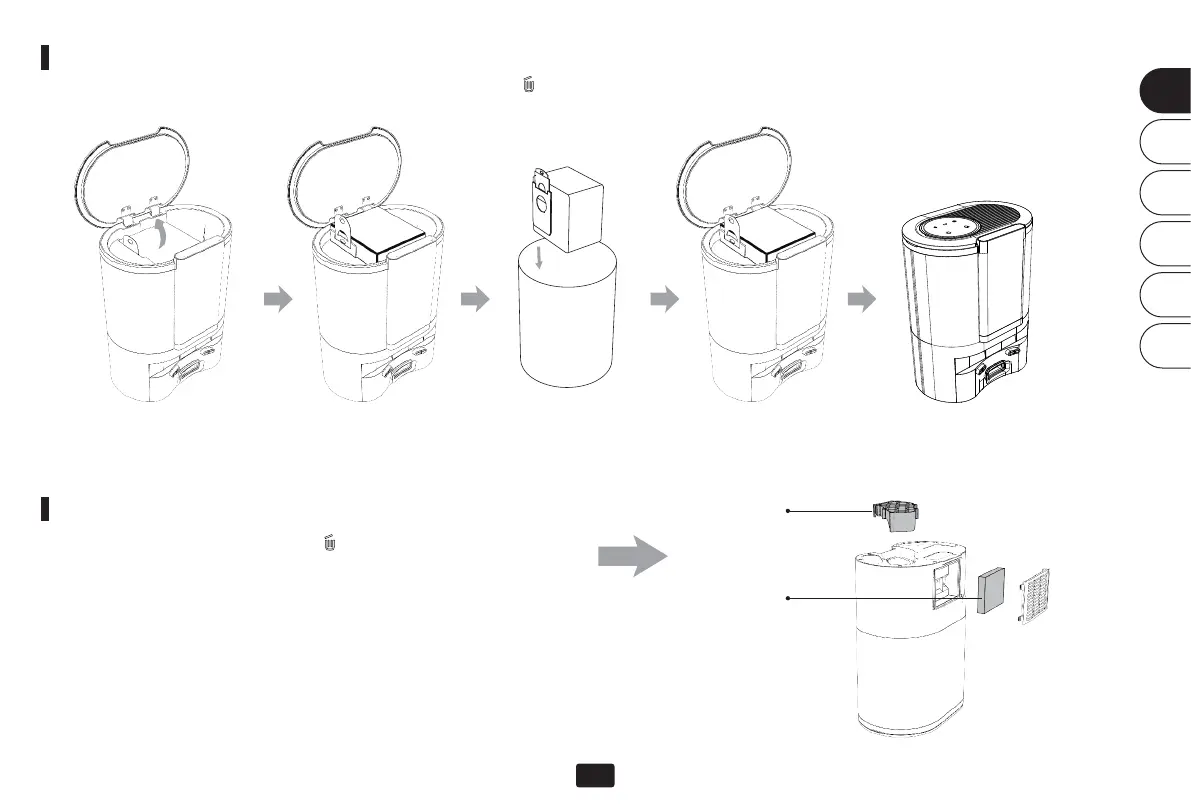
Once the dust bag is full, the indicator on the dust collector lights up green. Please replace the dust bag with a new one!
It is recommended to replace the dust bag every 6-8 weeks.
Note: The handle on the dust bag serves as a closure. When pulled up, it closes automatically.
Change dust bag
Cleaning the suction unit/tunnel
Open the lid. Pull out the dust bag by its
handle.
Dispose the old dust
bag.
Insert a new dust bag.
Dust tunnel cover
Filter
Close the lid.
*Do not disassemble the screws by force, but carefully with a
screwdriver. Aer each disassembly, reassemble everything
according to the original design.
EN
DE
FR
IT
ES
JP


 To Next Page