20
Indicator light Common error Solution
Flashing red
Fan error / overheating / the
dust collector’s lid is not closed
properly
1. Frequent suction can cause the overheating protection of the dust collector to
be triggered. Allow the suction motor to cool down and try again aer approx.
30 minutes.
2. Make sure the cover of the suction station is completely closed and seals well.
Also make sure that the robot vacuum cleaner is placed at the dust collector for
charging and that the charging contacts are in contact.
Flashing red
The dust bag is not installed / not
correctly in place
1. Check whether a dust bag is installed. If not, insert a new dust bag.
2. Check that the dust bag is installed correctly and that the sensors of the dust
bag holder detect the bag.
lash
simutane-
ously
Failed to pair / Not paired yet
1. Press and hold the both buttons and on the dust collector simultaneously
for 5 seconds: The dust collector enters into pairing mode, the three indicators
on the dust collector lash green.
2. Press and hold the button for 5 seconds on the robot: The robot enters
pairing mode, the indicators of the robot lash green.
3. Place the robot at the dust collector to charge, and wait till the voice prompt
indicates that the pairing is successful.
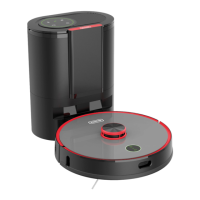
Dust collector
The dust collector indicates its current status via the status-LED's on top of the lid:


 To Next Page