EasyManua.ls Logo

Cleanmate S 1000 - Page 12

Cleanmate S 1000
24 pages
Print Icon
To Next Page IconTo Next Page
To Previous Page IconTo Previous Page
Loading...
12
Product Components
11
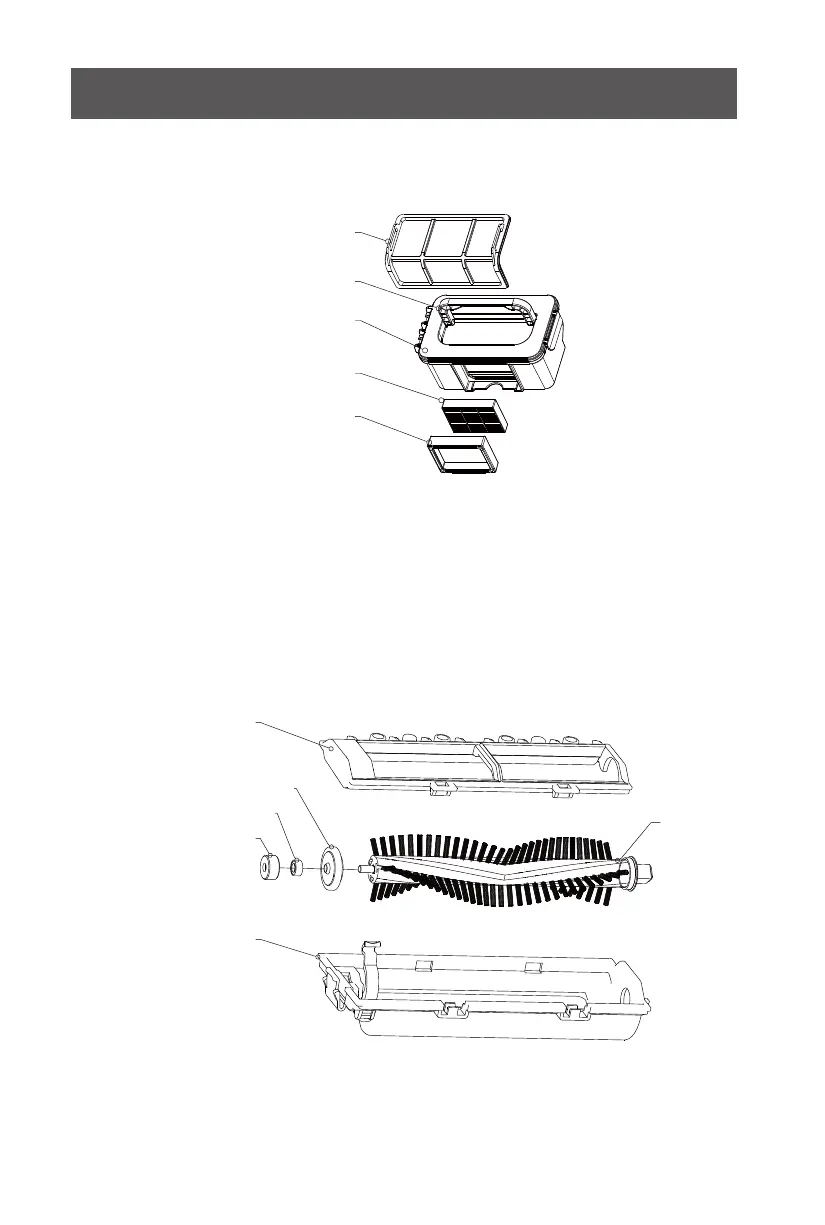
Dust Bin Kit
Roller Brush Kit
Primary filter
Handle
Dust bin
HEPA filter
HEPA filter shelf
Roller brush coverplate
Roller brush bushing
Ball bearing
Bearing gluesheath
Roller brush holder
Roller brush
Product Components
Docking Station
Charging Socket
1. Display Screen
2. Auto Charging
3. Direction Button
(Only Effective in Standby Mode)
4. Max Cleaning
(Only Effective in Standby Mode)
5. Clock Setting
6. Schedule Setting
7. ON/OF
8. Mode Cleaning
(Only Effective in Standby Mode)
Power Indicator
Top Cover
Charging Poles
Install two AAA type batteries into the remote control before use, Remove
the batteries if the remote control will be left unused for a long period.
Note:
8
Remote
PLAN
HOME
ON/OFF
MODE CLOCK MAX

Related product manuals