Getting Started Guide
To Make a Call
1. Press the
ON/OFF key to activate
the phone. You will hear a dial tone.
2. Dial the number as you would on a
standard phone. The number appears
on the LCD screen.
You can also predial the number
while in Standby mode and press the
ON/OFF key to connect the call.
To add a pause to the number you
are predialing, press and hold the
pound (#) key.
To Answer a Call
• Press any key (except “*” key,
MUTE, VOLUME UP or VOLUME
DOWN
).
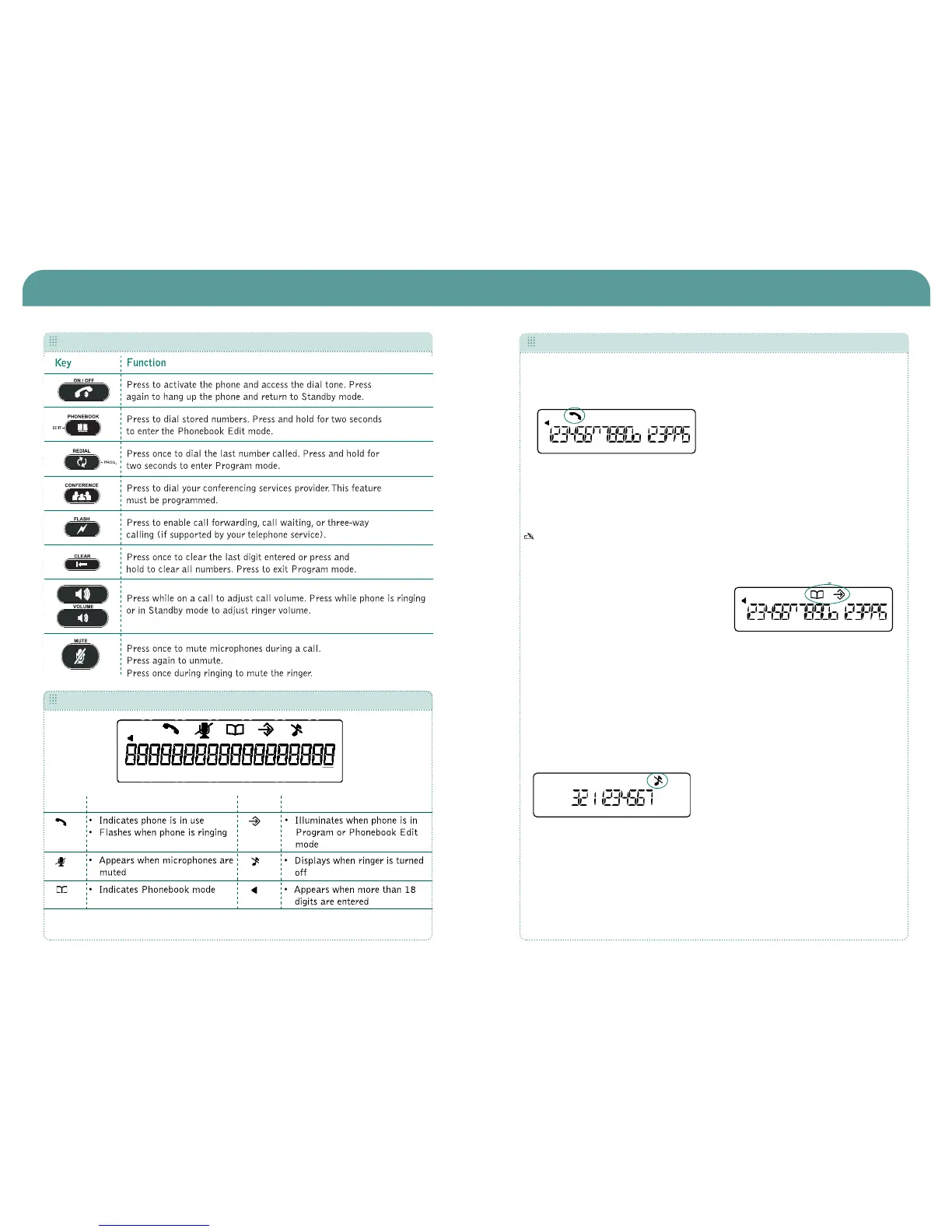
When there is an incoming call, the
phone rings (unless the ringer is
turned off) and the phone LEDs and
phone icon on the LCD screen flash.
To End a Call
• Press the ON/OFF key.
To Turn the Ringer On/Off (In Standby)
• Press and hold the star key (*).
To Adjust Ringer Volume
• While the phone is ringing, press
VOLUME UP or VOLUME DOWN.
• While the phone is inactive, press
VOLUME UP or VOLUME DOWN.The
ringer melody will play once at the
new level.
To Access Your Conferencing Service
• Press the CONFERENCE key. This
feature must be programmed before
use.
To Access Your Service Center
• While in Standby mode, press and
hold the
0 key for 2 seconds. This
feature must be programmed before
use.
To Store a Number in the Phonebook
1. Enter the number while phone is in
standby (inactive) mode.
2. Press and hold the
PHONEBOOK key
until the Phonebook and Program
icons appear.
3. Assign a Phonebook location (
0–9)
by pressing the corresponding
number key.
4. Press PHONEBOOK again to save the
entry. You will hear a confirmation
tone.
5. To exit Phonebook Edit mode before
saving the entry, press
CLEAR.
To Make a Call Using the Phonebook
1. Press the PHONEBOOK key.
2. Press the number (
0-9) that
corresponds with the stored phone
number you want to dial. The number
will be displayed on the LCD screen.
3. Press the
ON/OFF key to dial the
number.
The phone icon appears when the phone is
active.


 To Previous Page
 Loading...