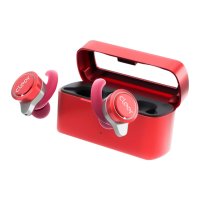
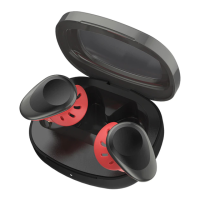
The Cleer ALLY PLUS II is a pair of true wireless noise-cancelling headphones designed to provide a customized audio experience with advanced control features. These headphones offer both active noise cancellation and an ambient mode, allowing users to tailor their listening environment.
Function Description:
The ALLY PLUS II headphones are primarily designed for audio playback and call management. They feature active noise cancellation (ANC) to suppress wide-band ambient noise, creating a more immersive listening experience. Additionally, an Ambient Mode allows users to hear sounds around them, which is useful for situational awareness without needing to remove the earbuds. The headphones connect wirelessly via Bluetooth, supporting various profiles for seamless integration with compatible devices.
Usage Features:
Getting Started:
- Automatic Power On: The ALLY PLUS II earbuds automatically power on when removed from their charging case.
- First-Time Pairing: When powered on for the first time, the earbuds automatically enter pairing mode. Users can then select "Cleer ALLY PLUS II" from their device's Bluetooth list to pair.
- Automatic Reconnection: The earbuds will automatically connect to the last connected device if it is within range and available for pairing.
- Manual Pairing: If manual pairing is needed, users can remove both earbuds from the charging case, then press the touch pad on either earbud 5 times to enter pairing mode.
Cleer+ App Integration:
The Cleer+ app (available on App Store and Google Play) enhances the user experience by offering customized control over the ALLY PLUS II. Through the app, users can:
- Ambient Noise Control: Turn ANC on or off and fine-tune the ambient noise control level in real-time.
- Equalizer Settings: Customize the equalizer settings to suit their audio preferences.
- Touch Pad Function: Change the function of the touch pads on the earbuds.
- Bluetooth Name: Rename their ALLY PLUS II device.
- Software Updates: Receive updates for new features and improvements.
- Battery Monitoring: Check the playback time and battery level of their earbuds.
- Voice Prompt Selection: Choose their preferred voice prompts.
- Sound settings are saved to the ALLY PLUS II, ensuring a consistent experience across different playback devices.
Touch Pad Controls:
The earbuds feature touch pads for intuitive control of various functions:
Charging:
- Wired Charging: Connect the ALLY PLUS II charging case to a power source using the provided USB-C to USB-A cable.
- Wireless Charging: The charging case supports wireless charging and can be placed on a compatible wireless charging pad.
- Quick Charge: A 5-minute charge via USB-C cable provides approximately 1 hour of playtime.
- Full Charge Playtime: When fully charged, the earbuds offer up to 10 hours of playtime with ANC ON (plus an additional 20 hours from the charging case) or up to 11 hours with ANC OFF (plus an additional 22 hours from the charging case).
LED Behavior:
The LED indicators on the earbuds provide visual feedback on their status:
- Power On (not connected): Six white lights.
- Power On (connected): Six white lights.
- Pairing Mode: Alternating red and white lights.
- Battery Low (<20%, not connected): Two red lights.
- Charging: Red light.
- Battery Fully Charged: LED OFF.
The charging case also has LED indicators for its battery status:
- While being charged:
- Solid red: Battery Level 1% - 99%.
- Solid white: Battery Level 100%.
- Not being charged:
- Solid red: Battery Level 1% - 19%.
- Solid white: Battery Level 20% - 100%.
Maintenance Features:
Cleaning and Care:
- The product is designed with high-quality materials that can be recycled. Users are encouraged to dispose of the product responsibly according to local regulations for electronic waste.
- The product contains batteries that should not be disposed of with normal household waste.
- The earbuds have an IPX4 water resistance rating, meaning they are resistant to splashes from any direction, making them suitable for workouts or light rain. However, they are not designed for submersion.
- Cleer Limited provides a (1) year limited warranty covering defects in material or workmanship when purchased directly from Cleer Limited or an authorized retailer.
- Under warranty, Cleer Limited will, at its option, repair the product using new or refurbished parts or replace it with a new or refurbished product.
- The warranty covers hardware components but excludes technical assistance for software, software products (provided "AS IS"), consumable parts like batteries (unless failure is due to material defect), cosmetic damage, damage from normal wear and tear, accidents, misuse, unauthorized service, or use outside published guidelines.
- To obtain warranty service, the product must be delivered, freight prepaid, in its original packaging or equivalent, to the point of purchase or Cleer Limited Customer Service. A dated purchase receipt is required.
- Users are responsible for backing up any data, software, or other materials stored on their unit, as Cleer Limited is not responsible for data loss during service.
- Any repair, replacement part, or product under warranty will be covered for the remainder of the original warranty period or 90 days, whichever is longer.
Clearing Pairing Record:
- To clear the pairing record of the ALLY PLUS II, remove both earbuds from the charging case, put them into pairing mode, then press and hold the touch pad until the LEDs on the earbuds flash red 3 times. Return the earbuds to the charging case and leave them there for 10 seconds. The pairing record will then be cleared.
FCC Compliance:
- The device complies with Part 15 of the FCC Rules, ensuring it does not cause harmful interference and accepts any interference received.
- Users are advised that changes or modifications not expressly approved by the party responsible for compliance could void their authority to operate the equipment.
- The device complies with FCC radiation exposure requirements and can be used in portable exposure conditions without RF restriction.
For further support and product registration, users can visit www.cleeraudio.com.

 Need help?
 General

 To Next Page