8
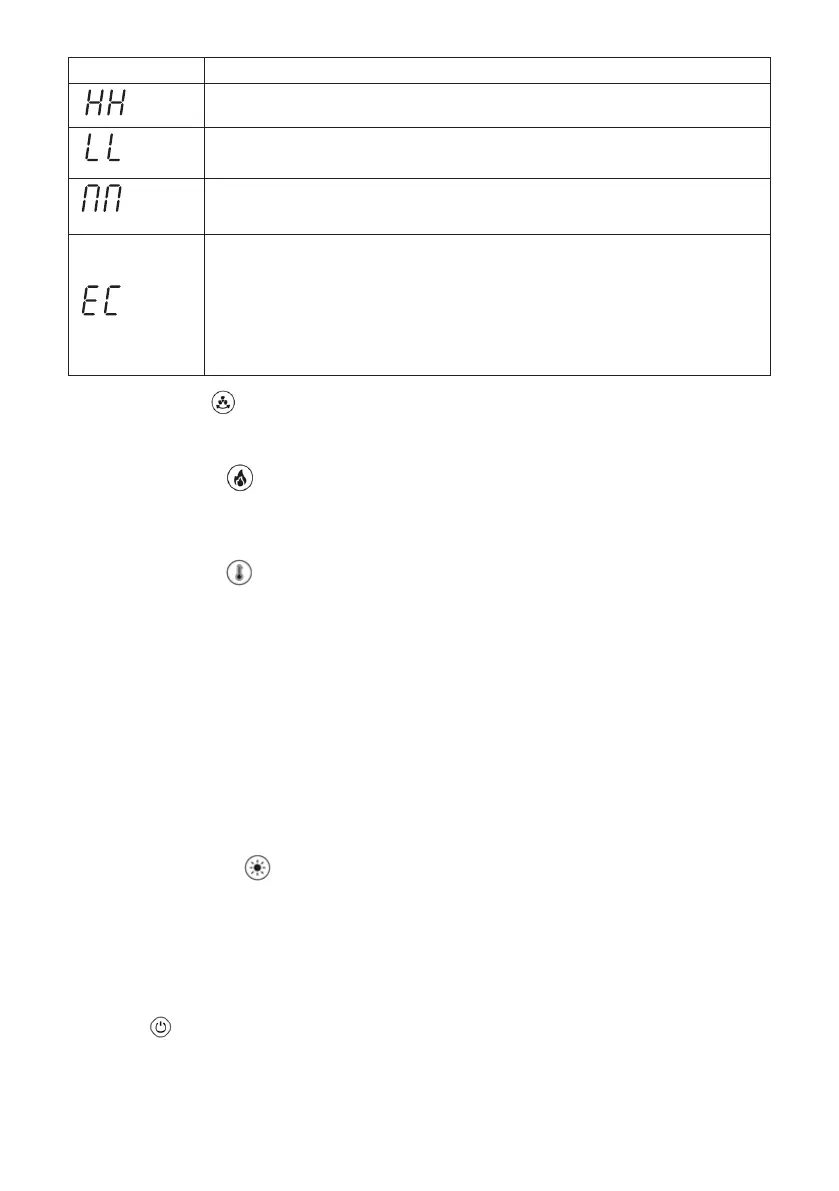
Display Operating mode
Strong air speed moder
The appliance switches to the highest level of ventilation mode.
Sleep Mode
Reduce the current gear by 1 gear every 15 minutes, and the minimum is reduced to
the first gear.
Natural air speed mode
Air volume 3-5-7 gear air-speed in turn.
ECO mode
Only active in heating mode.
- If the room temperature is below 18 °C, the appliance operates at high speed
- if the room temperature is between 18-22 °C, the appliance operates at low speed
- if the room temperature is above 22 °C, the appliance operates at the lowest fan
speed
Note: ECO mode can only be selected in heating mode. If you change the speed during
an active operating mode, the operating mode is deactivated and must be reactivated.
7. Oscillation button
Press the Shake head button to enable or disable the shake head.
The default shake head Angle is 80±5 degrees.
8. Heating level button
Press the button to switch to heating mode.
Press the button repeatedly to increase the desired ventilation level.
You can choose between 4 dierent ventilation levels.
9. Temperature button
Press the button to set the desired temperature. 25°C is the preset temperature.
You can set the temperature from 5°C - 35°C.
The desired temperature setting is adopted directly.
Note: The heating is only activated if the set temperature is above the current room temperature.As soon
as the room temperature falls below the set temperature, the appliance switches on automatically until
the set temperature is reached again. In this way, the room temperature remains constant and power
consumption is kept as low as possible.
Note: The default setting for the heating is 25 °C.
If the room temperature falls below 0 °C, the LED display only shows - - as these cannot
be displayed. The appliance switches o automatically if it has been in continuous
operation for 12 hours.
Note: The heater initially emits heat from the lefthand air outlet and after about 20
seconds emits heat from the right-hand side. This is a normal process.
10. Brightness level button
Press the ambience button to start the atmospheric light function.
Press the ambience button repeatedly to obtain the desired colour scheme
(white, blue,green, red, purple, Gradient color).
To end the atmospheric light function, press the ambience button again after the colour changes to
Gradient color. The indicator light goes out.
Press and hold the button to adjust the brightness of the light.
Note: Up to 4 brightness levels can be set for each light color.
11. Turn O


 To Next Page