9
Press Power button to turn the fan and heater o and unplug it from the mains outlet after use.
Note: After the appliance has been switched o from heating mode, it automatically
switches to blower mode and blows out a stream of air for approx 30 seconds to allow
the heating element to cool down.The 30 second countdown timer is displayed on the
LED screen.
WARNING: Allow the fan &heater to cool down for 30-60 seconds before switching on
again and before turning o at the power outlet. This will protect the inner parts.
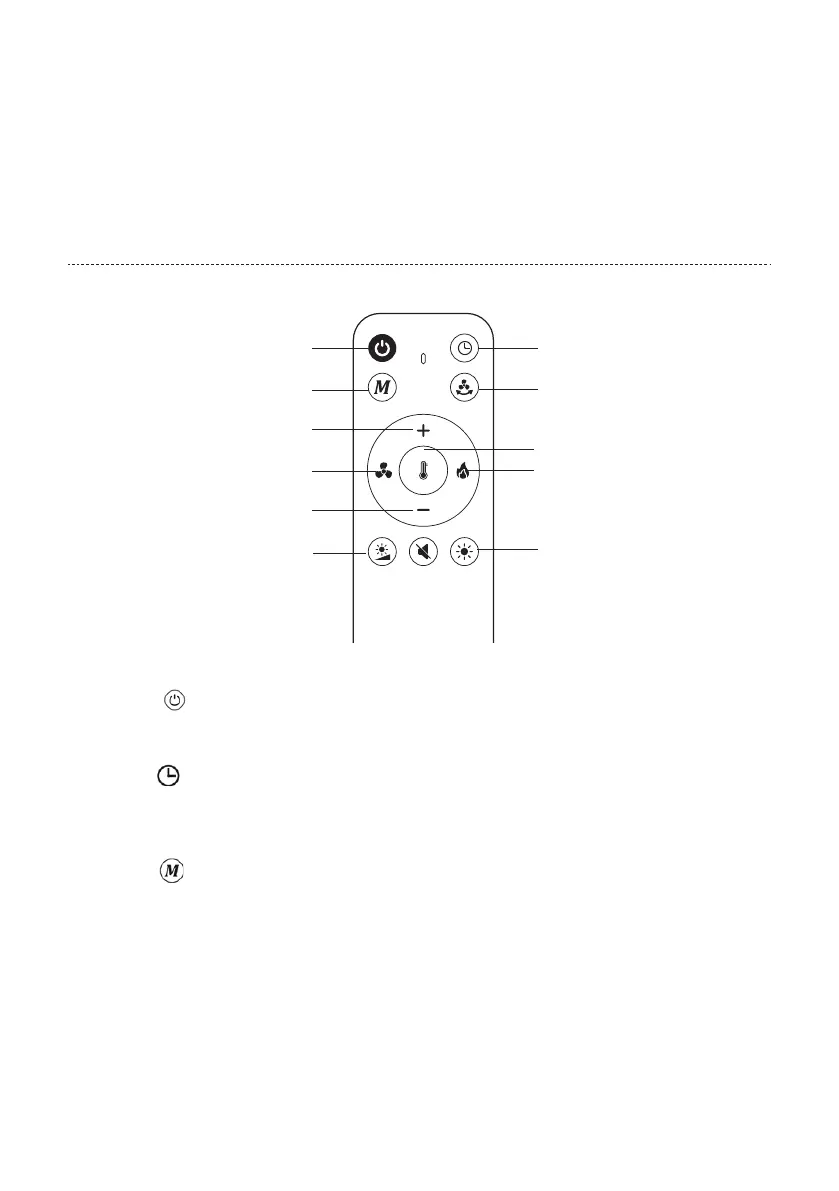
REMOTE CONTROL INTRODUCTION
Mode button
Plus button
Ventilaton level button
Brightness level button
Minus button
On/Off button Timer button
Oscillation button
Temperature button
Heating level button
LED atmospheric light
Note: The buttons have a signal tone feedback.
On/o button
In the standby state, press the power button to start the fan. The default gear is 3.
Press it again to shut down.
Timer button
Press this key to set 1-8 hours timer-o(stand-by state).When the power supply is turned o, the former
timer setting will be canceled.
NOTE: A small dot flashes at the bottom right of the display, simulating the timer.
Mode button
To change an operating mode, press the button repeatedly until the desired mode is shown on the display.
You can choose between Strong air speed moder, Sleep Mode, Natural air speed mode and ECO mode.


 To Next Page