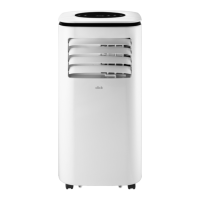
This document is an instruction manual for the Click 3-in-1 Air Cooler, model CAC-75W, which functions as an air cooler, air purifier, and humidifier.
Function Description:
The Click CAC-75W is a versatile indoor appliance designed to improve air quality and comfort. It operates as an air cooler by utilizing evaporative cooling, a humidifier by adding moisture to the air, and an air purifier through its Anion function. The Anion function creates negative ions that attach to positively charged particles like dust, bacteria, pollen, smoke, and other allergens, causing them to bond together into dense dirt particles that cannot float in the air, thereby purifying the room air. The device is intended for air conditioning indoor domestic environments and is not suitable for commercial, industrial, or trade use.
Important Technical Specifications:
- Model: CAC-75W
- Rating: 220-240V ~ 50-60Hz
- Power: 75W
- Net Weight: 6.4 kg
- Gross Weight: 7.7 kg
- Dimensions: 260 (W) × 300 (D) × 700 (H) mm
Usage Features:
The air cooler can be operated via a control panel on the unit or a remote control.
Control Panel / Remote Control Functions:
- POWER ON/OFF: Turns the unit on or off. When in standby, the display shows the current room temperature.
- SPEED: Cycles through three fan speeds: Low, Medium, and High. The selected speed is illuminated on the display.
- MODE: Changes between three airflow styles:
- Standard Wind: Fan blows at maximum speed.
- Natural Wind: Fan speed fluctuates to imitate natural wind.
- Sleep Wind: Fan speed decreases by one level every half hour and then continues to run at low speed.
- LIGHT: Turns off the LED display.
- TIMER: Activates a timer that can be set from 1 to 12 hours. The unit will automatically stop after the set time expires.
- SWING/OSCILLATION: Turns the oscillation function of the air outlet on or off. The SWING indicator is displayed when active. The vertical direction of the airflow can be manually adjusted.
- ANION ON/OFF: Activates or deactivates the ionizer for air purification. The Anion button illuminates when activated.
- COOL/HUMIDIFY: Turns on the humidifying and cooling function. Before activating, ensure the water level is at or above the "MIN" level to prevent damage. Two ice packs (included) should be frozen and placed into the top water inlet for enhanced cooling. When the COOL function is off, the unit operates as a fan without using water for cooling.
Low Water Alarm:
The unit is equipped with a Low Water Alarm sensor. In Cooling Mode, if the water in the tank falls below the minimum level, a beeping sound will occur, the indicator light will flash, and evaporative cooling will pause. To deactivate the alarm and resume cooling, switch the unit OFF, unplug it, refill the water tank above the minimum level, then plug in and switch ON again. To use the unit as a fan without evaporative cooling and deactivate the alarm, switch the unit OFF and then ON again. The alarm will not activate in Fan-only mode but will sound again if COOL function is activated with an empty water tank.
Product Overview Components:
- Control panel
- Louvers (horizontal louvers must be opened manually before operation)
- Water level indicator
- Casters
- Recessed handle
- Air inlet
- Water tank
- Top water inlet cover
- Top water inlet
- Remote control
- Cooling media (honeycomb filter pads)
- Anti-dust filter
- Ice packs (2pcs)
Maintenance Features:
Regular cleaning and maintenance are crucial for optimal performance and longevity of the appliance.
Cleaning Water Tank and Top Water Inlet:
- Disconnect the power cord before any maintenance.
- Add water to the water tank via the top water inlet.
- To remove the water tank:
- Detach the water pump from its platform by pressing the two bracket hooks inwards.
- Pull the water tank out from the cooler. Place the unloaded water pump in a small dish to prevent water from dripping.
- Clean the water tank with a soft brush or cloth. Do not use gasoline, thinners, solvents, ammonias, or other chemicals.
- Clean the water filter under running water with a soft brush if needed.
- Drain all water from the tank after cleaning.
- Reinstall the water pump to its platform inside the water tank.
- Push the water tank back into the cooler until the lock tab clicks properly.
Changing the Honeycomb Filter Pads:
The appliance uses honeycomb cooling/filter pads. The cleaning frequency depends on local air and water conditions.
- Cleaning: If mineral deposits build up (due to hard water), remove the filter and wash it under fresh water. For a deeper clean, use a mild detergent and a soft brush, then rinse thoroughly with clean water and let it dry.
- Recommendation: Clean the honeycomb filter at least every two months. For best results, allow the honeycomb filter to dry after each use by turning off the COOL function and running the unit as a fan for 15 minutes before turning the unit off completely.
General Safety Instructions:
- Read the manual thoroughly and keep it for future reference.
- Ensure outlet voltage matches the product's rating label.
- Do not use damaged power cords, plugs, or loose outlets.
- Avoid plugging multiple devices into one outlet.
- Do not bend, twist, kink, or allow anything to rest on the power cord.
- Keep the power cord away from heat-producing appliances.
- Do not expose the product to water; avoid touching the unit with wet hands or feet.
- Supervise children to ensure they do not play with the appliance.
- If the supply cord is damaged, it must be replaced by qualified personnel.
- Do not cover ventilation openings or insert objects into slots.
- Disconnect the unit immediately if unusual odors or smoke are noticed and contact the service center.
- Disconnect power when moving or not using the unit for long periods.
- Beware of dust accumulation causing overheating or insulation deterioration.
- Batteries from the remote control must be removed by an adult and kept out of reach of children and pets.
- Clean the product only with a dry cloth after unplugging.
- Do not direct airflow onto plants or animals for extended periods.
- Contact the call center for any repairs or service to maintain warranty validity.
- The manufacturer assumes no liability for damages caused by misuse or non-compliance with instructions.
Placement Guidelines:
- Ensure the location is not wet or damp and is well-ventilated.
- Keep away from direct sunlight or heaters.
- Avoid splashes or food.
- Protect from excessive dust or grease.
- Do not place small metallic objects on top of the unit or block openings.
Areas to Avoid for Installation/Use:
- Outdoors or where water is likely to splash.
- Near baths, showers, laundry basins, or swimming pools.
- In areas where oil is likely to splash.
- Near hot gas or electric burners, or sources of fire/heat.
- In areas where furniture or other objects obstruct airflow.
- In the presence of flammable substances or vapors (alcohol, insecticides, petrol, etc.).
- At a dry cleaner's premises.
WARNING:
- Do not expose the appliance to high heat, sparks, or open flames.
- Do not pierce or burn the appliance.
- Maintenance must only be carried out by properly qualified, authorized personnel. Contact info@ayonz.com for service.
- Electric shock hazard! Always switch off and disconnect the unit from the power outlet before installation, cleaning, or servicing.
Remote Control Battery Installation:
- Open the battery box on the back of the remote control.
- Install 2 x AAA batteries (included), matching the polarities (+/-).
- Replace the back cover.
Remote Control Usage Notes:
- Do not mix old and new batteries or different types of batteries.
- Remove batteries if not using the unit for a long time.
- Keep batteries away from children and pets; seek medical attention if a child swallows a battery.
- Never throw batteries into a fire.
- Avoid dropping or impacting the remote control, as this voids the warranty.
- The remote control operates effectively within a range of 5 to 6 meters.
- Do not expose the remote control sensor to bright light.

 Need help?
 General

 To Next Page