Setting Sunrise and Sunset (Continued)
On your console, push and hold SET to enter the Setup Mode as before. Let go of the SET key once the console
beeps, then press it two more times and you should enter the menu allowing you to input your Latitude (it
should be displaying LA in the bottom section). You will firstly see that NTH is flashing (you can press the + key
to switch between North and South, though you will need to leave this on North if within the UK) but most-
importantly you can press the ALM key to move down to the co-ordinates themselves. Now use the + or
MIN/MAX keys to increase/decrease each value as desired, using the ALM key again to switch across to the
decimals so these can be adjusted too.
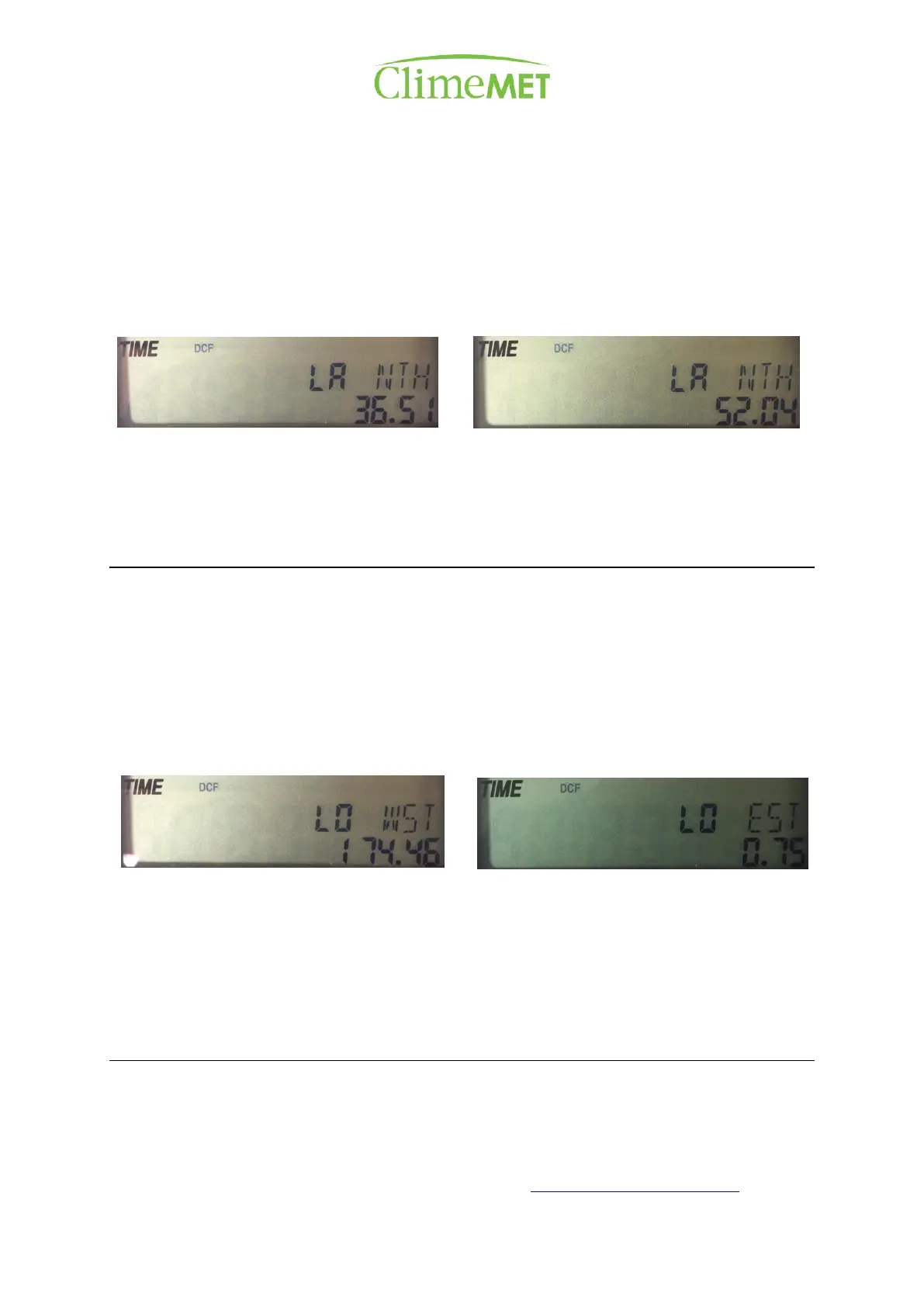
For example, our main office is located near post code CO10 2YA with coordinates of 52.04 North and 0.75
East, so we'd set this first value to LA NTH 52.04. Once entered, press the SET key again to move onto the
screen for Longitude.
Longitude is a bit trickier, as you will also need to set it to East/West depending on your location in the UK, as
the Meridian Line runs through London. If your longitude shows as a negative number on Bing, you will need
to select West, not East. Either way, this should be a low figure: our office is 0.75 East, so this will display on
the console as LO EST 0.75. Press the + key to toggle between East and West as needed, then press ALM to
move onto the co-ordinates. You will need to press the ALM key again to scroll between the three different
sections of numbers, then use the MIN/MAX key to decrease and the + key to increase these digits as before.
You may need to round the last digits up or down. Once completed, leave the console for 30 seconds to save.
Most longitudes for the UK are between 8 West and 1.7 East, so the first flashing digit when you change the
Longitude value should remain at 0, as this digit is for longitudes in the 100s.
Once you've followed the above steps, you should see that your sunrise and sunset readings are correct. If
not, be sure to wait until the console has picked up the correct time following the adjustment of the time zone
to 0 for the UK, as the current time displayed affects the sunrise and sunset times too.
Your CM9088 is now ready to go!
For extra functionality, such as changing units of measure, resetting minimums and maximums, and setting
alarms, please refer to the manual.
Further information can also be found on our website: http://www.climemet.com/faqs/


 To Previous Page
 Loading...