10
In the same way, pressing the SHALL button during echo-sounding
switches to setting the shallow alarm depth. The word SHALLOW
is shown, and the shallow alarm setting depth is displayed. The
factory pre-set shallow alarm depth is zero. Pressing the DEEP
button makes the alarm depth setting deeper, and pressing the
SHALL button makes the setting shallower. If an attempt is made to
increase the shallow setting below the deep alarm setting, or to
reduce it to less than zero, the settings no longer change. Press
ENTER to store the shallow alarm depth setting, whereupon the
display returns to measuring depth.
ACTIVATING DEPTH ALARMS
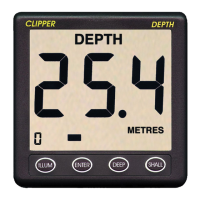
At any time, the deep and shallow alarms may be activated or
de-activated together at the set levels by pressing the DEEP and
SHALL buttons together, as shown on Figure 7. When alarms are
active, a bell symbol is displayed, but is absent when alarms are
de-activated. Whenever the measured (and averaged) depth is at,
or shallower than, the shallow alarm setting, the alarm sounds, and
the word SHALLOW is shown. Whenever the measured (and
averaged) depth is at, or deeper than, the deep alarm setting,
the alarm sounds, and the word DEEP is shown.
METRES
ENTER
SHALL
DEEP
ILLUM
DEPTH
Figure 7 - Activating and de-Activating the Alarms


 To Next Page