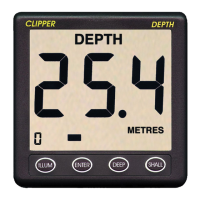
Press ENTER and SHALL together to increase the update rate by
one, as shown on Figure 10. The resulting setting is shown on the
digit in the left-hand bottom corner, and changes successively from
the factory pre-set value of 3 to 4, then to 5, to 6, to 7, and then on
to 1, 2, etc. For every successive press of ENTER and SHALL
together. The last setting chosen is stored.
Press the ILLUM key to return to normal echo sounding mode.
DISPLAYING AVERAGED READINGS
(Enable engineering mode, see page 11)
The unit averages the depth readings it makes seven times a
second with an averaging time of about two seconds. The
averaged values reduce the effect of swell and turbulence on the
readings, but the accuracy of readings is not compromised. The
averaged, rather than the instantaneous, values are used
internally by the unit to trigger the alarms. Using the slow-moving
averaged values prevents triggering false depth alarms if
interference is present, by ensuring that the alarm depth has
been consistently crossed before the alarm is sounded.
(Enable engineering mode, see page 11)
The factory pre-set display mode is Fast (F), which shows depths
as they are received twice a second. Press DEEP and SHALL
together to switch between Fast (F) and Averaged (A) depth
display. The present display status is shown on the digit in the left-
hand bottom corner, which switches between F and A for each
press of DEEP and SHALL together, as shown on Figure 11.
Press the ILLUM key to return to normal echo sounding mode.
Use of Averaged readings results in very smooth changes in the
displayed readings, and greatly reduces the unit’s sensitivity to
external noise and turbulence. Note that using averaged
readings is not the same as setting a slow update rate.
Averaged readings change relatively slowly, but the display rate
determines how often the readings (averaged or fast) are
displayed. It is a matter of operational choice of where to strike a
compromise between display rate and fast or averaged
measurements.
15


 To Next Page