11
The alarm can be stopped either by moving the vessel so the depth is
between the settings, by altering the alarm settings themselves, or by
de-activating alarms by pressing DEEP and SHALL together again.
Each press of DEEP and SHALL together switches the alarm on and off.
CHANGING THE GAIN DELAY SETTING
The Clipper Echosounder measures the depth beneath the
transducer by timing the delay between the transmitted ultrasonic
pulse (the “ping”) and its returning echo from the bottom. The echo
from nearby objects is much stronger than from more distant
objects, and so the Clipper Echosounder has swept receiver gain
sensitivity so that weaker (more distant) echoes are detected as
reliably as those from short range. However, reflections from
nearby turbulence or bubbles may sometimes be confused with
those from the bottom. To prevent nearby reflections from being
misinterpreted, sweeping the gain can be delayed until a pre-set
depth is reached. The delay is called the sensitivity threshold, and
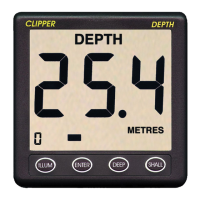
can be viewed at any time during normal operation by pressing the
ENTER button. Pressing ENTER again returns to normal echosounding.
The sensitivity threshold can be changed if required to minimise false
detections at short range. The factory pre-set sensitivity threshold is
zero, but it can be increased in 0.1m (0.5ft.) Steps, depending on the
configuration of the unit, up to a maximum of 5m (16.5ft.) Press
ENTER to enable sensitivity threshold changes. The DEEP and
SHALL buttons then make the sensitivity threshold deeper and
shallower respectively within the available range. Pressing ENTER
again to return to normal echo-sounding also stores the revised
sensitivity threshold in memory, so the unit always operates with the
new setting.
ENGINEERING MODE
The Clipper Echosounder can be changed to operate in several
different ways to suit differing users’ requirements. To enable
engineering mode:


 To Next Page