29 29A
TIMER
IMPORTANTE: se non vengono
schiacciati tasti per un tempo
superiore a 10 secondi,
il comando esce dal programma
di impostazione
e torna allo stato di riposo.
1 - Selezione
modalitàdifunzionamento
IMpostazIone
ora dI avvIaMento:
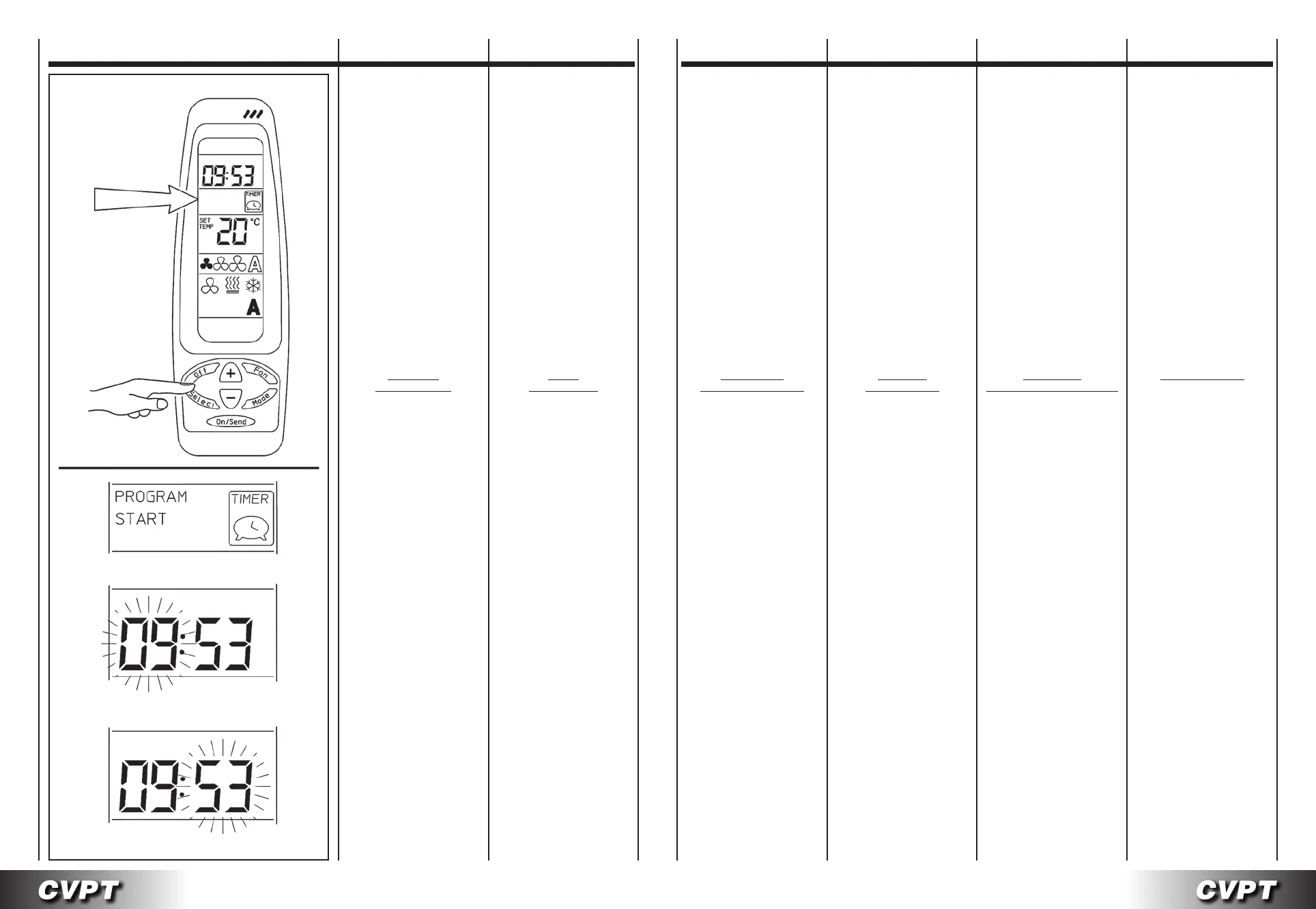
- Premere il tasto SELECT
due volte. La scritta
PROGRAM & START
lampeggiante apparirà
sul display.
- Premere i tasti (+) o (-), le
ore inizieranno a lampeggiare.
Per impostare l’ora
utilizzare i tasti (+) o (-).
- Premere il tasto SELECT,
i minuti inizieranno
a lampeggiare.
Per impostare i minuti
utilizzare i tasti (+) o (-).
TIMER
IMPORTANT: if no button
is pressed for more than 10
seconds, the remote control
exits the setting procedure
and returns to standby status.
1 - Selecting
theoperatingmode
settIng
the
start tIMe:
- Press the SELECT button
twice. The message
PROGRAM & START
will flash on the display.
- Press the (+) or (-) button;
the hours will start flashing.
To set the hours,
use the (+) and (-) buttons.
- Press the SELECT button;
the minutes will start flashing.
To set the minutes,
use the (+) and (-) buttons.
TIMER TIMER TIMER TIMER
IMPORTANT: si on n’appuie
sur aucune touche, au bout de 10
secondes la télécommande
quitte la programmation
et passe à l’état de repos.
1 - Sélection
modedefonctionnement
prograMMatIon
heure de MIse en Marche:
- Appuyer deux fois
sur la touche SELECT.
PROGRAM & START
clignote sur l’afficheur.
- Appuyer sur la touche (+) ou
(-), les deux chiffres de l’heure
commencent à clignoter.
Pour programmer l’heure
utiliser les touches (+) ou (-).
-
Appuyer sur la touche SELECT
les deux chiffres des minutes
commencent à clignoter.
A l’aide des touches (+) ou (-)
programmer les minutes.
WICHTIG: wenn für eine Dauer
von mehr als 10 Sekunden keine
Taste gedrückt wird, verlässt die
Fernbedienung den Programmier-
modus und kehrt
in den Ruhezustand zurück.
1 - Wahl
desBetriebsmodus
eInstellung
der
eInschaltzeIt:
- Zweimal die Taste SELECT
drücken. Am Display erscheint
die blinkende Aufschrift
PROGRAM & START.
- Die Taste (+) oder (-)
drücken, die Stunden
beginnen zu blinken.
Mit der Taste (+) oder (-)
die Uhrzeit einstellen.
- Erneut die Taste SELECT
drücken, die Minuten
beginnen zu blinken.
Mit der Taste (+) oder (-)
die Minuten einstellen.
IMPORTANTE: si no se pulsan
teclas durante un tiempo superior
a 10 segundos, el mando sale
del programa de programación
y vuelve al estado de reposo.
1 - Seleccióndelamodalidad
defuncionamiento
prograMacIón
de
la hora de puesta en Marcha:
- Pulse la tecla
SELECT dos veces.
En la pantalla aparecerá
PROGRAM & START
parpadeante.
- Pulse la tecla (+) o (-), las
horas empezarán a parpadear.
Para programar la hora
use las teclas (+) y (+).
- Pulse la tecla SELECT,
los minutos
empezarán a parpadear.
Para programar los minutos
use las teclas (+) y (+).
BELANGRIJK: indien langer
dan 10 seconden niet
op de toetsen gedrukt wordt,
verlaat de bediening het
programma van de instellingen
en wordt teruggegaan naar
de ruststand.
1 - Keuzewerkwijze
InstellIng startuur:
- Druk tweemaal op de toets
SELECT. Het opschrift
PROGRAM & START
knippert op de display.
- Druk op (+) of (-).
De uren knipperen.
Gebruik de toetsen (+) en (-)
om het uur te regelen.
- Druk op de toets SELECT.
De minuten knipperen.
Gebruik de toetsen (+) en (-)
om de minuten te regelen.


 To Next Page
 Loading...