The ISOLO LITE is an integrated wireless system designed for musicians, offering studio-grade tone without the constraints of cables. It comprises a microphone transmitter and a stage receiver, providing a compact solution for live performances.
Function Description:
The ISOLO LITE system allows players to wirelessly transmit their instrument's audio to a stage receiver. The stage receiver integrates a preamp, EQ, aux-in audio, and built-in effects, offering comprehensive sound control. The microphone transmitter captures the instrument's sound, while the receiver processes and outputs it to various audio setups like amplifiers, mixers, or headphones. The system supports multiple receivers for extended range and synchronized operation, preventing interference.
Important Technical Specifications:
Microphone Transmitter:
- Power / Pairing Button: Press and hold for 5 seconds to turn on. Short click after turning on for pairing.
- Charging Terminal: Standard USB charger. Initial charge of 2 hours recommended.
- Charging / Low Power Indicator: LED ON indicates charging or low battery; LED OFF indicates charging complete.
- Preamp Gain: Selectable levels: Low (0dB), Medium (8dB), High (15dB).
- Mic Capsule: Omnidirectional condenser mic.
- Low-rebound Gooseneck: Adjustable for preferred position; avoid extreme bending.
- Power / Pairing Indicator: Flashing slowly indicates "On"; flashing quickly indicates "Pairing"; glowing indicates "Paired and operating."
LITE Stage Receiver:
- Antenna: Standard equipment; a directional antenna can be purchased as an extra accessory for enhanced range.
- BASS Control: +/- 6dB @ 200Hz (shelf type) for wireless mic signal.
- TREBLE Control: +/- 6dB @ 2000Hz (shelf type) for wireless mic signal.
- WIRELESS Control: Wireless mic gain control +/- 6dB.
- MASTER Control: Master volume control from Mute to 0dB.
- EFFECTS: Digital effect processor with 4 presets: Room reverb, Hall reverb, Arena reverb, Delay + Reverb. Effects only work on the wireless mic signal.
- BLEND Control: Controls the balance of dry and wet signals. Turning the knob counterclockwise all the way provides 100% dry signal.
- MUTE: Connector for a foot switch (3.5mm TRS cable) to mute/unmute the signal from the receiver. A 6.3mm to 3.5mm adapter can be used. Foot switch is NOT included.
- AUX IN: Connects via 3.5mm TRS cable to phones, tablets, MP3s, or PCs to play backing tracks through the receiver.
- LINE / DI OUT:
- DI OUT (to mixers): Balanced signal via 6.3mm TRS to XLR cable.
- LINE OUT (to amps): Unbalanced signal via 6.3mm TS cable.
- DC INPUT: Power supply input range 7-9 Volt DC. Can be powered by a 5V/2A power adapter (plugged into a wall socket) or directly by a power bank using a DC7V Converter Cable. Polarity check is crucial (+ center pin, - outer barrel).
- POWER INDICATOR:
- Blue light: Battery time > 80%.
- Green light: Battery time 80%~10%.
- Red light: Battery time < 10%.
Usage Features:
- Quick Start Guide:
- Setup Stage Receiver: Screw in the antenna and plug in the power. The power indicator flashes blue, indicating readiness for pairing.
- Turn on Microphone: Press and hold the microphone transmitter's power switch for 5 seconds. The pairing indicator will flash.
- Pair Microphone: Place the microphone close to the stage receiver (approx. 10cm) and short-press the power button on the transmitter. A green light on the transmitter indicates successful pairing.
- Install Microphone: Attach the microphone to the instrument using its specific mount, as detailed in the ISOLO model's mount manual. A QR code is provided for video reference.
- Multi-Receiver Sync: Up to 3 receivers can be used simultaneously. Connect the "SYNC OUT" of the first unit to the "SYNC IN" of the second (and so on) using a 3.5mm TRS cable. A 1m distance between receivers is recommended. When synced, all receivers switch to range boost mode and synchronize wireless signals to avoid interference.
- Integrated Effects: The receiver offers four digital effects (Room reverb, Hall reverb, Arena reverb, Delay + Reverb) that can be applied to the wireless mic signal.
- EQ Control: Dedicated Bass and Treble controls allow for precise tonal shaping of the wireless microphone signal.
- Auxiliary Input: Enables playing backing tracks from external devices through the receiver, blending them with the instrument's sound.
- Mute Functionality: A foot switch can be connected to the receiver for convenient muting/unmuting during performances.
Maintenance Features:
- Warranty: One-year warranty starts after online registration. Covers defects and malfunctions under normal use. Excludes giveaway goods. Accessories missing or blemished must be reported within 7 days of purchase. Receipts and order numbers are required for validation.
- Warranty Exclusions: Physical abuse, liquid contamination, unintended use, unauthorized repairs, incorrect connections, faulty equipment connections, incorrect power supplies, and transit damage due to inadequate packaging are not covered.
- Safety Warnings:
- Avoid liquid and moisture to prevent corrosion, fire, or electric shock.
- In case of obvious damage to the mic or receiver, contact customer service or local dealers.
- Cloudvocal is not responsible for damage caused by inappropriate use.
- Charging: The microphone transmitter uses a standard USB charger. A 2-hour initial charge is recommended.
- Power Supply: The stage receiver can be powered by a 5V/2A adapter or a power bank, ensuring flexibility in power sources. Always verify correct polarity when using external power supplies.
- Indicator Lights: Clear LED indicators on both the transmitter and receiver provide status updates for power, pairing, charging, and battery levels, aiding in troubleshooting and maintenance.

 Need help?
 General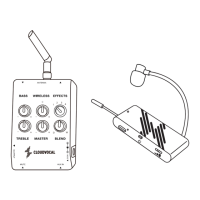

 To Next Page