QUICK START GUIDE
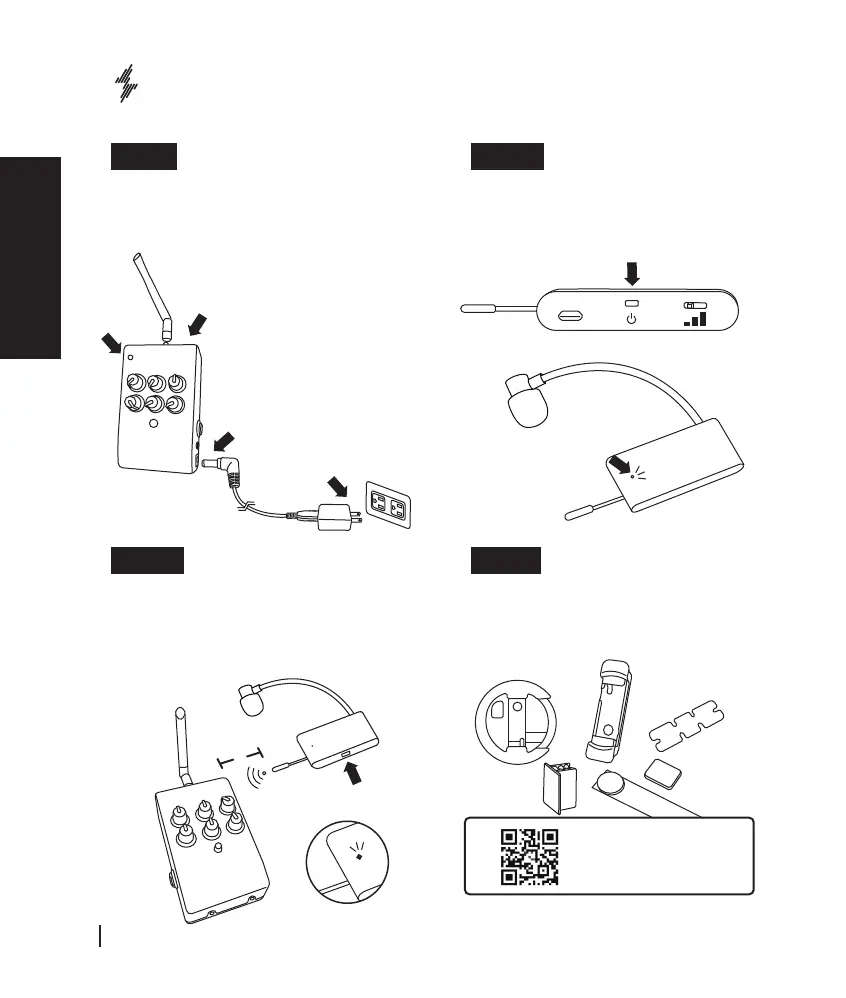
Screw in the antenna to the stage receiver (1) and
plug in the power (2). At this time, the power indicator
flashes blue meaning it’s ready to be paired (3).
Place the microphone close to the stage receiver
(about 10cm away), and press the power button
shortly (1).
When the transmitter is showing green indicates that
the two are paired (2).
Attach the microphone on to different
instruments: please refer to its mount
manual which comes with your ISOLO
model.
Press the power switch of the microphone
transmitter for 5 seconds (1), and the
pairing indicator starts to flash (2).
Step1 Setup stage receiver Step 2 Turn on Microphone
Step 3 Pair Microphone
Step 4 Install the microphone
(
1
)
(
3
)
(
2
)
(
2
)
(
2
)
(
1
)
Please scan the QR-Code
to see the video reference.
(
1
)
(
2
)
10cm
English
English
ISOLO LITE
User Manual
04


 To Next Page