21 22
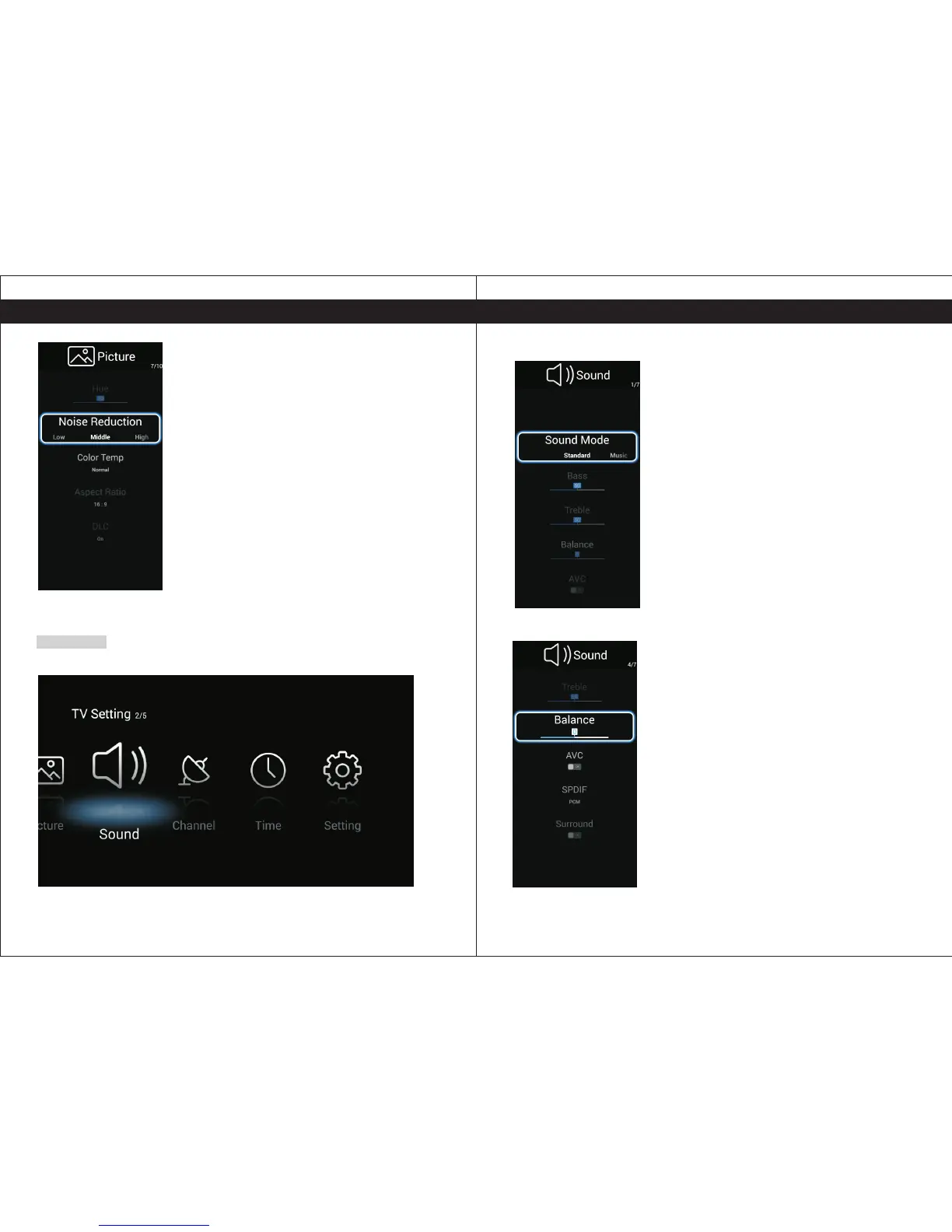
Press the 【 】/【 】to select sound.◄ ►
Sound
Sound Mode
Standard/Music/Theater/News/User(Only in this mode,
Treble and Bass can be adjusted.)
Bass
Adjust the low frequency sounds.
Treble
Adjust the high frequency sounds.
Balance
Adjust the level of sound coming from the left and right speakers.
AVC
Press L/R to set or cancel. When set on, it will level out the
sound being heard when sudden changes in volume occur
during commercial breaks or channel changes.
Press Enter button to enter the sub-title, and press ◄ ►【 】/【 】to sdjust.
SPDIF Select to OFF, RAW, PCM Digital Interface.
Surround Select to ON/OFF Surround.
Hue Adjust the hue(Red,Green,Blue) of the picture.
Noise Reduction (Off/Low/Middle/High)
You can clear up the input signal by set the item.
Color Temperature
Select the color temperature that you feel comfortable.
Cool Gives white colors a blue tint.
Medium Gives white colors a neutral tint.
Warm Gives white colors a red tint.
Aspect Ratio
Select the suitable aspect Ration. (16:9/ /Zoom1/Zoom2)
DLC Select ON/OFF.
4:3
TV SettingsTV Settings


 To Next Page